www.amgmicro.com 13
EVOS
fl
User Guide
REV B Published 20 SEP 2010
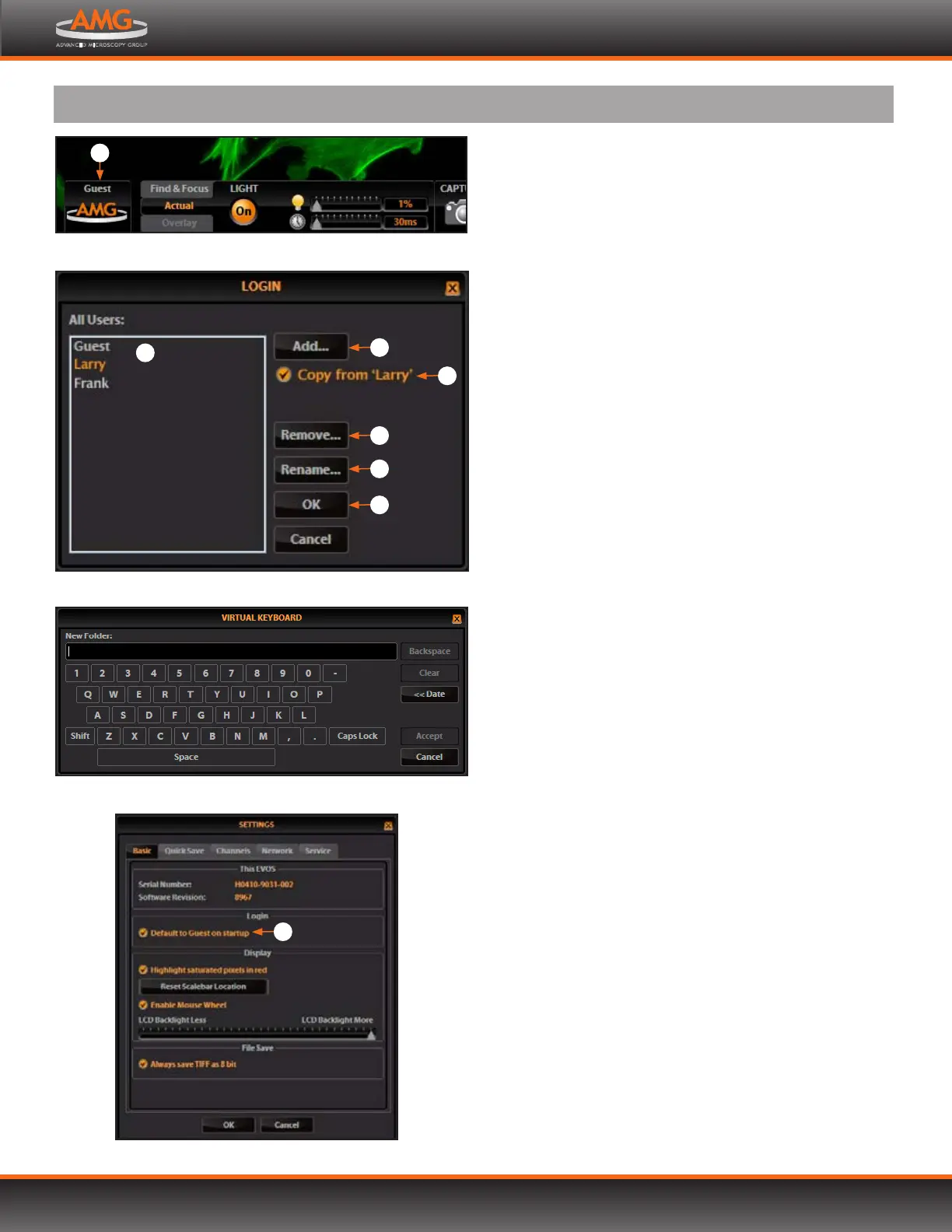
Virtual keyboard
LOGGING IN/CREATING NEW USER LOGINS
EVOS keeps settings in memory for each user ID, so multiple
users can work with the same EVOS microscope without
having to reset their preferences.
To use this feature, set up a user profile for each regular user.
You may also assign user IDs for experiments in progress.
Note: User profiles are not password protected. All users
should verify they are logged in correctly to avoid
changing others’ settings.
LOG IN WITH AN EXISTING PROFILE
1. Click the login button at the bottom left of the
screen. (This is the AMG logo with the current user
profile indicated above.)
2. Select the desired user profile and click OK .
Note: No password is necessary to log in.
ADD OR REMOVE A USER PROFILE
1. Click the login button .
2. To copy an existing profile, highlight the profile in the
user list , select the “Copy from ‘name’$” option , and
click the Add button . The virtual keyboard will pop up
so you can name the new profile.
3. To create a new user profile without copying any
settings, deselect the “Copy from” option , click the
Add button , and enter a user name.
4. After adding a new user profile, click OK to log in
under that name and adjust settings as desired. When
you switch o, EVOS will save your settings to memory.
5. To remove a user profile, highlight it and click the
Remove button . A confirmation dialog box will
pop up. Deleting the user profile will remove all its
associated settings from memory.
6. To rename a user profile, click the Rename button
and enter the new name.
CHANGE THE DEFAULT LOGIN
The default user login is Guest; to set the default login
as the last active user, go to the Basic tab of the Settings
dialog box and uncheck the “Default to Guest on
startup”_ option.
Note: For multiple users, we recommend leaving the “Default
to Guest on startup” option checked.
Login button (set to Guest profile)
1
Login dialog box
5
3
4
6
7
2
Settings: Basic Tab (to change default login)
8
ADVANCED OPERATION


 To Next Page