www.amgmicro.com 11
EVOS
fl
User Guide
REV B Published 20 SEP 2010
BASIC OPERATION
BRIGHTFIELD OR PHASE CONTRAST
OPERATION
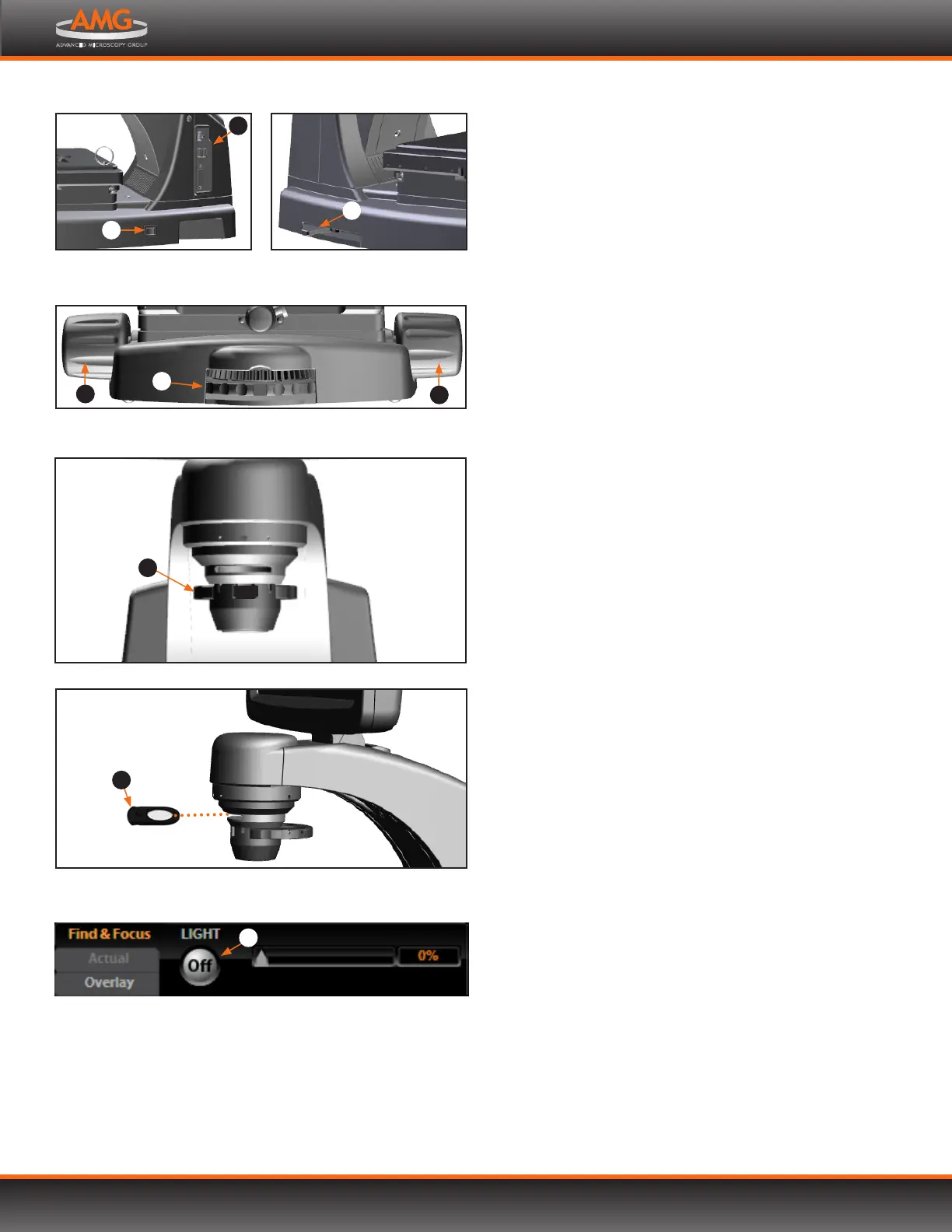
1. Turn on the microscope using the power switch on
the right side of the microscope base.
2. Plug a USB flash drive into one of the USB ports on
the right side of the microscope arm.
3. Place the sample on the stage, using a vessel holder if
needed.
Note: Place slides with coverslips face up.
4. Set the magnification using the objective selection
wheel on the front of the microscope.
5. Move the light cube selection lever on the left side
of the microscope all the way toward you. (The channel
indicator bar will highlight the “Transmitted” position.)
6. Turn the phase annuli selector to the position that
corresponds to the selected objective and contrast
method.
7. Insert the appropriate condenser slider into the slot
on the condenser assembly for optimal image quality.
Five condenser sliders are included with EVOS
fl
microscopes. For brightfield applications you may use
the Diuser or Pinhole slider, or a Meniscus slider.
Due to variances in sample size, color and thickness,
actual slider use may dier from the suggested slider
use described below.
Diuser slider: Brightfield, 2x or 4x (for flat field
illumination)
Pinhole slider: Brightfield, all magnifications (to
enhance contrast)
Meniscus A slider: Brightfield, 2x (for low-volume fluid
in a multi-well dish)
Meniscus B slider: Brightfield, 2x (for high-volume fluid
in a multi-well dish)
8. Turn on illumination using the LIGHT ON button ,
located on the left side of the control bar.
9. Focus the sample using the focusing knobs .
Phase annuli selector
continued on next page
Insert slider into condenser
6
8
Objective selection wheel and focusing knobs
8
3
5
BF
Light cube selection lever
4
2
Power switch and data ports
1
4
LIGHT ON button in the control bar
7


 To Next Page