www.amgmicro.com 5
EVOS
fl
User Guide
REV B Published 20 SEP 2010
SETUP
LED LIGHT CUBES
IMPORTANT! Before changing light channels, ALWAYS
be sure the light cube lock has been removed. Applying
force to the light cube selection lever while the lock is
in place may seriously damage the mechanism. This
type of damage is not covered by the manufacturer’s
warranty.
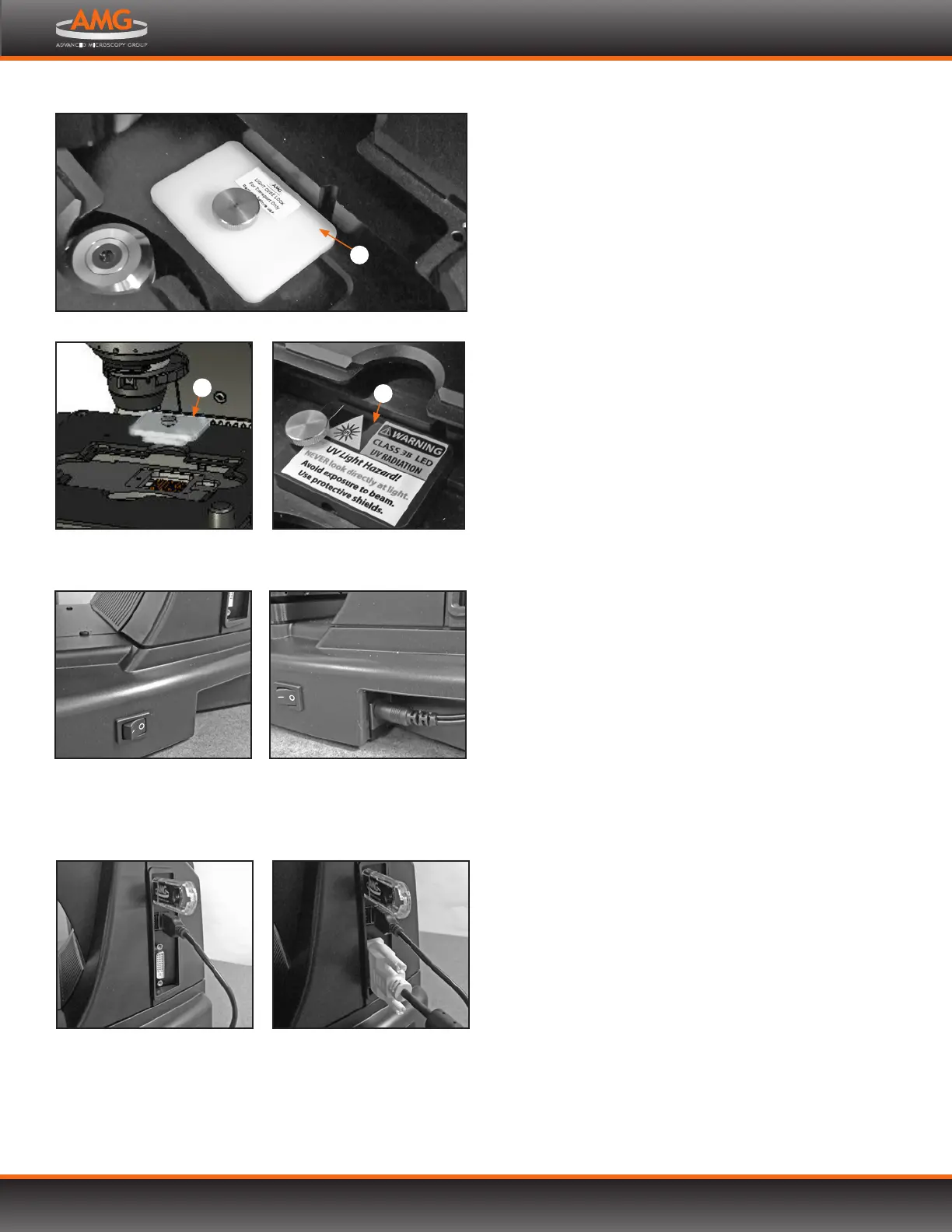
1. Move the stage back to allow access to the light cube
lock , which is centered under the back of the stage.
2. Loosen the thumbscrew to remove the light cube lock.
You may store the light cube lock in your accessories
box for future use during transport or shipping.
3. Place the light cube access cover into the opening
and tighten thumbscrew.
Note: For information about adding optional LED light
cubes, refer to Changing LED Light Cubes (p.23).
POWER SUPPLY
1. Turn the power switch to the “” (OFF) position
before connecting the power adaptor.
IMPORTANT! Always use the correct power supply.
The power adaptor specifications appear on the
serial number label (front of LCD hinge) and in the
SPECIFICATIONS (p.36). Damage due to an incompatible
power adaptor is not covered by warranty.
2. Connect the power adaptor to the power jack on the
right side of the microscope base, attach the cord to the
adaptor, and plug the cord into an outlet.
USB PORTS
Plug the mouse and the USB flash drive into the USB ports
located on the bottom right of the support arm. You may
also plug in a USB keyboard (not included) for text input.
DVI OUTPUT PORT
A DVI port is available for output to a projector or other
display. (DVI cable not included.) This port produces
digital output only; EVOS is compatible with either a DVI-D
or DVI-I display.
Power switch
Power adaptor plugged in
LED light cube lock engaged
1
Remove light cube lock Secure light cube access cover
over opening
1
2
Mouse and USB flash drive
plugged in
DVI cable (not included)
plugged in


 To Next Page