www.amgmicro.com 29
EVOS
fl
User Guide
REV B Published 20 SEP 2010
CONTROLS GLOSSARY
MECHANICAL CONTROLS
This controls glossary is not alphabetized. Mechanical
controls are listed in the order they are normally used.
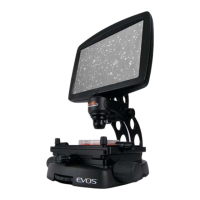
POWER INPUT JACK
Plug the power adaptor into the power input jack .
POWER SWITCH
Set the power switch to “—” to turn the microscope
on or “O” to turn it o.
USB AND DVI PORTS
Plug the mouse and flash drive into the USB ports .
Use the DVI port for digital output to a projector or
other display.
COARSE STAGE POSITIONING KNOBS
Use the coarse stage positioning knobs to position
the specimen within the field of view, particularly at
low magnifications.
STAGE X-AXIS KNOB
Use the stage X-axis knob for fine left-right
movements to position the specimen within the field
of view, particularly at high magnifications. To secure
the stage in place for time-lapse image captures,
tighten the X-axis stage brake
6b
.
STAGE Y-AXIS KNOBS
Use the stage Y-axis knobs for fine front-back
movements to position the specimen within the field
of view, particularly at high magnifications. To secure
the stage in place for time-lapse image captures,
tighten the Y-axis stage brake
7b
.
FOCUSING KNOBS
Use the focusing knobs to bring the specimen into
focus.
OBJECTIVE SELECTION WHEEL
Turn the objective selection wheel to change
magnifications. The objective turret will click into
place at each position.
Focusing knobs and objective selection wheel
8
9
8
Coarse stage positioning knobs , stage X-axis knob /brake
6b
and stage Y-axis knobs /brake
7b
6
7
6b
7
7b
Power input jack , power switch USB ports and DVI port
2
1
3
4
— O
5
5
3
4
2
1
9


 To Next Page