www.amgmicro.com 9
EVOS
fl
User Guide
REV B Published 20 SEP 2010
The EVOS
fl
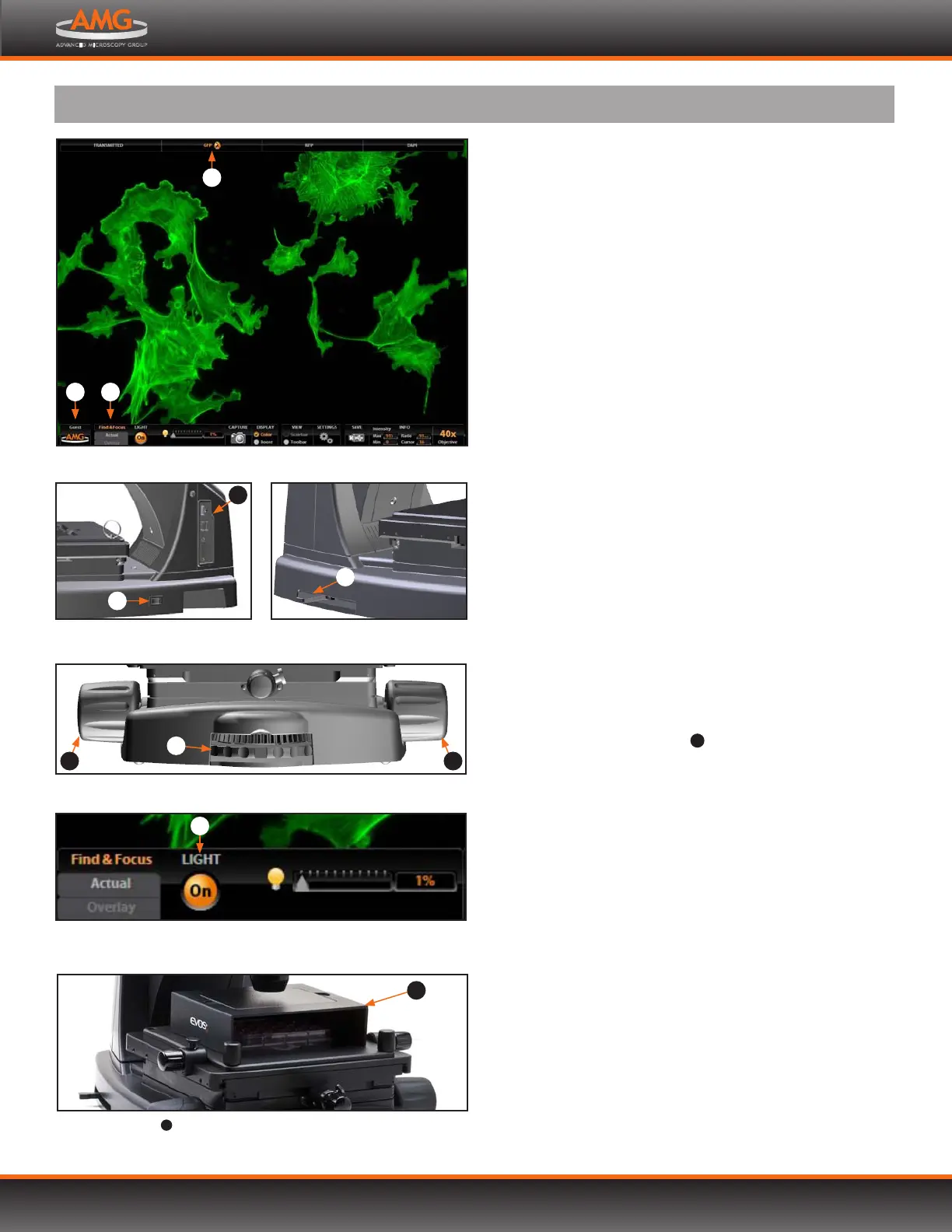
microscope uses both mechanical and software
controls for operation. Mechanical controls include the
stage X-Y axis knobs, focusing knobs, objective selection
wheel, and the light cube selection lever. Software controls
are located in the control bar at the bottom of the
screen. The channel indicator bar at the top of the
screen shows the selected filter cube or transmitted light
position. The login button displays the current user ID.
Refer to the QUICK-REFERENCE DIAGRAMS (p.8) as needed.
See also the CONTROLS GLOSSARY (p.25) for more details.
FLUORESCENCE OPERATION
1. Turn on the microscope using the power switch on
the right side of the microscope base.
2. Plug a USB flash drive into one of the USB ports on
the right side of the microscope arm.
3. Place the sample on the stage, using a vessel holder if
needed.
Note: Place slides with coverslips face up.
4. Set the magnification using the objective selection
wheel on the front of the microscope.
5. Move the light cube selection lever on the left side
of the microscope all the way toward you. (The channel
bar will highlight the “Transmitted” position.)
6. Turn on illumination using the LIGHT ON button ,
located on the left side of the control bar.
7. Focus the sample using the focusing knobs .
8. Place the light shield box
10
on the stage, over the
sample. This is important for optimal image quality.
Note: If your application requires access to the sample,
work in a dark room and use the Block slider to
block light reflected from the condenser.
9. Move the light cube selection lever to the desired
fluorescence channel. (The channel indicator bar will
highlight the selected light cube.)
10. Click the Find & Focus tab.
11. Click the LIGHT ON button to turn on fluorescence
illumination.
! WARNING! UV LIGHT HAZARD! When using the DAPI
channel, avoid exposure to beam and use protective
shields. NEVER look directly at light.
12. Adjust the focus as needed.
13. Adjust the illumination intensity if necessary, using the
Illumination slider on the control bar or the mouse
scroll wheel.
Light cube selection lever
10
Light shield box
10
in place on stage
Power switch and data ports
LIGHT ON button in the control bar
8
1
2
Software control bar , channel bar and login button
3
continued on next page
BASIC OPERATION
7
7
4
5
4
Objective selection wheel and focusing knobs
6
9 9


 To Next Page