www.amgmicro.com 12
EVOS
fl
User Guide
REV B Published 20 SEP 2010
BASIC OPERATION
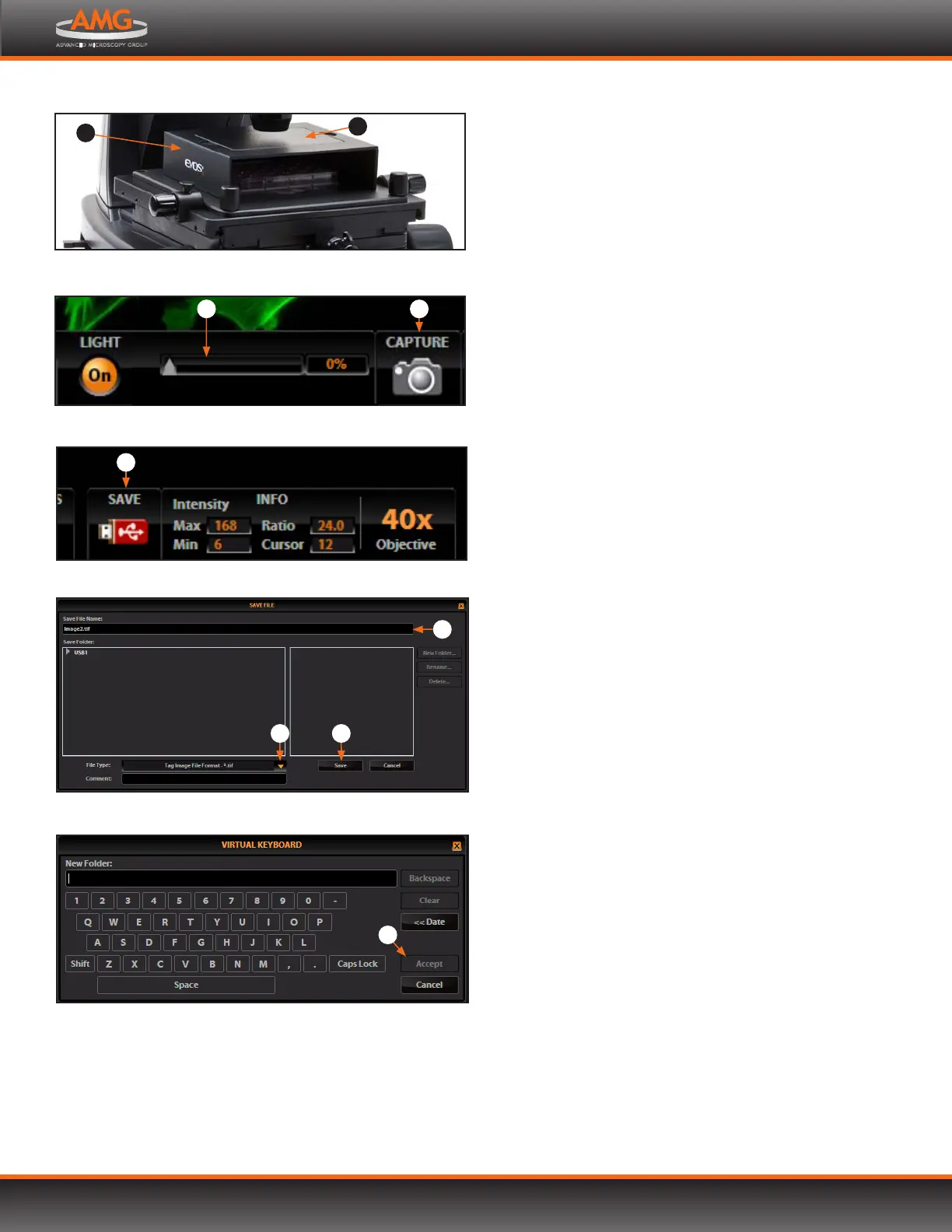
10. When switching from fluorescence to transmitted light
with the light shield box on the stage, remove the
light shield box cover so the light from the condenser
can pass through.
11. Adjust the illumination intensity if necessary, using the
Illumination slider on the control bar or the mouse
scroll wheel.
Note: Overexposed pixels will appear red. Dim the
illumination until the red highlights disappear
to get the maximum level of brightness without
any overexposed areas. See p. 27 for instructions
on changing the overexposed pixel display.
12. Click the Capture button to acquire the image.
13. Click the Save button to save the image. The Save
File dialog box will pop up.
14. Click in the Save File Name text field to enter the file
name. A virtual keyboard will pop up. After entering the file
name, click the Accept button at the lower right of the
keyboard.
15. Choose the file type and click the Save button .
Note: See Saving Images & Working with Files (p.14)
for more information.
1
Light shield box in place on stage (cover shown in place)
Illumination slider and Capture button in the control bar
4
Save button
5
Virtual keyboard
7
Save File dialog box
6
98
Brightfield or Phase Contrast Operation, continued
3
2


 To Next Page