Home
amplex
Laboratory Equipment
GENIE II
Page 13 (Select the Language)
amplex GENIE II - Select the Language
44 pages
Manual
Save Page as PDF
To Next Page
To Next Page
To Previous Page
To Previous Page
Loading...
GENIE
®
II Mk2/ eaz
yReport
TM
software
13
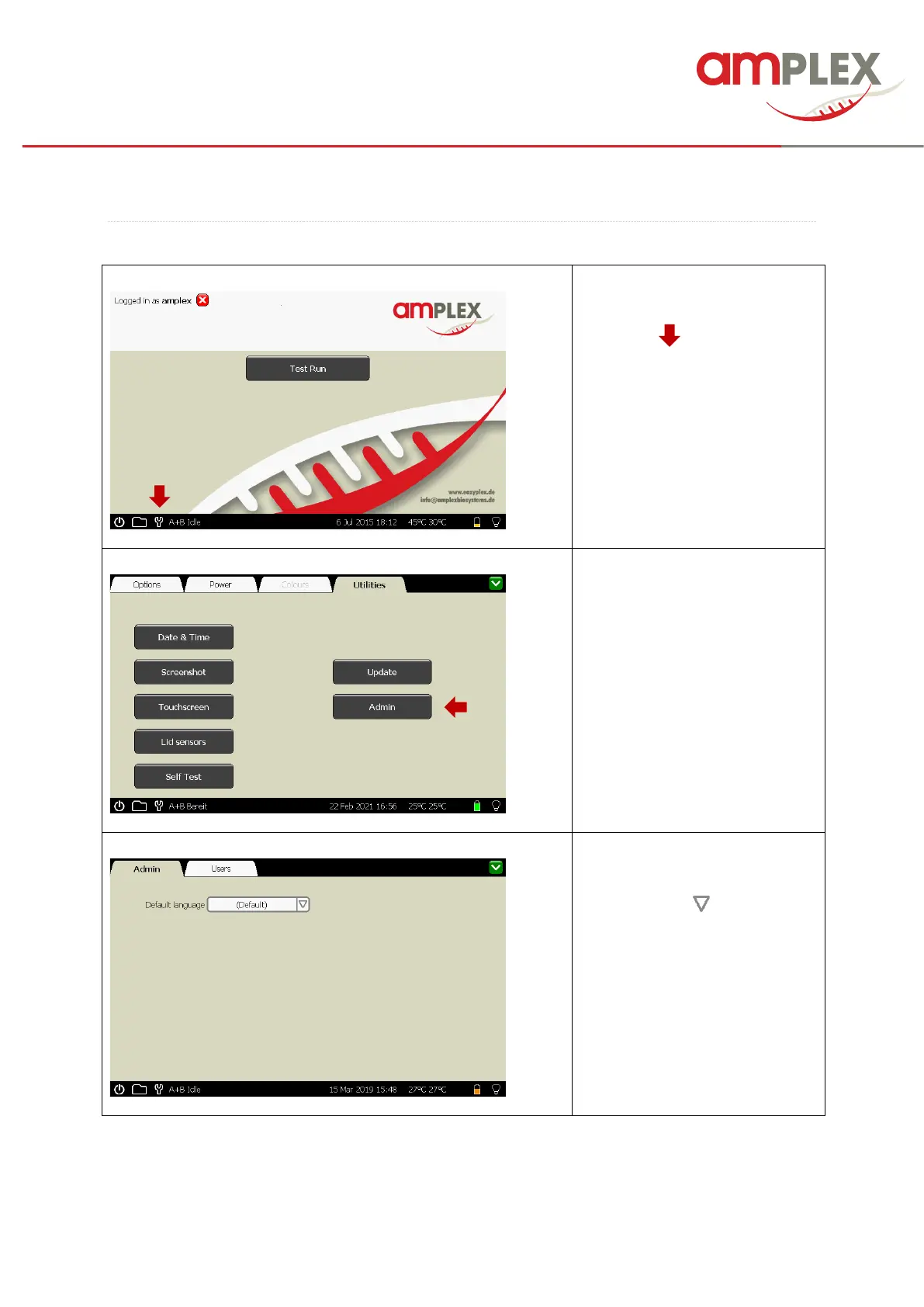
SELECT THE LANGUAGE:
To select a language, p
lease
open the software
by clicking the
little “tool” (
) at the bot
tom task
bar.
!
The language selecti
on is not
allowed in the “user”
mode, for
this purpose you need
access
as
supervisor.
Choose the “Utilities” ta
p and
open the admin are
a by tipping
the “Admin” button.
Please open the drop
down
menue by tipping the tri
angel next
to the text field (
).
12
14
Table of Contents
Main Page
default chapter
2
Table of Contents
2
Chapter 1: INTRODUCTION
4
Intended Use
4
Safety Notices
4
Chapter 2: GETTING STARTED
6
The First Steps
6
Unpacking
6
Site Preparation
7
Connections
8
User Interface
9
GENIE ® II Mk2 WELCOME SCREEN
9
Set Date and Time
10
User Management
11
Select the Language
13
Chapter 3: HOW to TAKE CARE of the SYSTEM
15
Chapter 4: RUN a TEST
16
Start a Test Run
16
Stop a Test Run
18
Adding Information to a Test Run
19
Results
19
Print Results
20
Create a Pdf
20
Export a Pdf
21
Create a Csv File
24
Start a Secound Run
24
Chapter 5: RESULTS
25
Finding Log - Files
25
Chapter 6: TROUBLESHOOTING
28
Problem to Power up
28
Error Messages
28
Beeping During the Run
28
Questionable Results
28
Chapter 7: NICE to KNOW
29
Screen Brightness Control
29
Power Settings
29
Zooming Function
30
Selection of Graphs
30
Screenshot
31
Utilities
32
Touchscreen Calibration
33
Chapter 8: MAINTENANCE
34
Cleaning and Decontamination
34
Battery and Charging
34
Stand by Mode
35
Self Test
36
Performance Check
36
Recalibrating Lid Sensors
37
Details of Service and Repair
39
Organising Service and Repair
39
GENIE ® II Mk2 SOFTWARE UPDATES
40
Chapter 9: ADDITIONAL INFORMATIONS
42
GENIE ® II Mk2 TECHNICAL SPECIFICATION
42
Warranty
43
Disposal
43
Explanation of Symbols
43
Document Revsion
43



 To Next Page