UHM210-11 User Guide
11
amscope.com
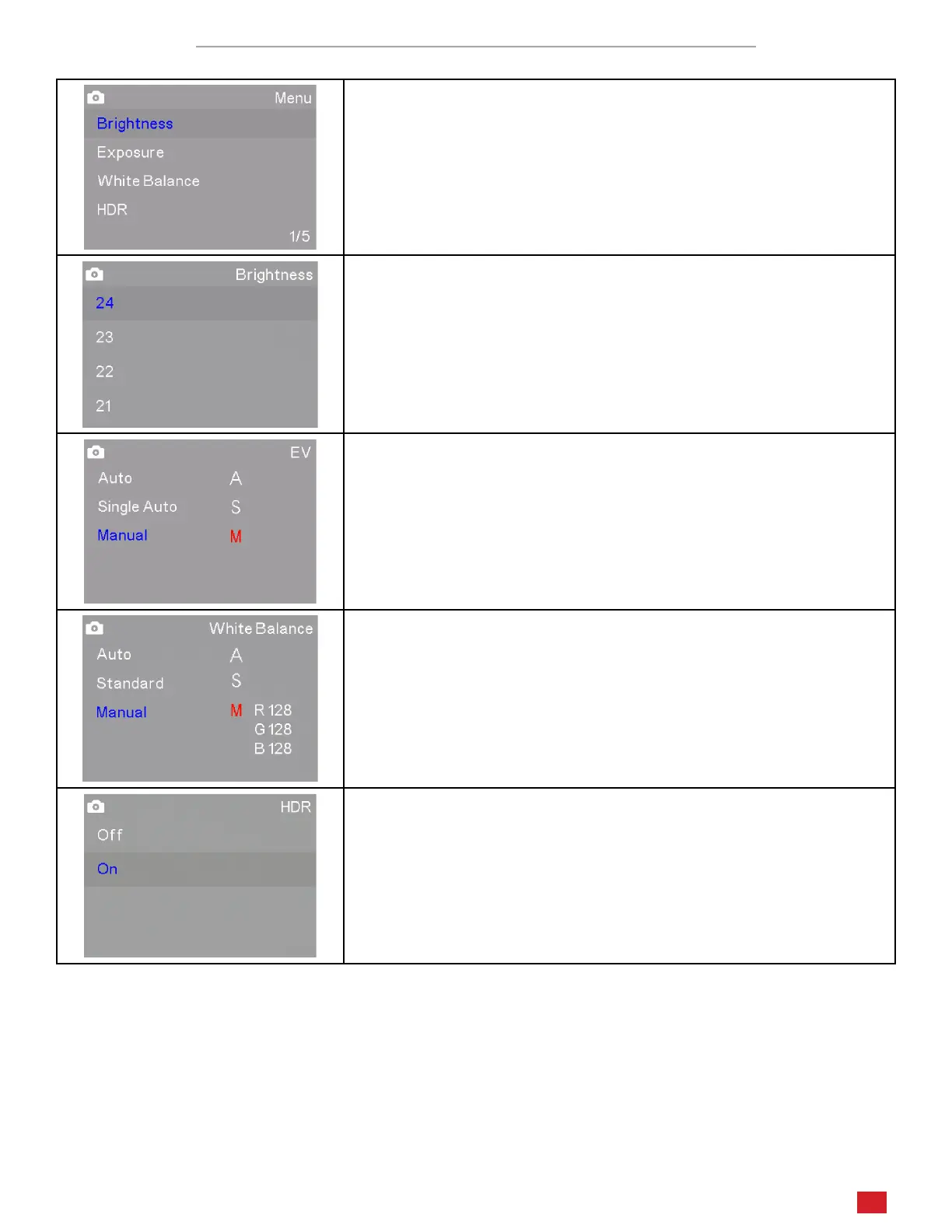
Photo and Video Sengs Menus Page 1/5
The rst page in Photo and Video modes includes sengs which control qual-
ies of the image including Brightness, Exposure, White Balance, and High
Dynamic Range (HDR).
The Brightness seng can only be used when the Exposure mode is
set to Auto. Since Auto Exposure aempts to render an average mid-
dle-grey exposure, Brightness will increase the exposure target incre-
mentally using values from 1 to 24.
Exposure controls the amount of light gathered to form an image.
Auto mode connuously uses an average of the levels seen across the
eld of view, and aempts to achieve a middle grey. Single Auto mode
performs the same funcon as Auto, but only at the me it is selected
rather than connuously. Manual allows you to select a value from 1 to
10 to manually target the appropriate level.
White Balance is used to compensate for color casts caused by various
light sources. Auto mode aempts to compensate for detected color
biases to render a more neutral image. Standard mode uses a pre-
dened color temperature as the neutral target. Manual mode allows
you to adjust each primary color (red, green, blue) independently using
values from 1 to 128.
HDR (High Dynamic Range) compresses exposure values across the im-
age to limit excess highlights and shadows. This seng can be toggled
on or o.












 To Next Page