60
05/2008 Rev. 0.6
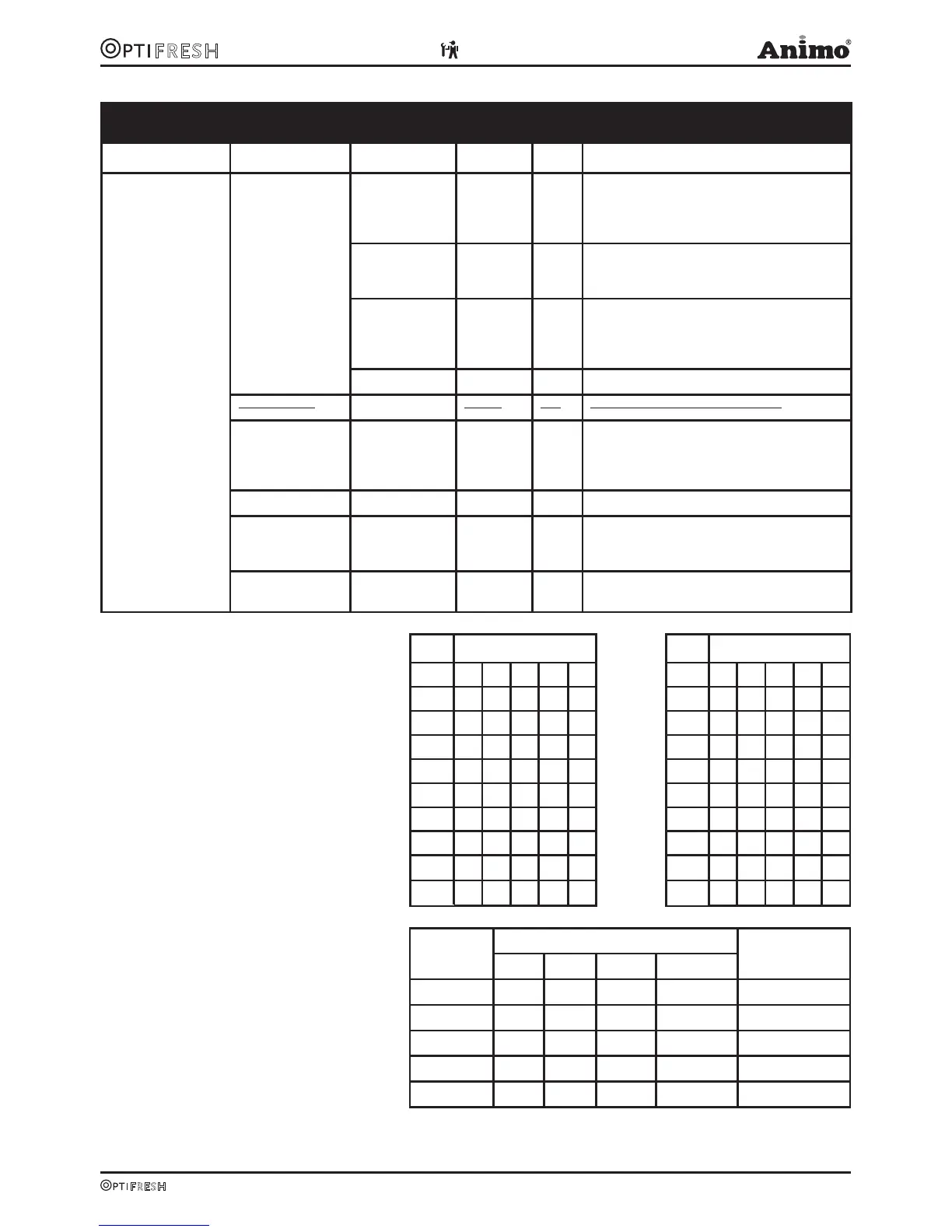
Service menu continued…
Main item Sub item Item Range Set Description
2.13 Addit. settings
From software 2.0
moved to menu
2.4.10
Waste manag.
Cup amount 0-1000 250
After reaching the set total of brewer
movements, dispensing is disabled and
the display reads: Out of order – Waste
bin full
Almost full sign. 0-1000 230
After reaching the set total of brewer move-
ments, the display reads: Waste bin almost
full
Time-out reset 0-50 sec. 15 s The length of time that the waste bin is al-
lowed to be removed (for emptying). When
replacing it the (internal) waste bin counter is
reset. Any display messages disappear.
Waste bin sign.. Yes/no Yes Turns off waste bin sensor software (bypass).
Drip tray sign.
Yes/no Yes Turns off drip tray sensor software.
Cycle counter xxxxx 0-99999 This Cycle counter records the number of
vends the brewer has made. Tip: This counter
can be reset after maintenance if the brewer
has been checked.
Reset c. counter Reset counter? Reset Cycle counter (Brewer)
Perm.filter coun xxxxx 0-10.000 6000 When the set number of (Brewer) vends is
reached the display reads ‘Replace perma-
nent filter’ when switching on.
Reset p. filter Reset counter? Reset the permanent filter counter after
(preventative) replacement
PIN Code Table
No. Pincode No. Pincode
1 34242 11 13332
2 31434 12 12413
3 41343 13 43121
4 43232 14 11142
5 23341 15 21211
6 42131 16 12233
7 24244 17 34144
8 23241 18 41433
9 24323 19 31241
Table 1
10 31332 20 22324
Water Hardness Table
Water
Quality
Hardness Limescale
Indicator ...cups
°D °F mmol/l mgCaCo3/l
Very hard 18-30 32-55 3,2-5,3 321- 536 5000
Hard 12-18 22-32 2,2-3,2 214-321 8500
Average 8-12 15-22 1,4-2,2 268-214 12.500*
Soft 4-8 7-15 0,7-1,4 72-268 20.500
Table 2 Very soft 0-4 0-7 0- 0,7 0-72 0 = off












 To Next Page