55
ENGLISH
USB OPERATION
--------------------------------------------------------------------------------------------
Connecting external data media
It is advised to put the television on stand-by
mode before connecting the External Data me-
dium. Connect the device and then switch the
television on again.
Before disconnecting the data medium, the
television must first be switched to standby, oth-
erwise files can be damaged.
Notes:
7
According to the USB standard, the USB1
socket of the TV supports a current of 500
mA. Devices such as external hard disk and
etc. that consume more power can only be
connected to the USB2 (HDD)interface of
the television.
7
USB2 (HDD) If you are using a power
cable for the external hard disk that you
have connected to the USB interface, then
the power cable of the external hard disk
shall also be unplugged when the TV is
turned off.
7
You must not disconnect the USB Device
from the TV while a file on the USB Device
is being read by the TV.
7
A bi-directional data transfer as defined for
ITE (Information Technology Equipment)
devices in EN 55022/EN 55024 is not
possible.
7
USB transfer is not an operation mode in
itself. It is only an additional function.
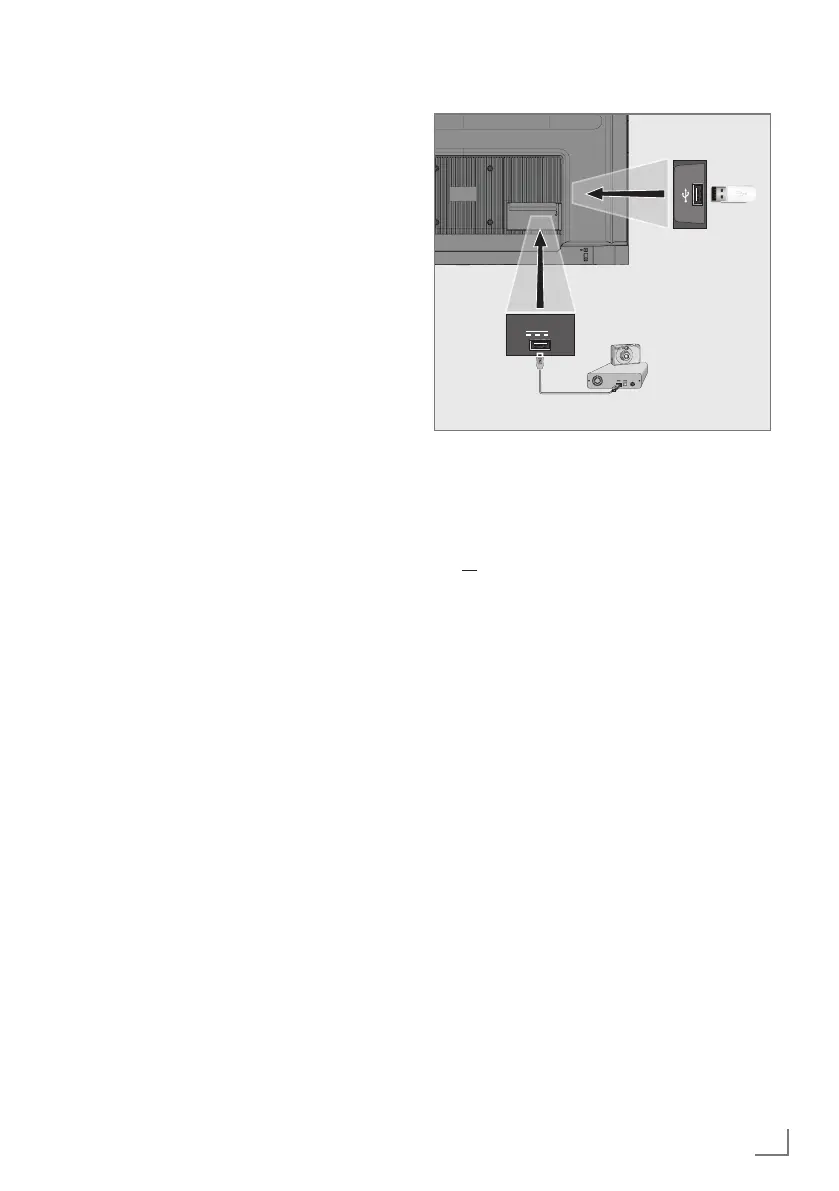
1 Connect the USB2 (HDD) interface of the
television and the corresponding socket on
the data device (external hard drive, digital
camera, card reader or MP3 player) using
a USB cable;
or
plug the memory stick in one of the
»USB1«sockets of the television.
Removing the external data me-
dium
Before removing the external data medium,
logoff the data medium.
1 Press »
)
«
on Home Screen.
2 Select »Settings »
)
«
and confirm with
»
«.
3 Select »System« with »
V
« and confirm with
»
«.
4 Select »Storage« with »
V
« and confirm with
»
« .
5 Select the external data medium you want
to remove with »
V
« or »
Λ
« and confirm
with »
« .
6 Confirm »Eject« with »
«.
– The message »..... safely removed« is
displayed.
7 Remove the data medium from the socket.
USB2 (HDD)
1A
USB1



 To Next Page