ENGLISH
56
USB OPERATION
--------------------------------------------------------------------------------------------
Multi Media Player menu
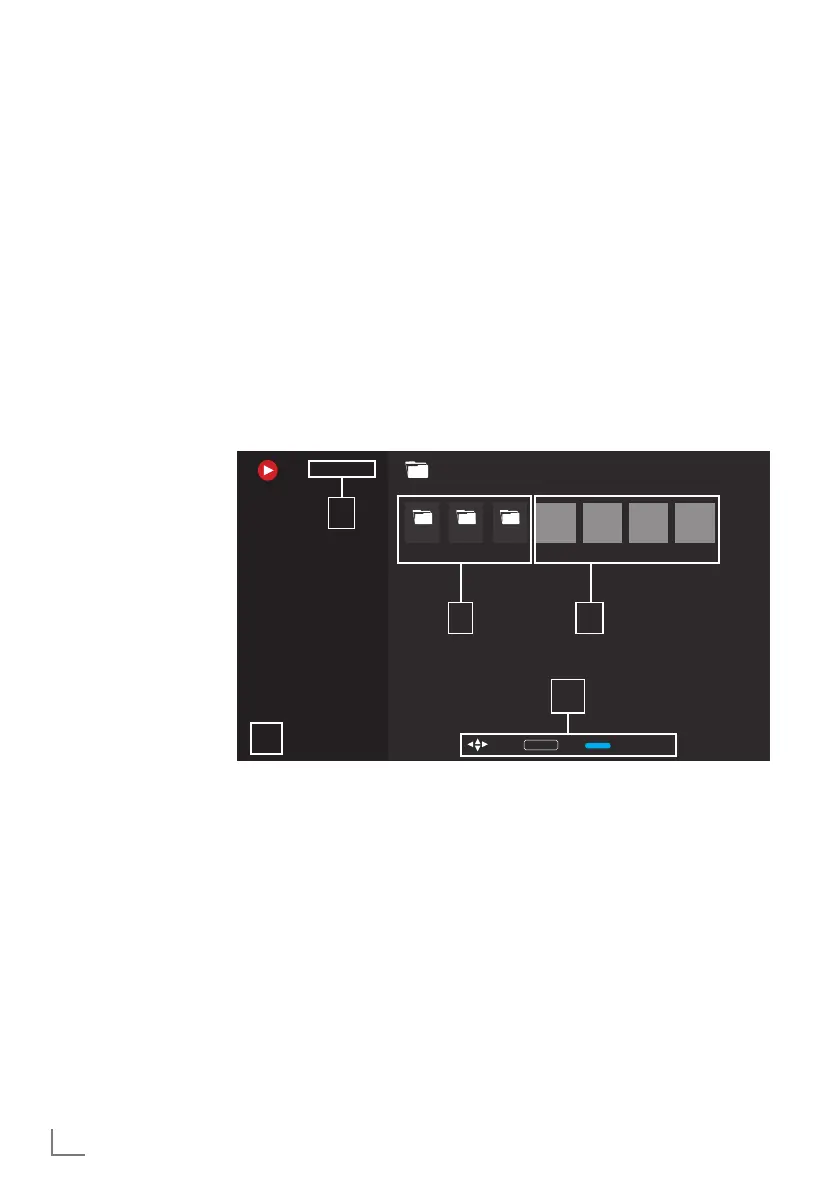
Multi Media Player file browser shows video,
audio, picture and text data on external data
medium.
If an external data medium contains different file
formats, you can disable data (Video file, Audio
file, Picture file or Text file) that you do not need
to play/display with the file format selection,
so that you can only play files in the format you
want to view.
1 File browser
2 Data type.
3 Data medium
folders.
4 Data medium files
5 Options.
1 Press »
T
«.
2 Select the "Multi Media Player" application
from the "Your Apps" tab.
– Multi Media Player file format selection
shall displayed.
Note:
7
Select "Show all" if "Multi Media Player" is
not among your favorite apps.
3 or select the file format you want to play
with »
<
« or »
>
« by selecting »Video«,
»Photo« or »Music« and confirm with »
«.
– File browser menu for the file format you
selected shall be displayed.
Playback basic functions
1 Select the file you want to play from the file
browser with »
<
«, »
>
«, »
V
« or »
Λ
« and
confirm with »
« .
2 Press »
w
« to pause playback.
3 Press »
w
« to resume playback.
4 Press »
« to end playback.
– The file browser appears.
Notes:
7
It is possible that some files that are supported
in USB mode do not operate due to some
problems that may arise depending on how
such files are created (compression) although
they have the supported file extension.
7
If there are more than one audio source
(audio stream) in the video files that are
being played, then you can switch between
the audio sources with »SUB« while the file
is being played in full screen mode.
7
Movies you will be watching from a movie
file only support subtitles with .srt, .sub, .ass,
.ssa, .smi format. Names of the subtitle and
movie files must be the same. Otherwise,
subtitle cannot be displayed.
/storage/969c-c854Video
Folder Folder Folder File File File File
OK EnterSelect Browse Mode
1
3
4
2
5



 To Next Page