6 Local Control Panel
(continued)
6-28
C232-302-401/402/403/404-603 / C232/EN M/A23
Readout of the event
memories
There are eight event memories for each type of event. The latest event is stored in
event memory 1, the previous one in event memory 2, and so forth.
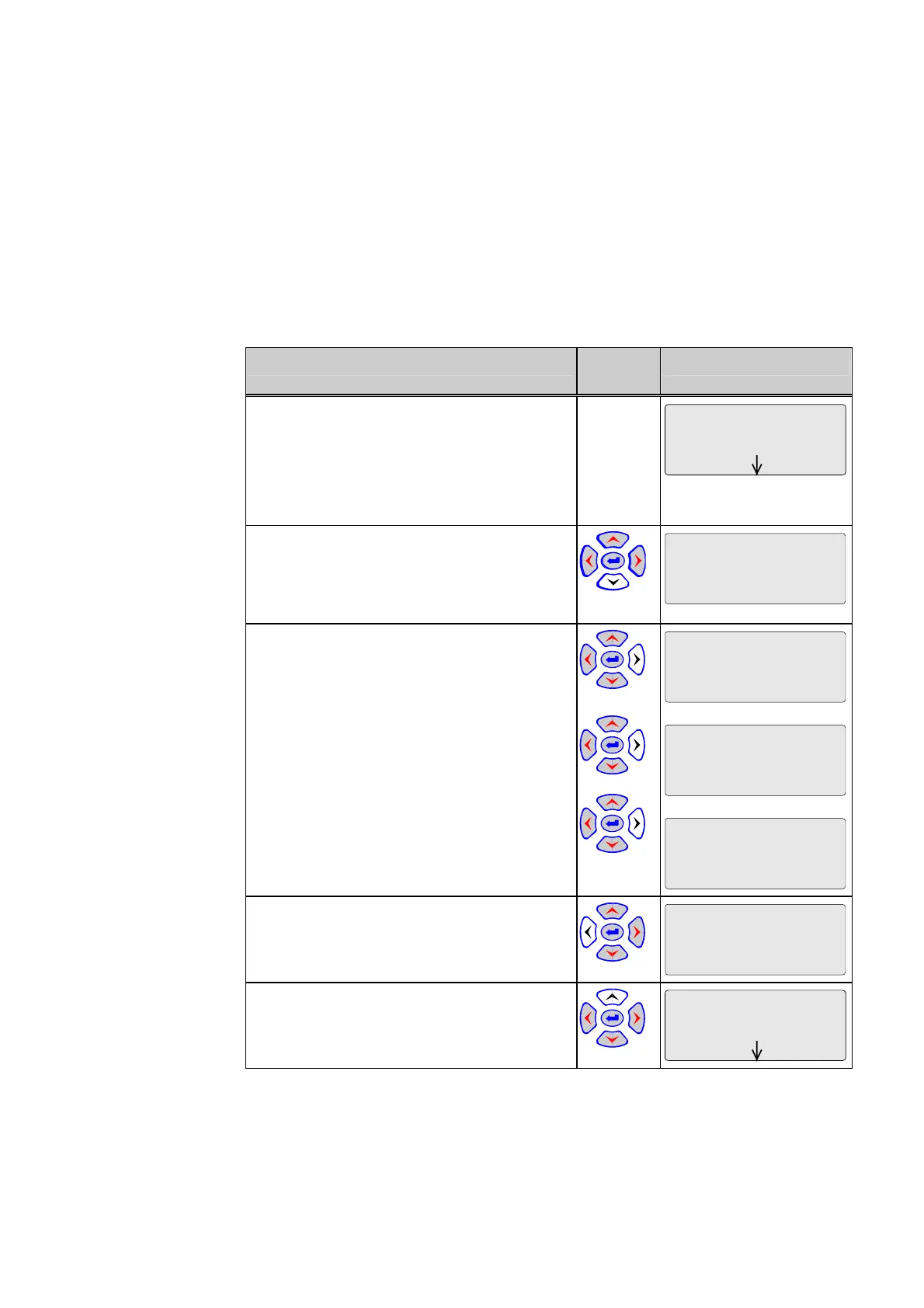
Readout of event memories is illustrated using the fault memory as an example.
Control Step / Description Control
Action
Display
0 Select the entry point for the first fault
memory, for example. If the memory contains
entries, the third line of the display will show
the date and time the fault began. If the third
line is blank, then there are no entries in the
fault memory.
Events/Rec/FT_RC
Fault recording 1
01.01.99 10:00:33
1 Press the ‘down’ key to enter the fault
memory. First, the fault number is shown. In
this example it is the 22nd fault since the last
reset.
Fault recording 1
FT_RC
Event
22
2 Press the ‘right’ key repeatedly to see first
the measured fault data and then the binary
signals in chronological order. The time shown
in the second line is the relative time,
measured from the onset of the fault, at which
the value was measured or the binary signal
started or ended.
Once the end of the fault has been reached
(after the ‘right’ key has been pressed
repeatedly), pressing the ‘right’ key again will
have no effect.
Fault recording 1
200 ms FT_DA
Running time
0.17 s
Fault recording 1
0 ms FT_RC
Record. in progress
Start
Fault recording 1
241 ms FT_RC
Record. in progress
End
3 Press the ‘left’ key to see the previous
measured value or the previous signal.
Fault recording 1
0 ms FT_RC
Record. in progress
Start
4 Press the ‘up’ key at any point within the
fault memory to return to the entry point.
Events/Rec/FT_RC
Fault recording 1
01.01.99 10:00:33



 To Next Page