installation &
operating instructions
Design Envelope 4200h & 4280
End Suction Horizontal Pumping Units
16
c setting speed control through differential
pressure (dp) sensor 4-20ma
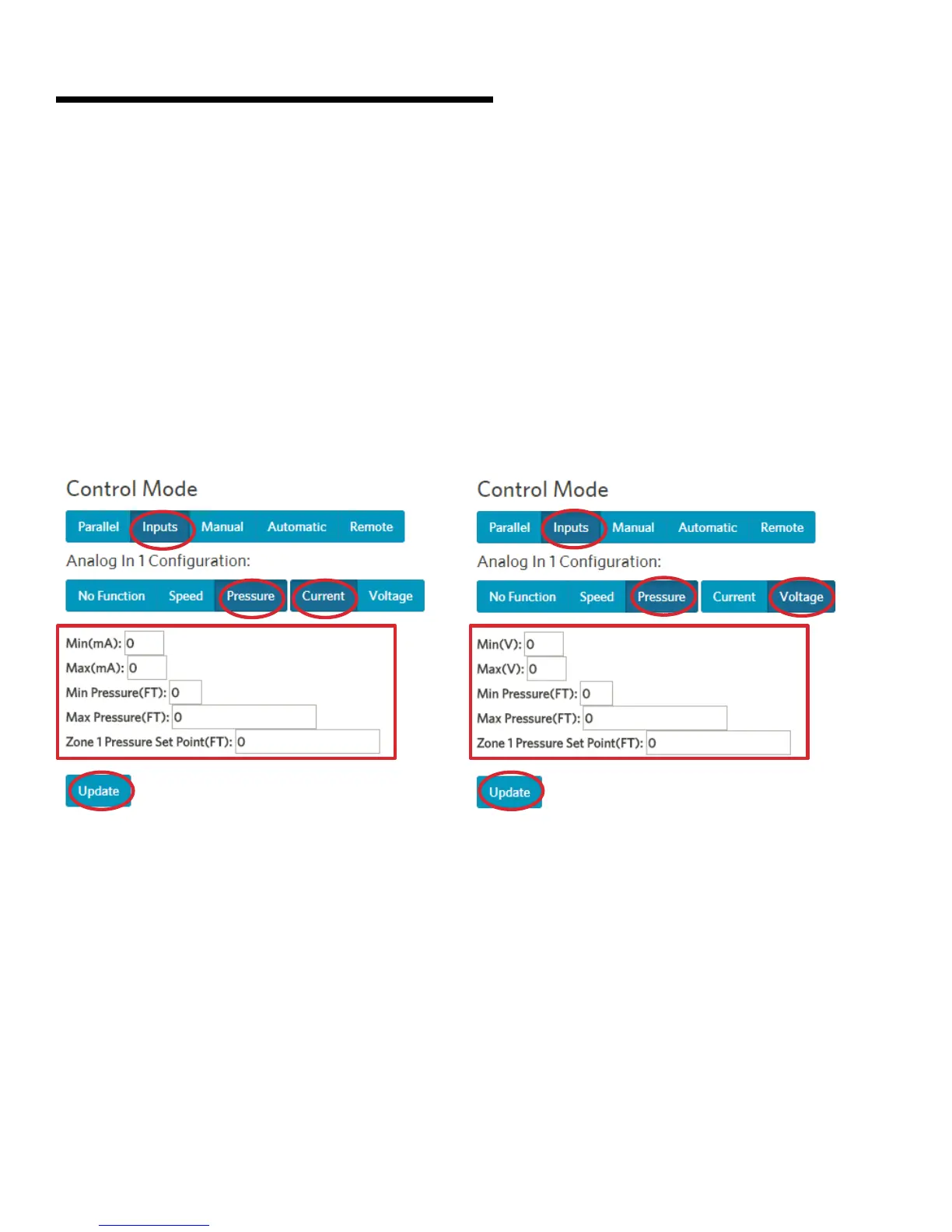
1 Under Control Mode, select InputsAnalog in 1 or
Analog in 2 Pressure Current
2 Set the DP sensor setting:
• Min(mA): 4
• Max(mA): 20
• Min Pressure: the minimum limit in the DP sensor
• Max Pressure: the max limit in the DP sensor
• Zone 1 Pressure set point: the desire set pressure
point
3 Click Update
d setting speed control through differential
pressure (dp) sensor 0-10v
1 Under Control Mode, select Inputs Analog in 1 or
Analog in 2 Pressure Voltage
2 Set the DP sensor setting:
• Min(V): 0
• Max(V): 10
• Min Pressure: the minimum limit in the DP sensor
• Max Pressure: the max limit in the DP sensor
• Zone 1 Pressure set point: the desire set pressure
point
3 Click Update






 To Next Page