4.4. Side Panel
The Gear icon at the top right side of the upper toolbar opens up the Side Panel.
• Settings this sets the global MIDI channel for the Vocoder V
♪: By default, Vocoder V will receive MIDI data on all 16 MIDI channels (All setting). You can change
this by selecting a specific channel here. You will need to do this if, for example, you want to use an
external controller with multiple instances of Vocoder V. In this situation, every instance can be set to
a unique channel, and you can change the preset or MIDI channel on your controller to control the
different instances of Vocoder V.
• MIDI this section lets you set the MIDI controller you are using and setup the
mapping of MIDI CC commands.
4.4.1. MIDI controller configuration
If you click on the drop-down menu to the right of where it says MIDI Controller you can
set whether your using a generic MIDI controller or one of Arturia's own. Underneath this
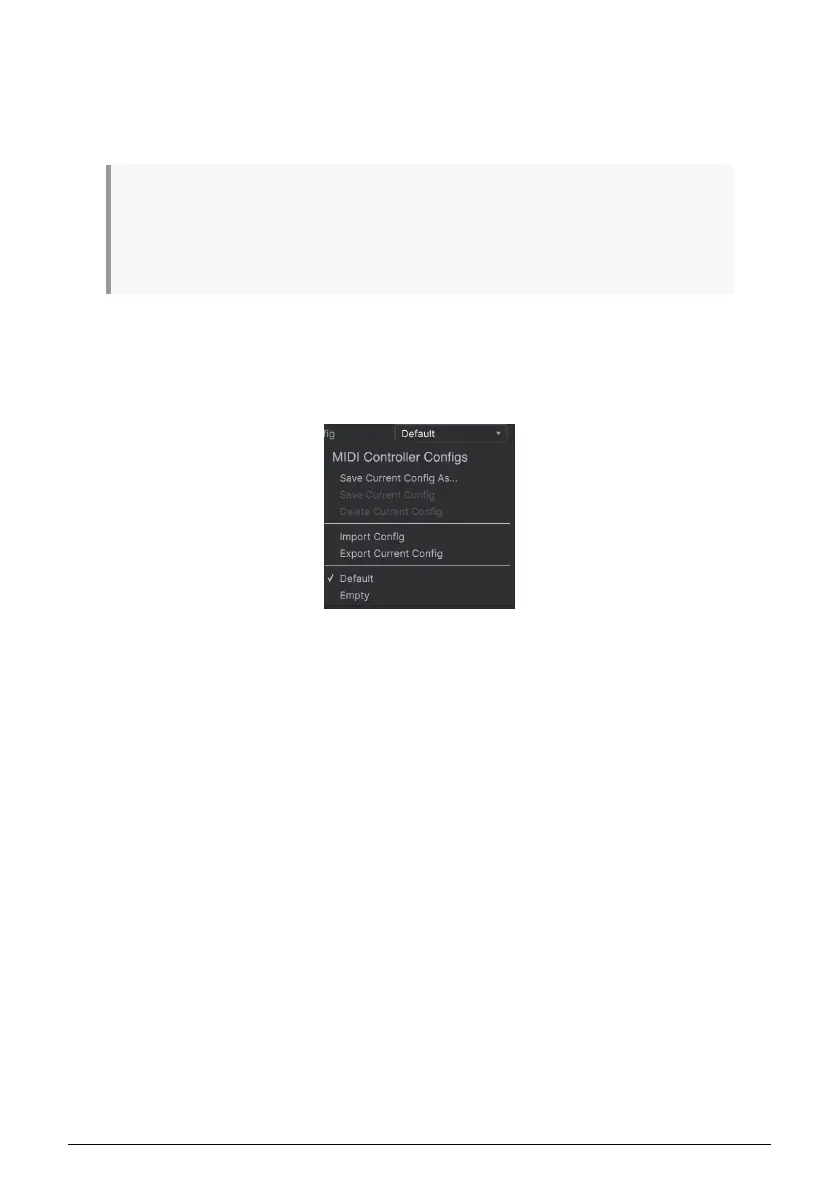
you have the MIDI configuration dropdown menu. Here you can manage different setups
of MIDI mappings for controlling Vocoder V. For example, if you have multiple hardware
controllers (small "live performance" keyboard, large "studio" keyboard, pad based controller,
etc.), you can create a profile for each of them just once and then quickly load it here. This
saves you from having to redo the MIDI mapping assignments from scratch each time you
swap hardware.
Once you have created a profile, you can save, delete, import or export it using the options
in this menu.
Your MIDI Mapping profiles are listed at the bottom of this pull-down menu and the currently
active profile has a checkmark next to it.
Underneath this you will see all the MIDI mappings currently setup. MIDI-assignable
parameters are shown highlighted and you can map physical controls on your MIDI
Controller to them. A typical example might be to map a real expression pedal to the Master
Volume control, or a physical knob on the MIDI controller to the Frequency knob of the Filter
module.
Purple controls are unassigned whereas red ones have already been assigned to an
external MIDI control.
20 Arturia - User Manual Vocoder V - The User Interface












 To Next Page