35
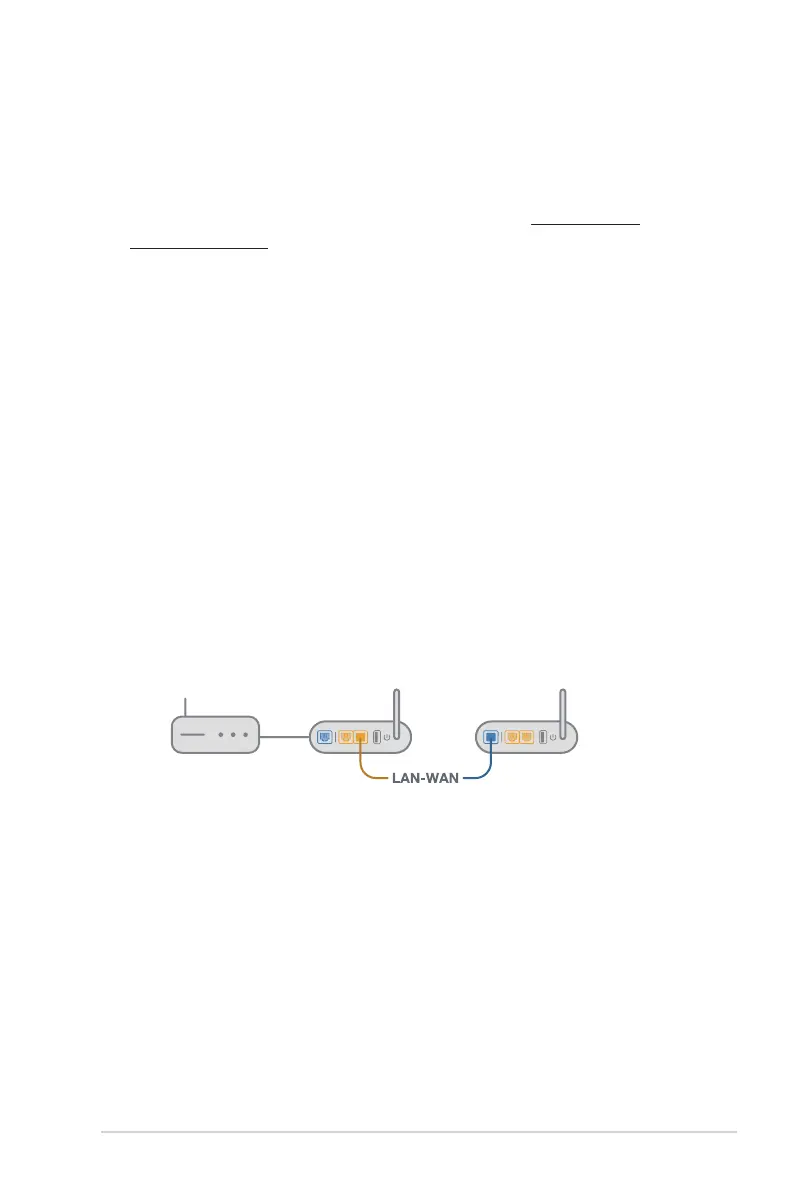
1) Follow the setup steps to establish a connection between the
AiMesh router and node via Wi-Fi first.
2)
Place the node in the ideal locations for best coverage. Run
an Ethernet cable from the LAN port of the AiMesh router
to the WAN port of AiMesh node
.
3)
AiMesh system will auto-select the best path for data
transmission, whether wired or wireless.
3.5.5 FAQs (Frequently Asked Questions)
Q1: Does the AiMesh router support Access Point mode?
A: Yes. You can choose to set the AiMesh router as router mode
or access point mode. Please go to web GUI (http://www.
asusrouter.com), and go to the page Administration >
Operation Mode.
Q2: Could I setup wired connection between AiMesh routers
(Ethernet backhaul)?
A: Yes. AiMesh system supports both wireless and wired
connection between AiMesh router and node to maximize
throughput and stability. AiMesh analyzes the wireless
signal strength for each frequency band available, and
then determines automatically whether a wireless or wired
connection is best to serve as the inter-router connection
backbone.


 To Next Page
 Loading...