86
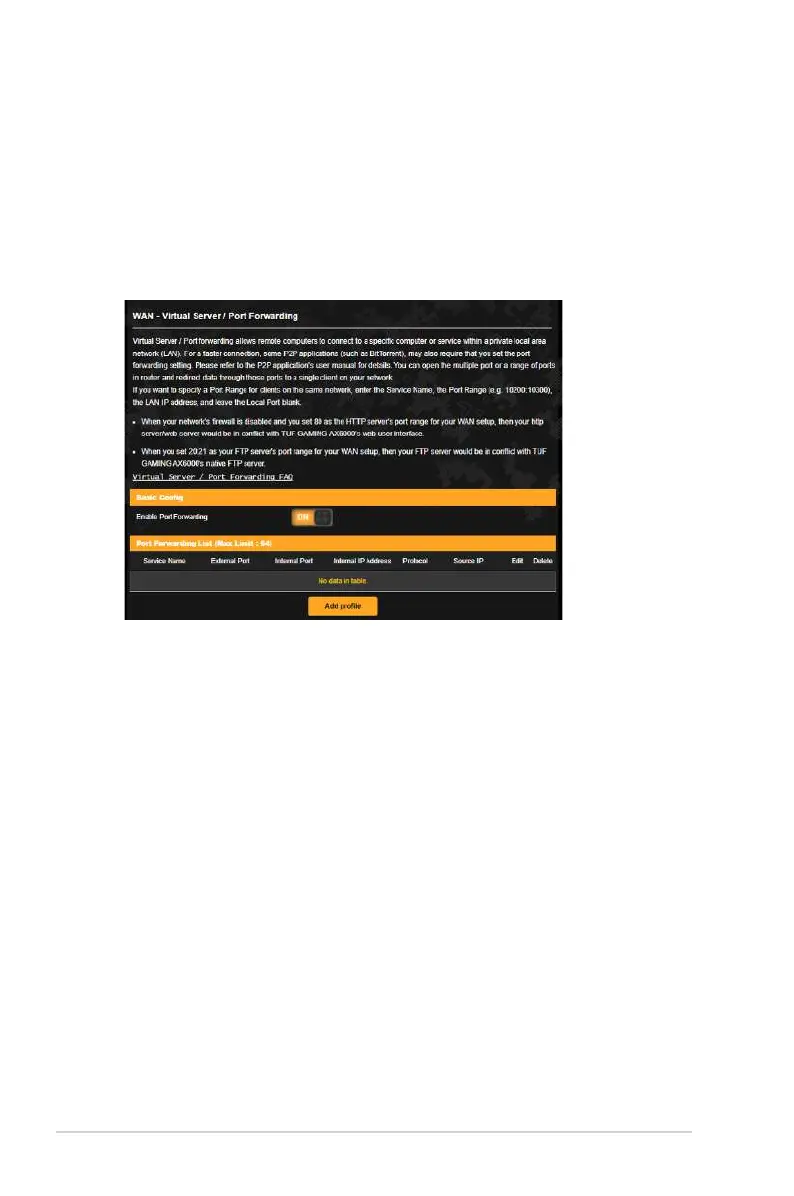
3.19.4 Virtual Server/Port Forwarding
Port forwarding is a method to direct network traffic from the
Internet to a specific port or a specific range of ports to a device
or number of devices on your local network. Setting up Port
Forwarding on your router allows PCs outside the network to
access specific services provided by a PC in your network.
To set up Port Forwarding:
1. From the navigation panel, go to Advanced Settings > WAN >
Virtual Server / Port Forwarding.
2. On the Enable Port Forwarding field, tick Yes .
3. Click Add profile and key in the following information on the
Port Forwarding List table:
• Service Name: Enter a service name.
• Protocol: Select the protocol. If you are unsure, select BOTH.
• External Port: The External Port accepts the following
formats:
1) Port ranges using a colon ”.” between the starting and
ending port, such as 300:350.
2) Single ports using a comma “,” between individual ports,
such as 566, 789.
3) A Mix of port ranges and single ports, using colons “.” and
commas “,” such as 1015:1024, 3021.


 To Next Page
 Loading...