43
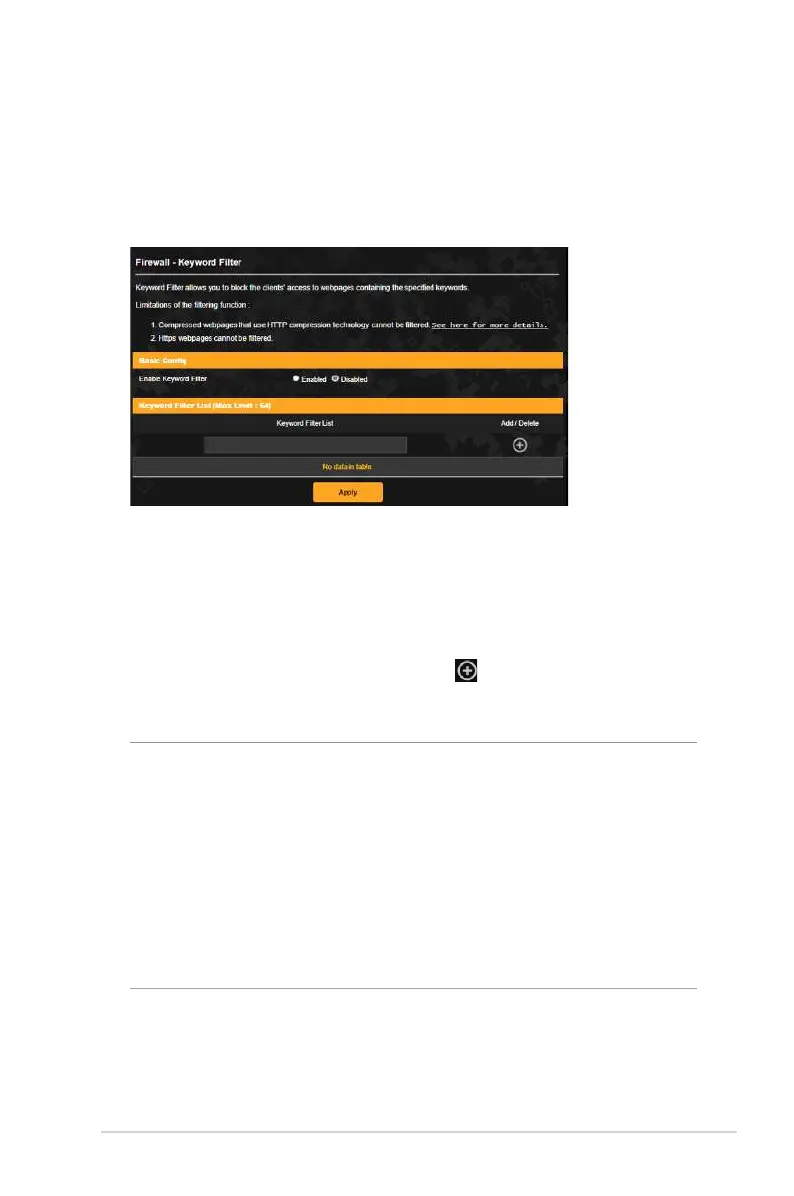
3.7.3 Keyword filter
Keyword filter blocks access to webpages containing specified
keywords.
To set up a keyword filter:
1. From the navigation panel, go to Advanced Settings >
Firewall > Keyword Filter.
2. On the Enable Keyword Filter field, select Enabled.
3. Enter a word or phrase and click the button.
4. Click Apply.
NOTES:
• The Keyword Filter is based on a DNS query. If a network client
has already accessed a website such as http://www.abcxxx.com,
then the website will not be blocked (a DNS cache in the system
stores previously visited websites). To resolve this issue, clear the
DNS cache before setting up the Keyword Filter.
• Web pages compressed using HTTP compression cannot be
filtered. HTTPS pages also cannot be blocked using a keyword
filter.


 To Next Page
 Loading...