CONTROLLER
30 | MVE User Manual (710-17074-00G)
7. Controller
Run Trip LocalReady
Exit
Menu
Store
Logs
Alt
Tools
Reset
LCL
RMT
StopStart
04186.B
1
2
3
4
5
6
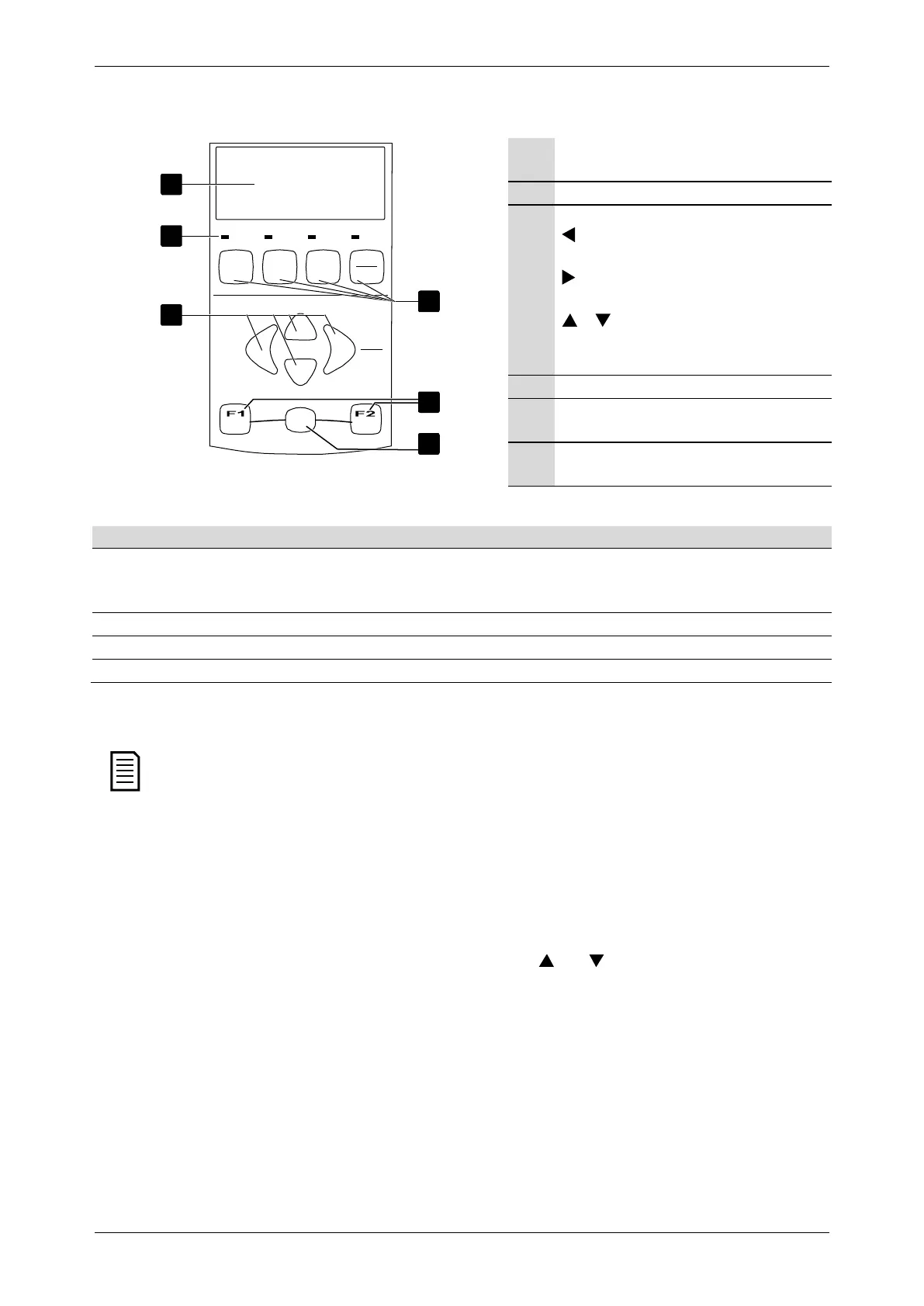
Four-line display for status and programming
details.
Status LEDs
Menu navigation buttons:
: Exit the menu or parameter, or cancel a
parameter change.
: Enter a menu or parameter, or save a
parameter change.
/ : Scroll to the next or previous menu
or parameter, or change the setting of the
current parameter.
Soft starter local control buttons
Shortcut buttons for quick access to common
tasks.
Alt button. Use with F1 or F2 to open
performance logs or commissioning tools.
7.1 Starter Status LEDs
The motor is stopped and the starter is ready to start.
The motor is stopped and the starter is waiting for the
Restart Delay
(parameter 4M) or
Motor Temperature
Check
(parameter 4N).
Run The motor is in run state (receiving full voltage). The motor is starting or stopping.
Trip The starter has tripped. The starter is in warning state.
Local The starter is in Local control mode. --
If the starter is in remote control mode, the Local LED will be off.
If all LEDs are off, the starter is not receiving control voltage.
When the Controller is powered up, the Ready LED flashes for 5 seconds as part of the initialisation routine.
7.2 Menu Shortcuts
The F1 and F2 buttons offer keyboard shortcuts to the Auto-Stop menu. Use parameters 8B and 8C (
8B, 8C – F1 and F2 Button
Action
on page 56) to select the shortcut target.
7.3 Displays
The controller displays a wide range of performance information about the soft starter. The top half of the screen shows real-time
information on current or motor power (as selected in parameter 8D). Use the
and buttons to select the information
shown on the bottom half of the screen.
• Starter status
• User programmable screen
• Motor temperature
• Current
• Motor power
• Voltage
• Last start information
• Date and time
• Performance graphs
• SCR conduction



 To Next Page