FMB10 User’s Manual Edition 06/2005
___________________________________________ Page 23 _____________________________________________
Audemat-Aztec SA – Audemat-Aztec INC
WEB: www.audemat-aztec.com - e-mail: contact@audemat-aztec.com
Note: it is imperative that the first PI code (Station 1) be valid (4 hexadecimal figures, no zeros); the second can be left
white: in this case, the PI running button will not be active (only one valid identification).
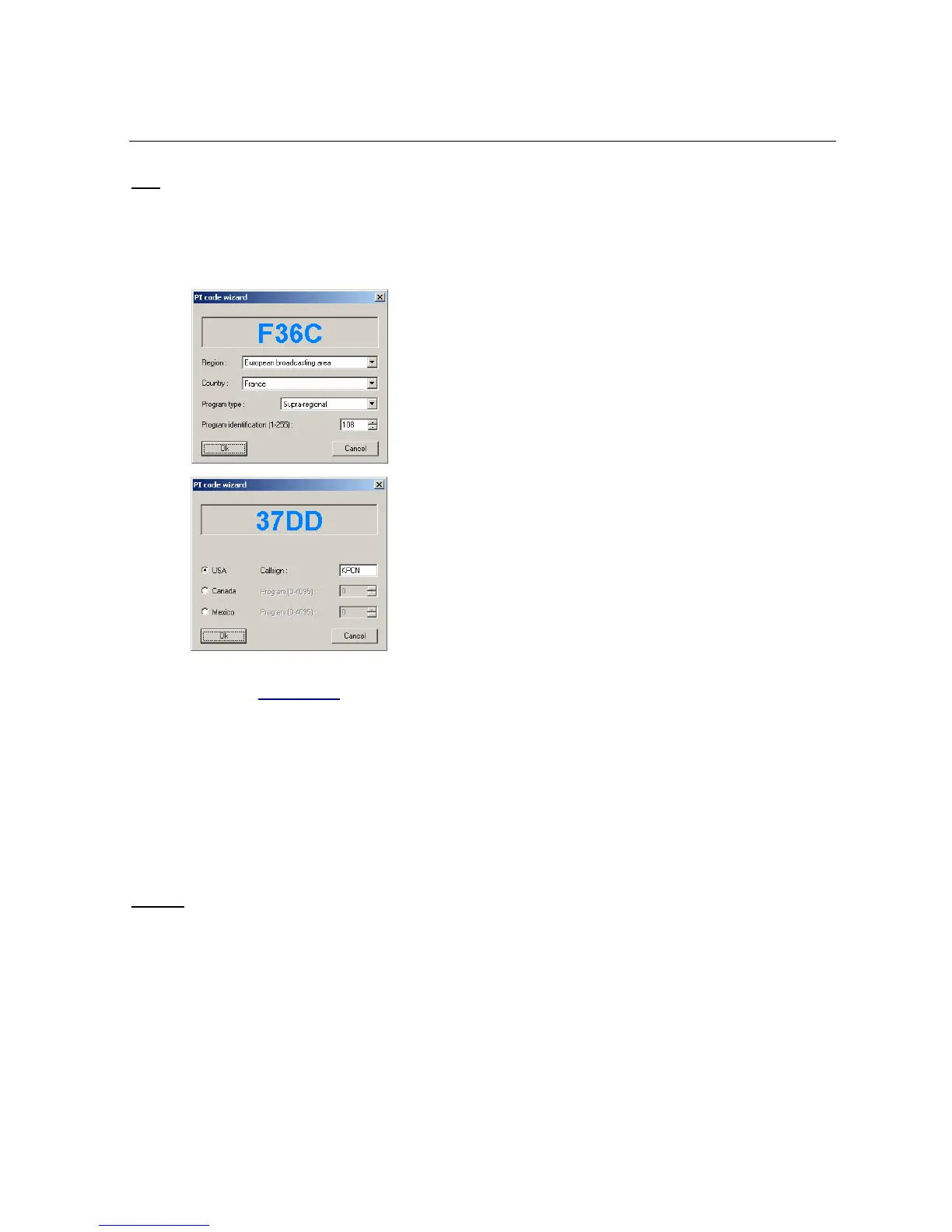
This page has two buttons '...' opposite the PI code capture zones: they enable access to a PI code’s
configuration assistant. The page which is actually displayed depends on the mode (RDS/RBDS) chosen for the
software (see paragraph 4.3.4):
In RDS mode, select diverse fields (Region, Country, Type of
program) and capture the program’s digital identifier, then validate
with Ok: the PI code which is calculated and displayed at top of
window will be automatically included in the capture zone.
In RBDS mode, select the appropriate country then enter the
station’s code (for the United States) or the station’s digital
identifier (for Canada or Mexico).
Then validate with Ok to memorize the PI code which is calculated
and displayed at top of window.
¾ Dynamic PS
The RDS encoder can generate two types of dynamic PS:
• Simple dynamic PS: a message of a maximum of 64 characters transmitted by groups of 8
characters. It is directly accessible in exploitation using the PS button (see paragraph 4.3.1.2).
• Formatted dynamic PS: a message containing fixed and variable texts. This functioning
mode has been designed to be driven by a broadcasting automaton (for example for indicating
the title and author of a broadcast) and is not accessible in current exploitation mode.
Caution
: this mode of functioning can be forbidden by regulations in some countries.


 To Next Page