FMB10 User’s Manual Edition 06/2005
___________________________________________ Page 24 _____________________________________________
Audemat-Aztec SA – Audemat-Aztec INC
WEB: www.audemat-aztec.com - e-mail: contact@audemat-aztec.com
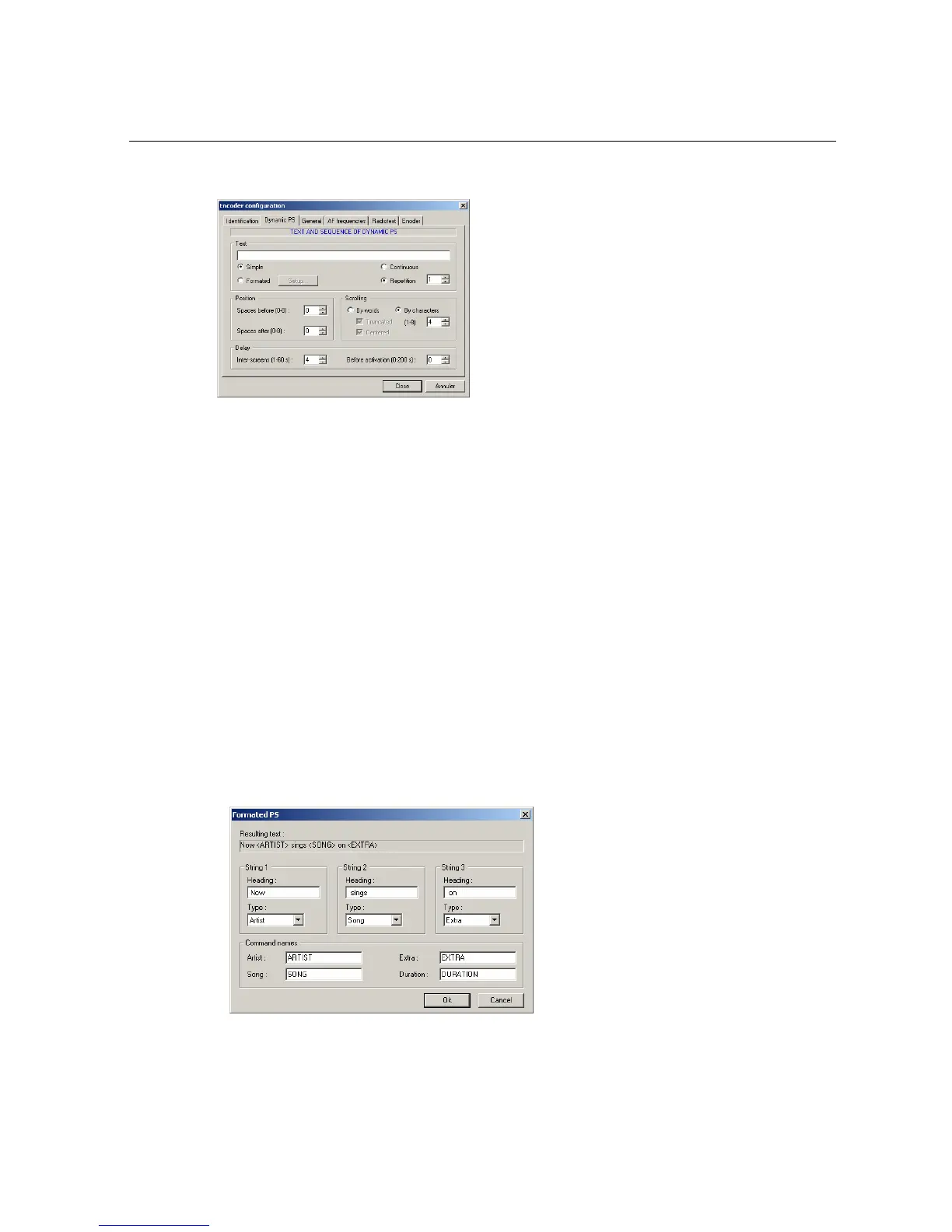
¾ This page contains configuration parameters of the simple Dynamic PS:
• Text: this edition zone enables the simple PS text to be captured or the resulting text to be
displayed for the formatted PS.
• Position: these controls enable the PS message to be framed with spaces so as to separate
two successive sequences.
• Scrolling: enables the text’s shift mode to be defined, either in words or in characters.
• Delay: the delay between screens defines the pause time between two successive displays;
the delay before activation enables a pause time to be introduced between sending the
command and its execution (mainly destined for formatted PS functioning with a broadcasting
automaton).
¾ The formatted dynamic PS is configured on a specific page:
• Channels 1, 2, 3: definition of the dynamic PS’s fixed channels and their location in the result
text.
• Command wording: these 4 edition zones enable the command channels to be defined for
each of the dynamic PS fields. These commands have been designed for broadcasting
automatons.
• Result text: this zone displays the dynamic PS’s text which will be generated from the
captured parameters. It is updated at the same time as the parameters are captured.


 To Next Page