25
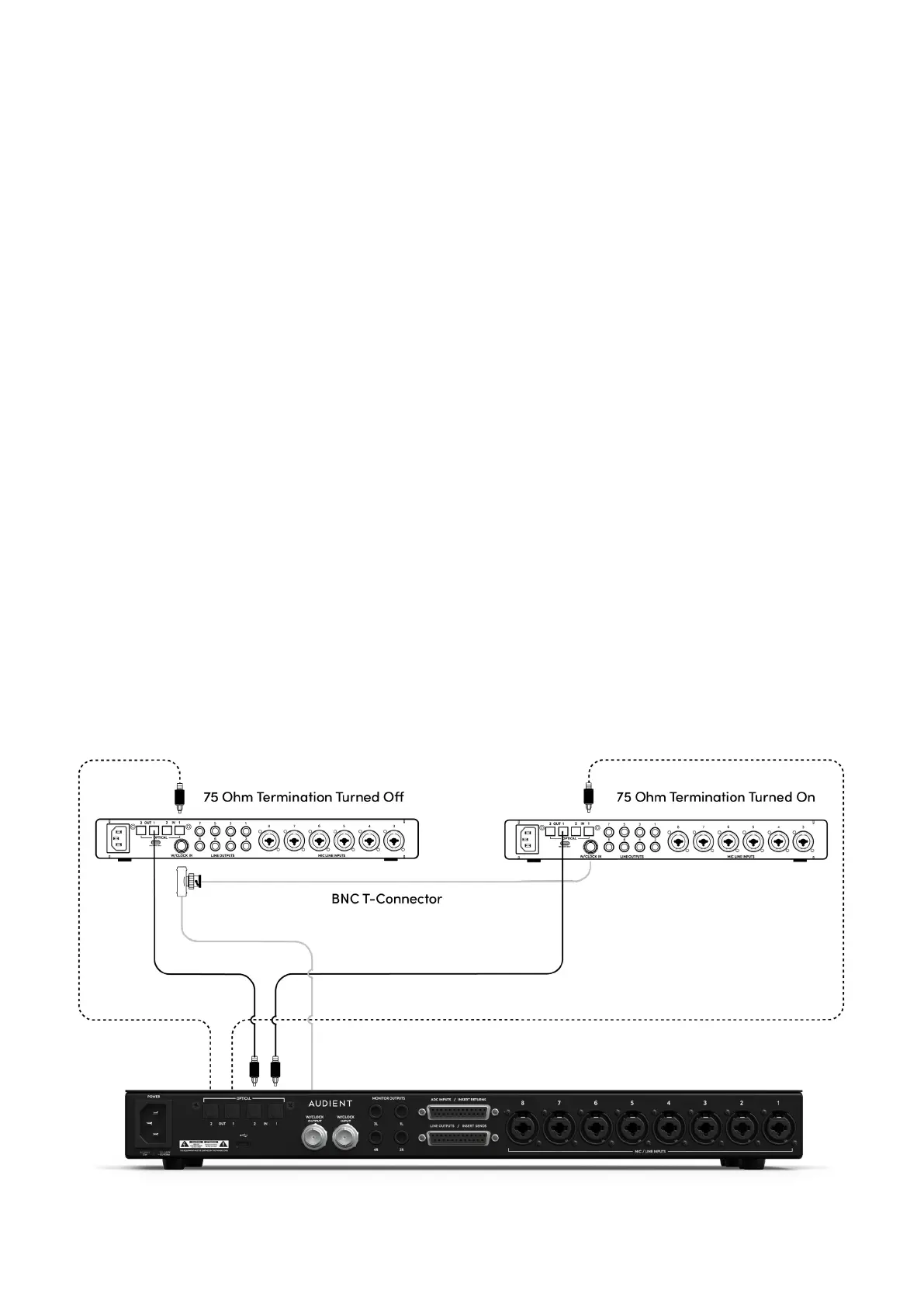
iD48 Master Clock via BNC
In this setup, the iD48 would act as the master clock and send the clock to two external devices via
its BNC Word Clock Output. The first external device’s Optical Output is connected to iD48’s Optical
Input 1 and iD48’s Optical Output 1 is connected to the external device’s optical input.
Similarly, the second external device’s Optical Output is connected to iD48’s Optical Input 2 and
iD48’s Optical Output 2 is connected to the external device’s optical input.
Now, a BNC T-Connector is plugged into the BNC word clock input of the first device. This is used to
daisy chain the BNC word clock signal from the first external device to the second. A 75-ohm BNC
Word Clock cable is then connected from iD48’s BNC Word Clock output to the Input of the BNC
T-Conenctor. A second 75-ohm BNC Word Clock cable is then connected from the output of the
BNC T-Connector to the BNC Word Clock input of the second External Device.
The iD48’s Clock source is set to Internal as it is acting as the master clock. The external devices
should both be set up to sync to the incoming clock via their BNC Word Clock inputs. To ensure
correct operation, 75-Ohm Termination should be enabled on only the second external device.



 To Next Page