96
Tap to open the Vehicle History screen
that displays the correlated test vehicle
records.
Saves the file when complete editing.
Vehicle History
This function stores records of test vehicle history, including vehicle
information and the retrieved DTCs from previous diagnostic sessions. Test
information is summarized and displayed in an easy-to-view table listing. The
Vehicle History also provides direct access to the previously tested vehicle
and allows you to restart a diagnostic session without the need to do vehicle
identification again.
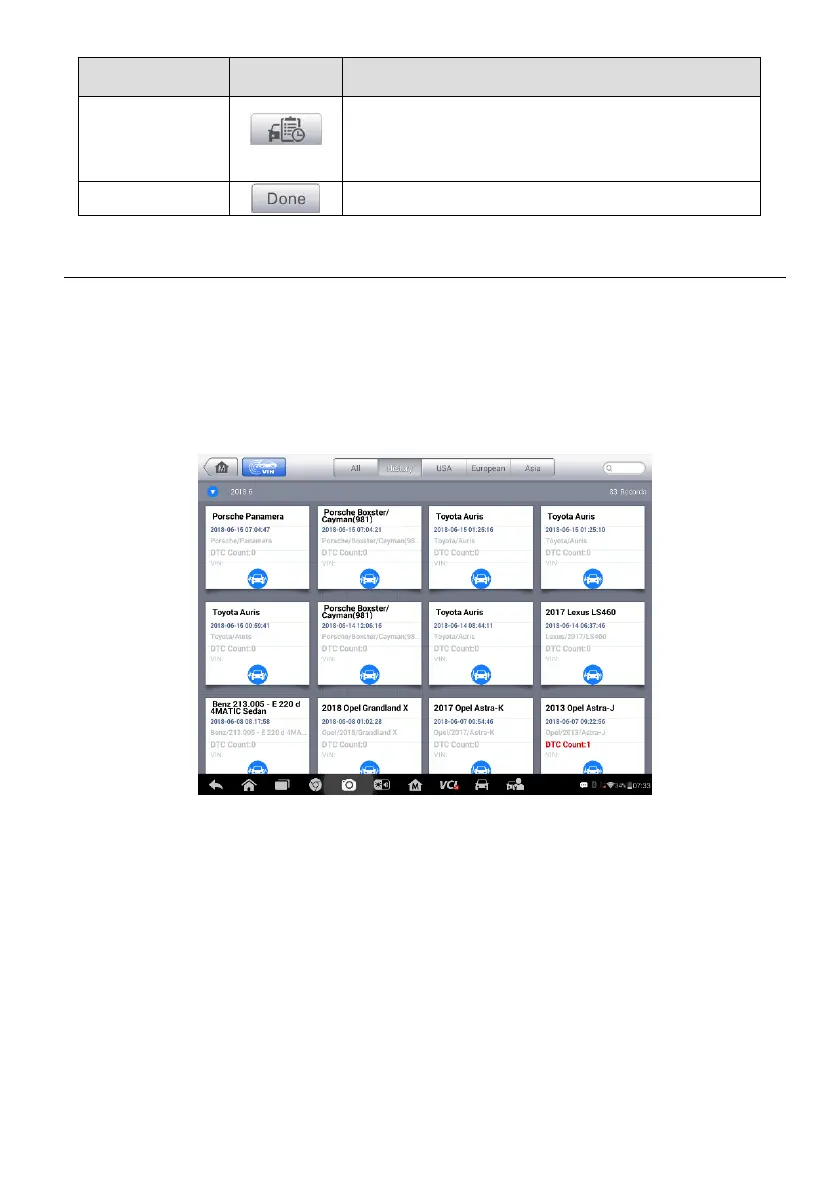
Figure 13-1 Sample Vehicle History Screen
1. Top Toolbar Buttons – navigation and application controls.
2. Main Section – displays all the vehicle history records.
To activate a test session for the recorded vehicle
1. Tap Shop Manager on the MaxiSys Job Menu.
2. Select Vehicle History.
3. Tap ADAS at the bottom of the thumbnail of a vehicle record item. Or,
4. Select a vehicle record item by tapping the thumbnail.














 To Next Page