Installing an Integrated Channel Service Unit (ICSU) Module
Issue 10 June 2005 293
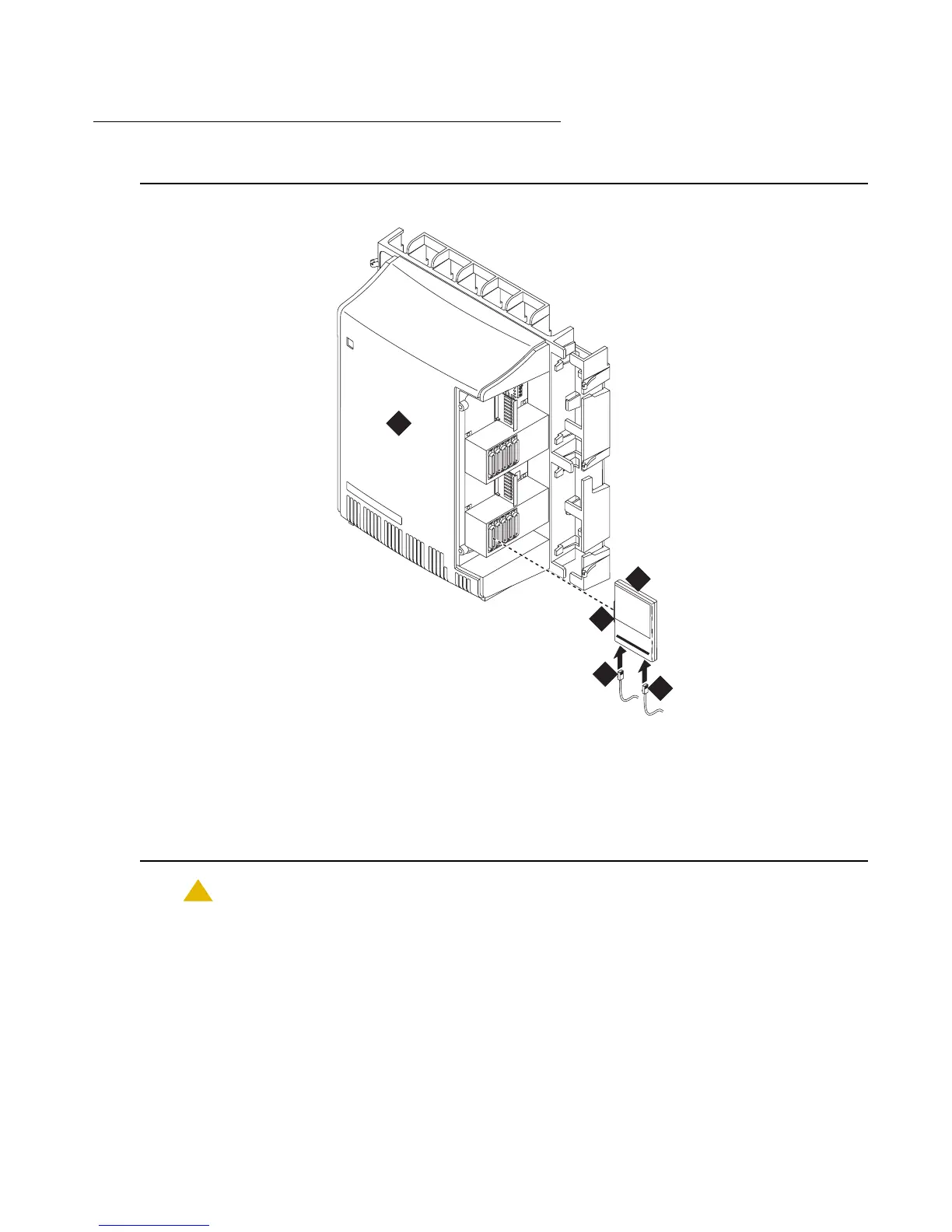
Installing the 120A3A CSU
Figure 93: 120A3A Channel Service Unit Module
CAUTION:
CAUTION: Do not plug the 120A3A into any circuit pack other than a TN464F/GP/HP or
TN767E or TN2464 or TN2313. Do not connect the 120A3A to any interface
other than a 700A DS1 loopback jack.
Be sure the DS1 circuit pack is set for 24-channel operation (1.544 Mbps). The
120A3A does not operate with the 32-channel interface. A switch on the circuit
pack or administration sets this option.
Figure notes:
1. Rear of carrier containing DS1 circuit pack
2. 120A3A CSU
3. To 25-pair connector on rear of carrier
4. DW8A-DE 4-pair cord to alarm contacts
(optional)
5. 4-pair cord to network interface
(H600-383)
1
cydfcsu1 KLC 033099
120A
CSU MODULE
MADE IN U.S.A.
A
LA
R
M
C
O
N
T
A
C
T
S
N
E
T
W
O
R
K
1
2
3
4
5



 To Next Page