Install Main Distribution Frame (MDF) and External Modem
Issue 10 June 2005 57
To install two MDFs:
1. On the rear of the MDF, cut the cable tie securing the top 5 cables to the MDF mounting
frame.
2. Mount the MDF to the bottom position on the right panel. See Figure 18: Preliminary
Dual-Mount MDF Cable Routing on page 56.
3. Secure all 10 cables to the bottom left bracket on the MDF with a cable tie.
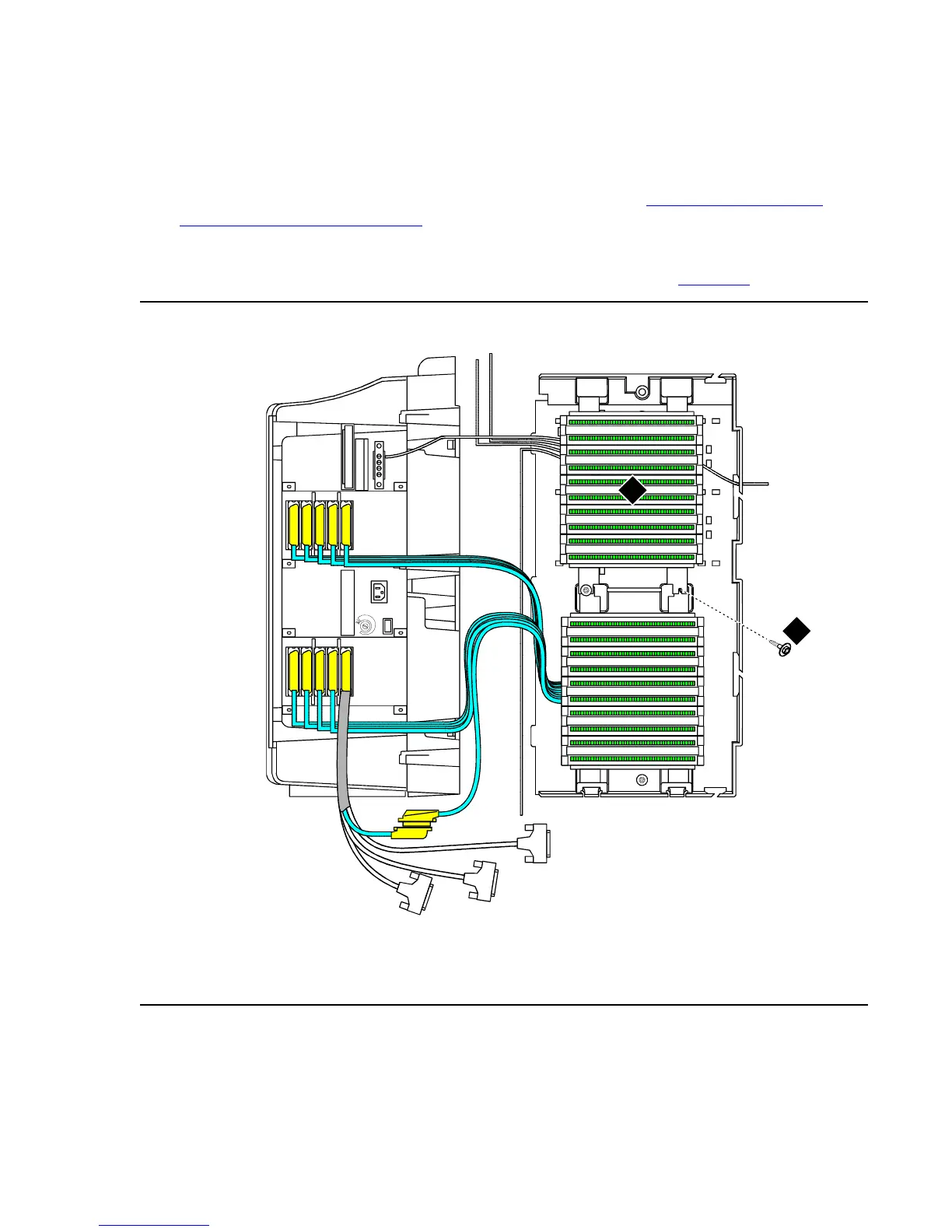
4. Mount the second MDF to the top position on the right panel. See Figure 19
.
Figure 19: Typical Dual-Mount MDF Cable Routing
Figure notes:
1. Main distribution frame (MDF) 2. #12 x 1-inch shoulder screw
cadmrpn3 LJK 050198
1
2
5
6
7
8
4
3
9
10
2
1
2
5
6
7
8
4
3
9
10
1
10
10
9
9
8
8
7
7
6
6
5
5
4
4
3
3
2
2
1
1


 To Next Page