75
RECORDINGOPERATIONSFORMAC
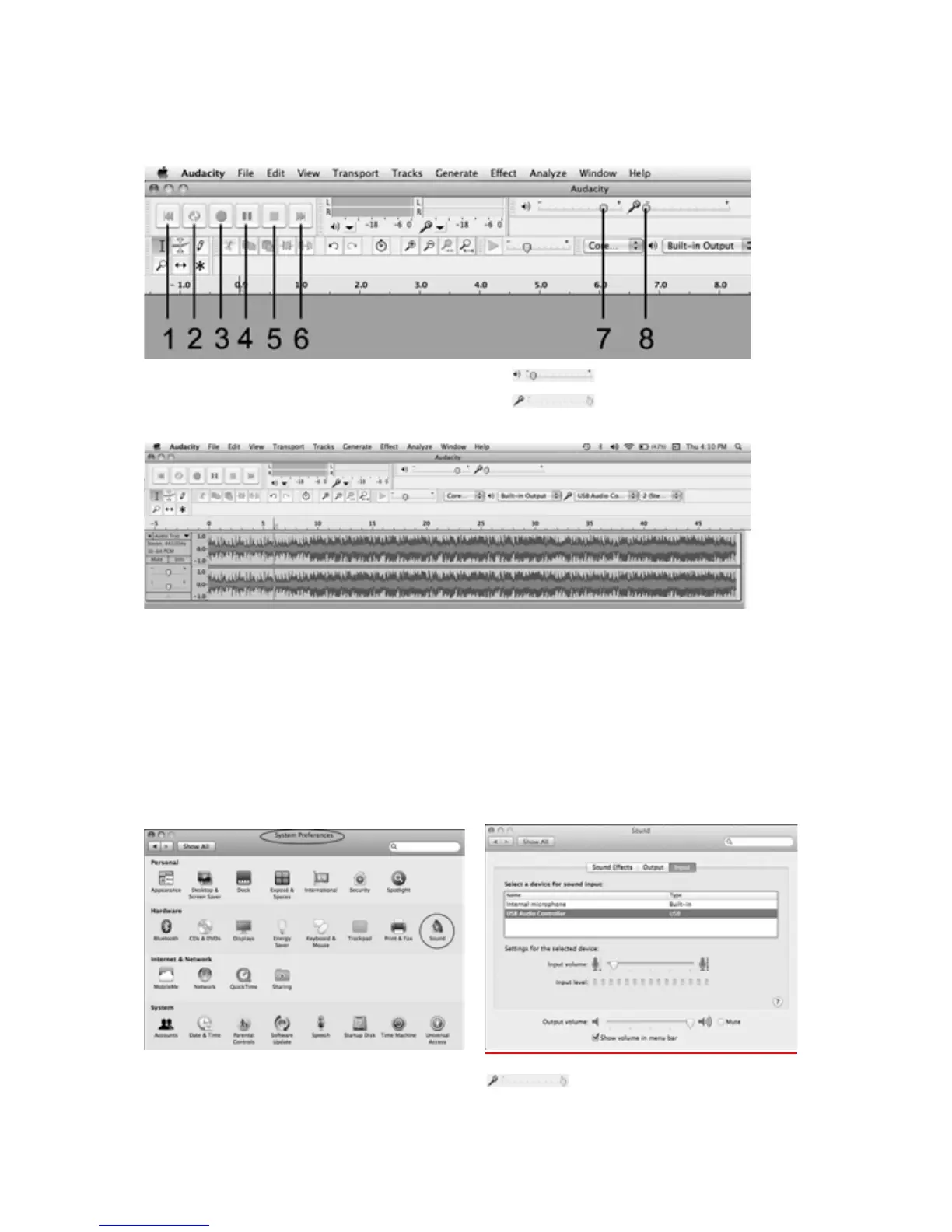
Basiccontrolbuttons
1.Skiptostart 4.Pause 7.
Outputlevelslider
2.fPlay 5.Stop 8.
Inputlevelslider
3.xRecord 6.Skiptoend
1. Pressthe“Record”buttonontheAudacityandsettheauxsource
(PHONO,
AUX,iPODorCD)toplay.
NOTE:Duringrecording, make surethatthe inputlevelindicatordoesnot
exceed “0”. If you find the recording is distorted (for example, the input
level indicator exceeds “0”, or
the wavef
orm is clipped, or the recording
soundisdistorted.)youcanadjustthesoundleveloftheoriginalmusic.
Tosettheinputvolume,gobacktothedesktopwindowandclick“System
Preferences”. Double click the “Sound” icon and in the Sound window set
theinputvolumesliderto5%.Thenclosethewindow
.
OR,youcanadjusttheinputlevelslider(
)tothemiddleposition(5%)
ontheAudacitysoftwaredirectly.



 To Next Page