3-3
Chapter 3. MOUNTING AND WIRING
•
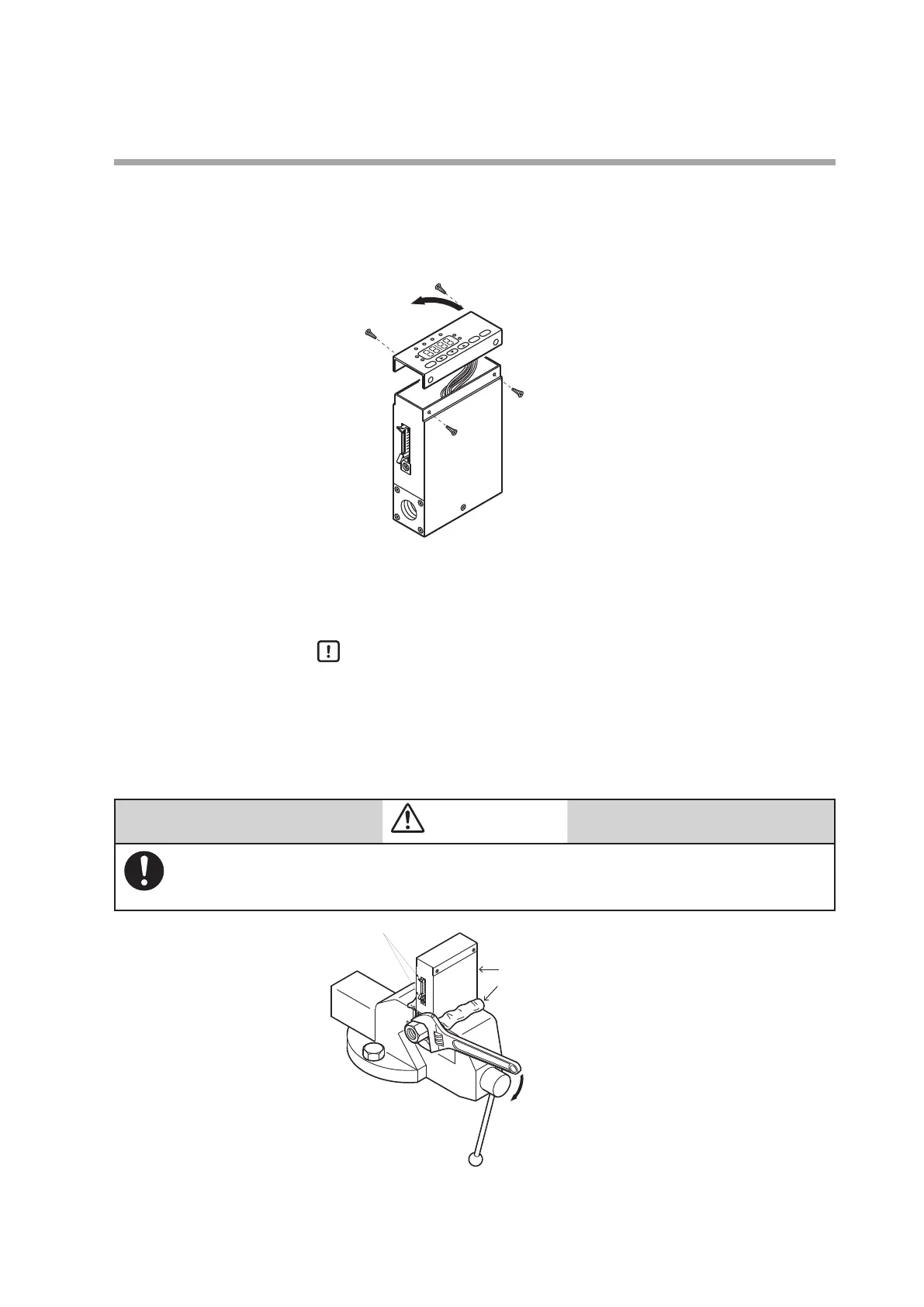
Procedure
(1) Turn the power OFF.
(2) Remove the four screws holding the display.
(3) Lift up the display from the main unit, and turn it 180˚ counterclockwise.
(4) Put the display back on the main unit, and fasten with the four screws
taken off in step (2).
(5) To return the display to its original position on the body, turn it 180˚
clockwise.
Handling Precautions
•
Before changing the display direction, be sure to turn the power OFF.
•
Prevent foreign objects from falling inside the main unit when the display
is taken off. Failure to do so might cause trouble or malfunction.
•
Do not remove the connectors used inside the main unit.
z
Installing joints (UNF) connections
CAUTION
When installing joints (UNF connections), secure the lower part of the main unit in a vise or the
like gripped between rags to protect the finished surfaces, and turn the joint to tighten. The
device may be damaged if the lower main unit is not secured.
Connector latches
Main unit
Rag



 To Next Page