3-5
Chapter 3. MOUNTING AND WIRING
z
Installing the separate display unit
For models with a separate display
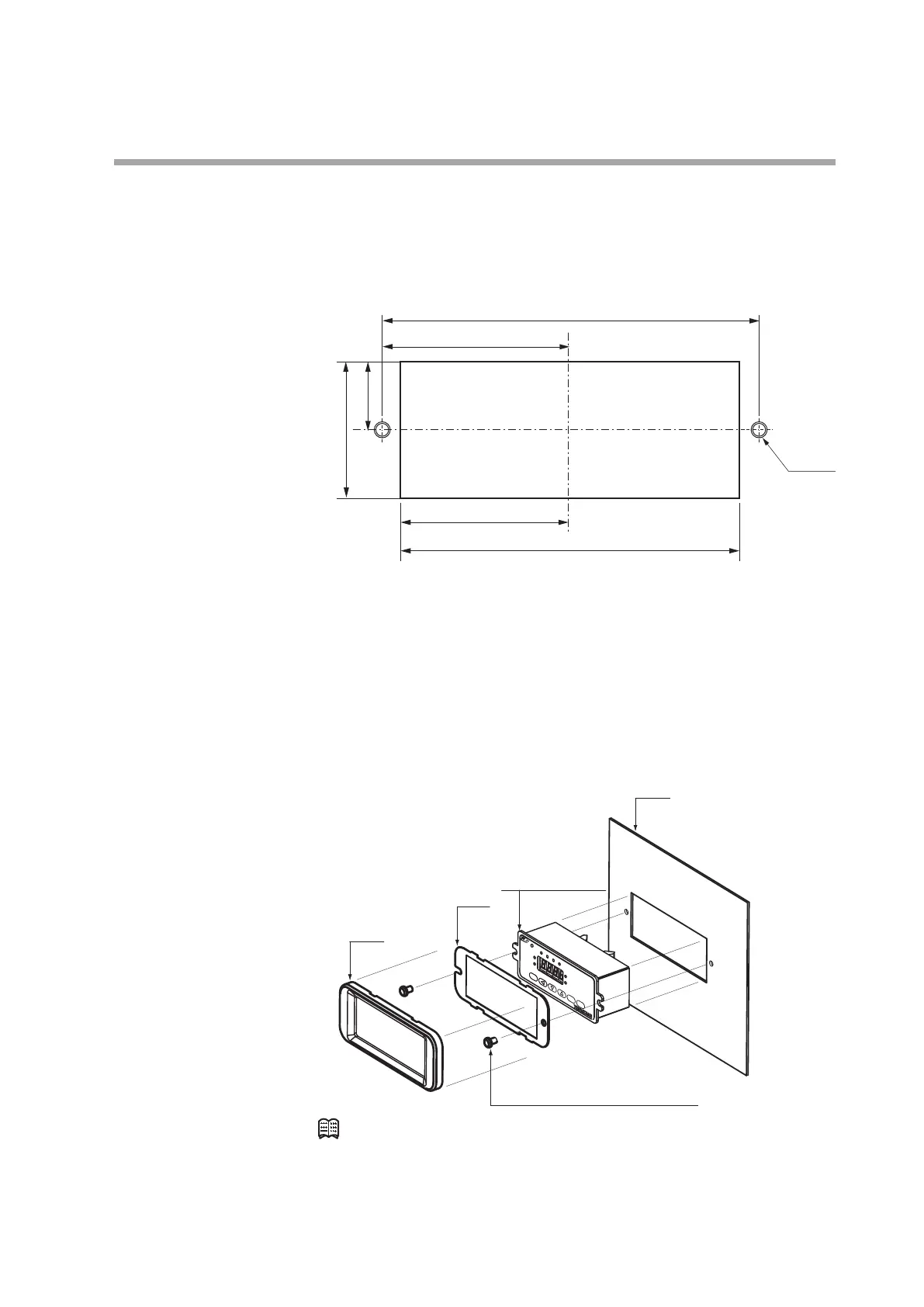
(1) Make mounting holes in the panel according to the panel cutout dimensions.
unit: mm
17.5 ±0.2
100 ±0.2
90 ±0.2
M4 (2)
50 ±0.2
45 ±0.2
(2) Mount the display and secure it by tightening the screws.
z
Installing the front cover for the separate display unit
For models with a separate display, a front cover (decorative frame) can be
mounted. Use of this cover makes it possible to hide the mounting screws,
improving the appearance.
Items needed for installation
• Front cover (81446858-001), 1 set
• Phillips screwdriver
Mask
Plate
Separate display
unit
Mounting screws
(cross recessed head machine screws)
Panel
Note
•
The front cover set includes one mask, one plate, and two mounting screws.
Procedure
(1) As shown in the figure, put the plate over the display panel, and then secure it
to the display by tightening the screws.
(2) Fit the mask onto the display to mount it.



 To Next Page