7.3 THUMBSTICK ISSUES
7.3.1 Xbox 360 mode doesn’t work
Make sure the game supports Xbox controller. You can also check
if the game supports mixed input (controller and mouse at the
same time) in this game list:
https://pcgamingwiki.com/wiki/List_of_games_that_support_sim
ultaneous_input
Open the game, then on Azeron switch to profile with the
thumbstick set to keyboard mode and then switch back to xbox
360 mode.
Make sure no other controllers are connected (or any device that
works with Xinput, analog buttons etc.). If there are, unplug the
controller, restart the PC.
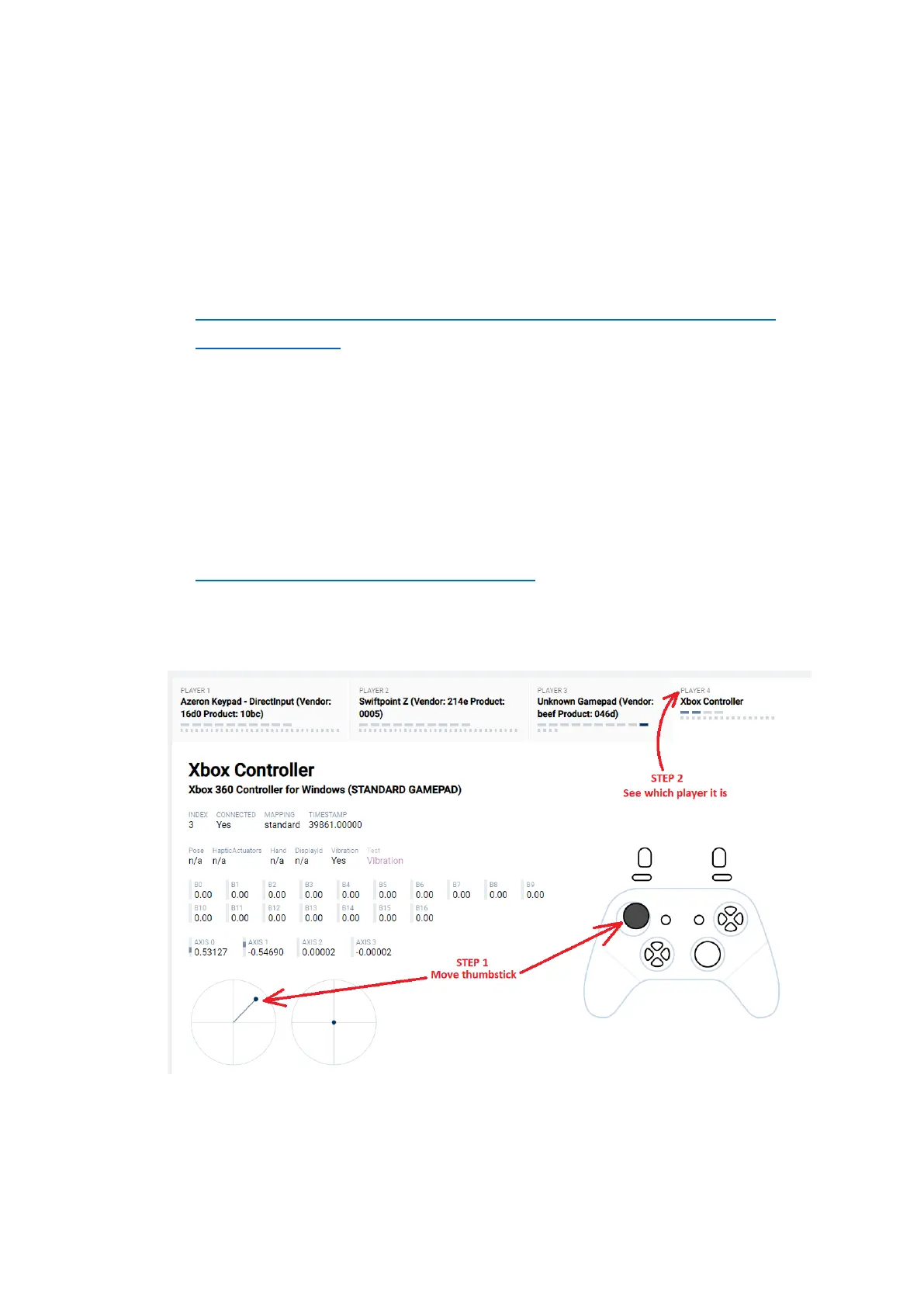
Check if Azeron keypad was assigned as Player 2. Check on
https://hardwaretester.com/gamepad on whether the thumbstick
responds as a Player 1, when you are moving it. If it comes us as
Player 2 or higher, other controller is interfering (unplug it, restart
PC, plug in only Azeron):
If you are running the game via Steam platform, it can overwrite
your controller settings.



 To Next Page