170
1.18.10.6 Edge controlled triggering (HRTC)
Note
Please have a look at the Hardware Real-Time Controller (HRTC) (p. 70) chapter for basic information.
To achieve an edged controlled triggering, you can use HRTC. Please follow these steps:
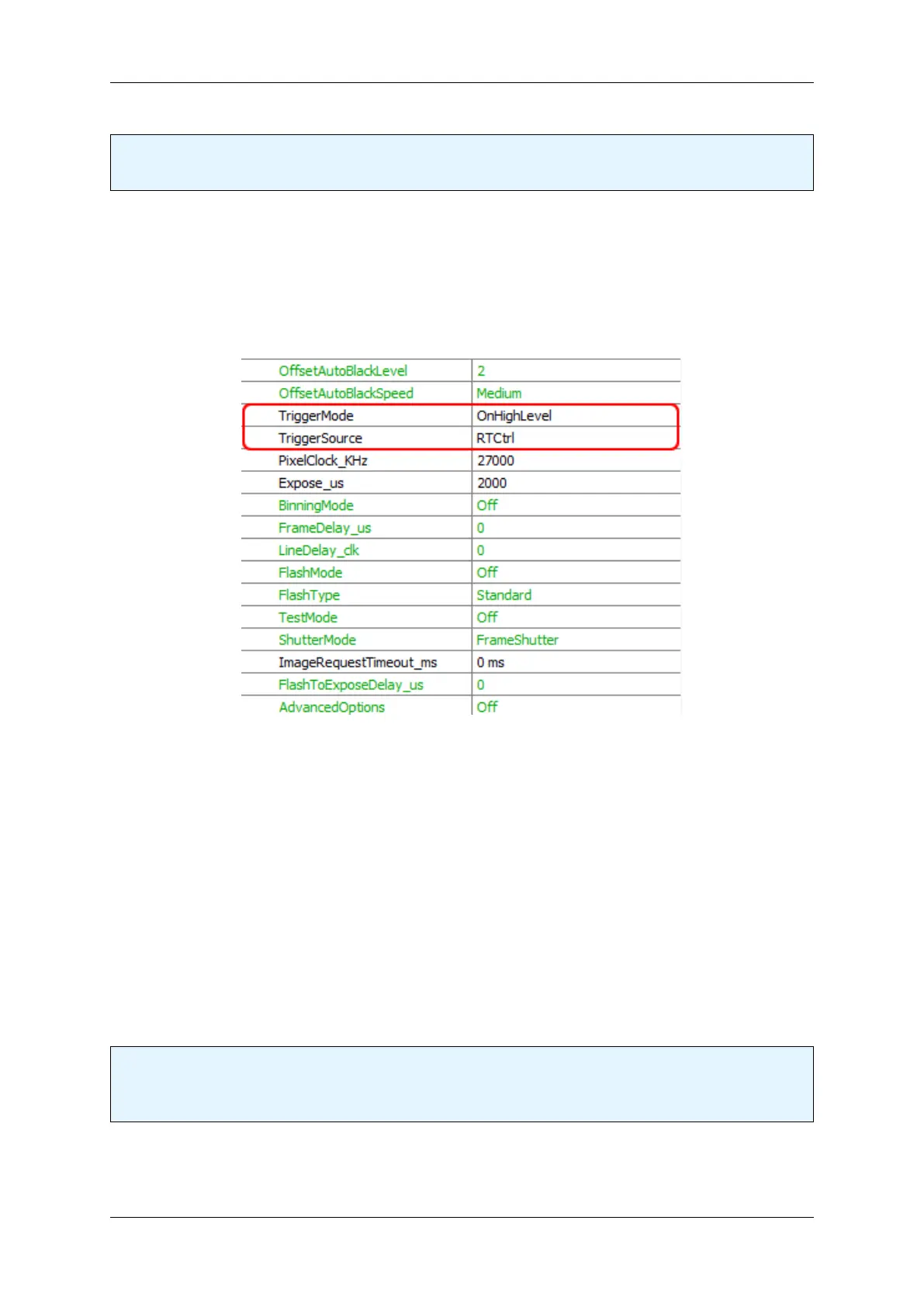
1. First of all, you have to set the TriggerMode to OnHighLevel .
2. Then, set the TriggerSource to RTCtrl .
Figure 1: wxPropView - TriggerMode and TriggerSource
Afterwards you have to configure the HRTC program:
1. The HRTC program waits for a rising edge at the digital input 0 (step 1).
2. If there is a rising edge, the trigger will be set (step 2).
3. After a short wait time (step 3),
4. the trigger will be reset (step 4).
5. Now, the HRTC program waits for a falling edge at the digital input 0 (step 5).
6. If there is a falling edge, the trigger will jump to step 0 (step 6).
Note
The waiting time at step 0 is necessary to debounce the signal level at the input (the duration should be
shorter than the frame time).
MATRIX VISION GmbH



 To Next Page