5. Lenses & lens holder
How to adjust the Back Focal Length?
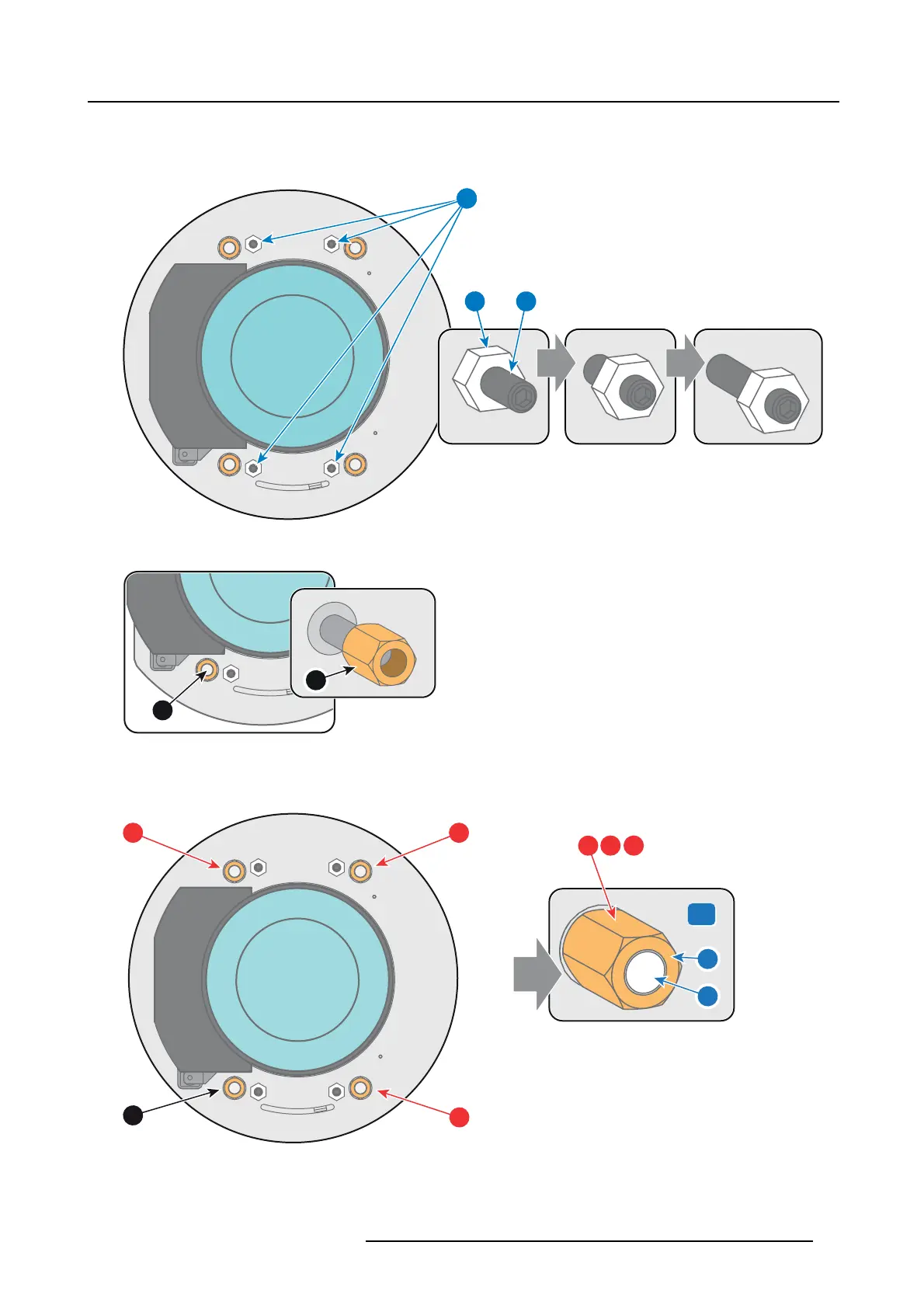
1. Unlock an d loosen the 4 set screws (reference 11 im age 5-28) of the Lens Holder by 1 centimeter. Use a 10m m nu t driver for
the lock nuts (reference 21 image 5-28) and us e a 3mm Allen wrench for the set screws.
11
1121
Image 5-28
2. Fully loosen the Scheimpflug nut at the lower left of the Lens Holder (reference 4 image 5-29). U se a 13mm nut driver.
4
4
Image 5-29
3. Turn the three Scheimpflug a djustment n
uts, reference 1, 2 and 3 image 5-30, until the front of the nut (reference 5 image 5-30)
is equally aligned with the front of the threaded rod (reference 6 image 5-30). Us e a 13mm nut driver.
Note: This is the nominal position of the Lens Holder.
1
4
2
5
6
x
3 x
1
2 3
3
Image 5-30
4. Zoom the lens for maximum image on the screen (WIDE) and focus the c enter of the projected image using the motorized focus
control (Local Key pad).
R5905963 PROMETHEUS SERIES 09/03/2015
79


 To Next Page