10
Instructions For Use
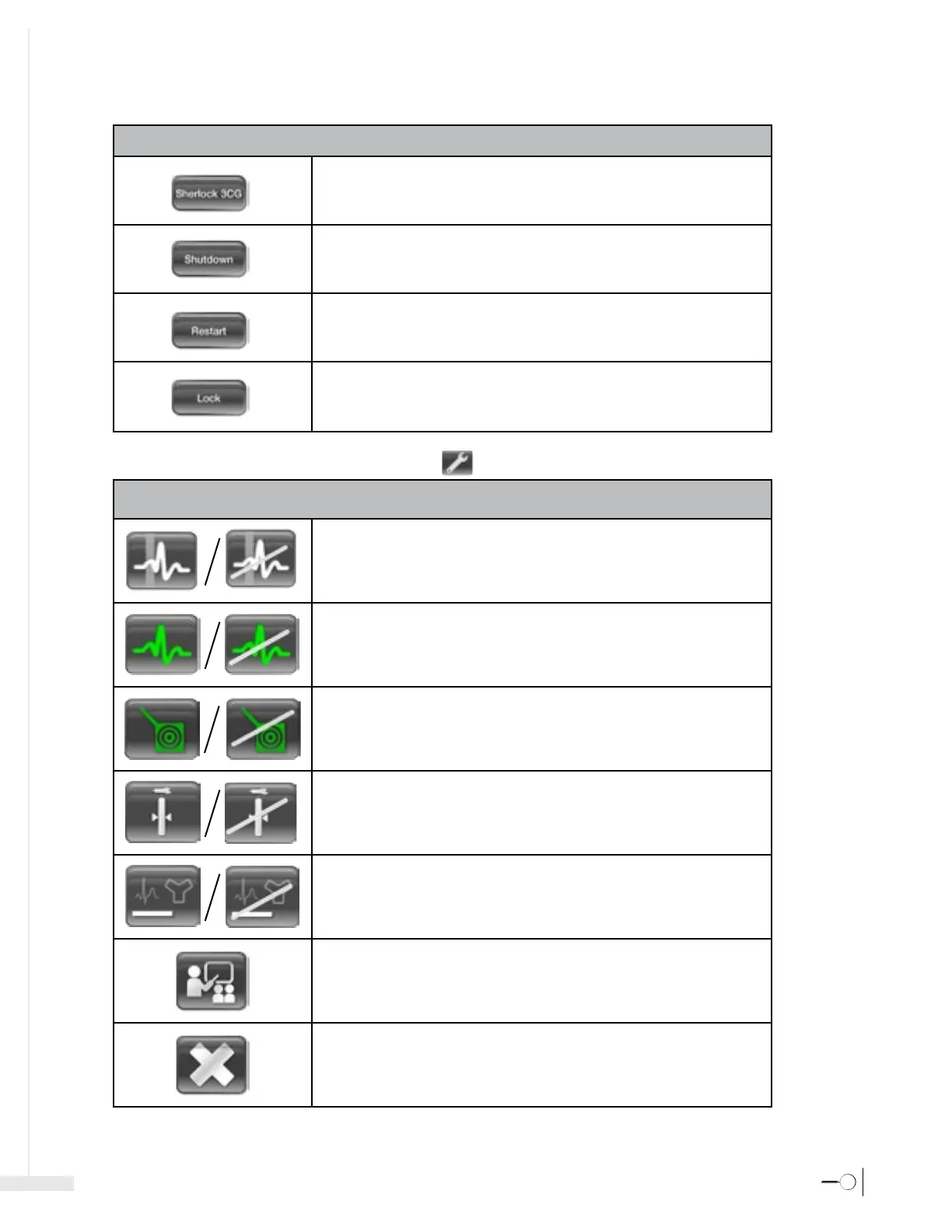
Sherlock 3CG™: Restarts the Sherlock 3CG™ Software Application.
Shutdown: Shuts down the Sherlock 3CG™ TCS Display.
Restart: Restarts the Sherlock 3CG™ TCS Display.
Lock: Locks the password enabled Sherlock 3CG™ TCS Display.
Tools Menu Controls , below, are accessible when the Tools botton
is activated.
Tools Menu Controls
P-wave Highlighting: Select to enable or disable highlighting the P-wave on the ECG signals.
ECG Color: Select to enable or disable the intravascular (yellow) ECG waveforms changing
color to green and red in sync with the stylet icon.
Stylet Color: Select to enable or disable the stylet icon changing color and shape based on
ECG changes.
Depth Gauge: Select to enable or disable the depth gauge.
Confirmation Statement Printing: Select to enable or disable the confirmation statement
printing on the ECG printout.
Demonstration: Select to initiate demonstration mode.
For training, contact your Bard Access Systems’ Sales Representatives.
Exit: Select to close the Menu Window.
Shutdown Menu Controls








 To Next Page