8
Instructions For Use
3.2 Sherlock 3CG™ TCS Controls and Indicators
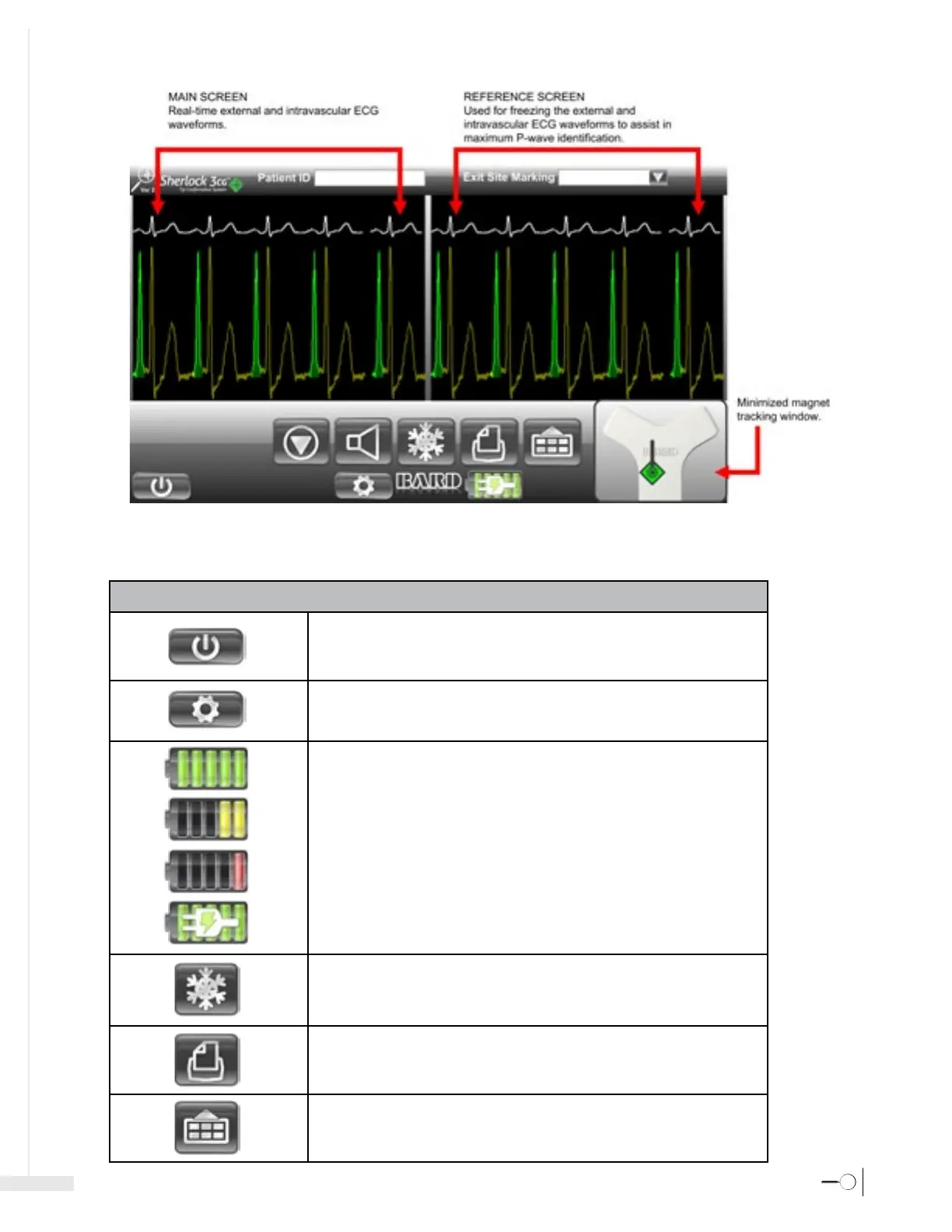
Shut down: Select to open the shutdown menu.
Caution: To avoid damage to the operating system, use the Shutdown button to turn off
the Sherlock 3CG™ TCS Display.
Settings: Select to open the system settings menu.
Battery Status: There are 5 charge levels on the battery indicator.
When the unit is operating on battery power, the battery indicator changes to yellow at 40%
and red/blinking at 20% of the remaining battery life. When the unit is charging the battery
the AC connected indicator will overlay the battery status.
Freeze: Select to copy the current ECG waveforms from the Main Screen to the
Reference Screen.
Print to file: Select to save and print the current ECG waveforms in the reference screen.
(Saves to both the hard-drive and USB external storage device if connected).
Menu: Select to open/close the ECG menu.
Front Panel Controls/Indicators






 To Next Page