13
Sherlock 3CG™ Tip Confirmation System
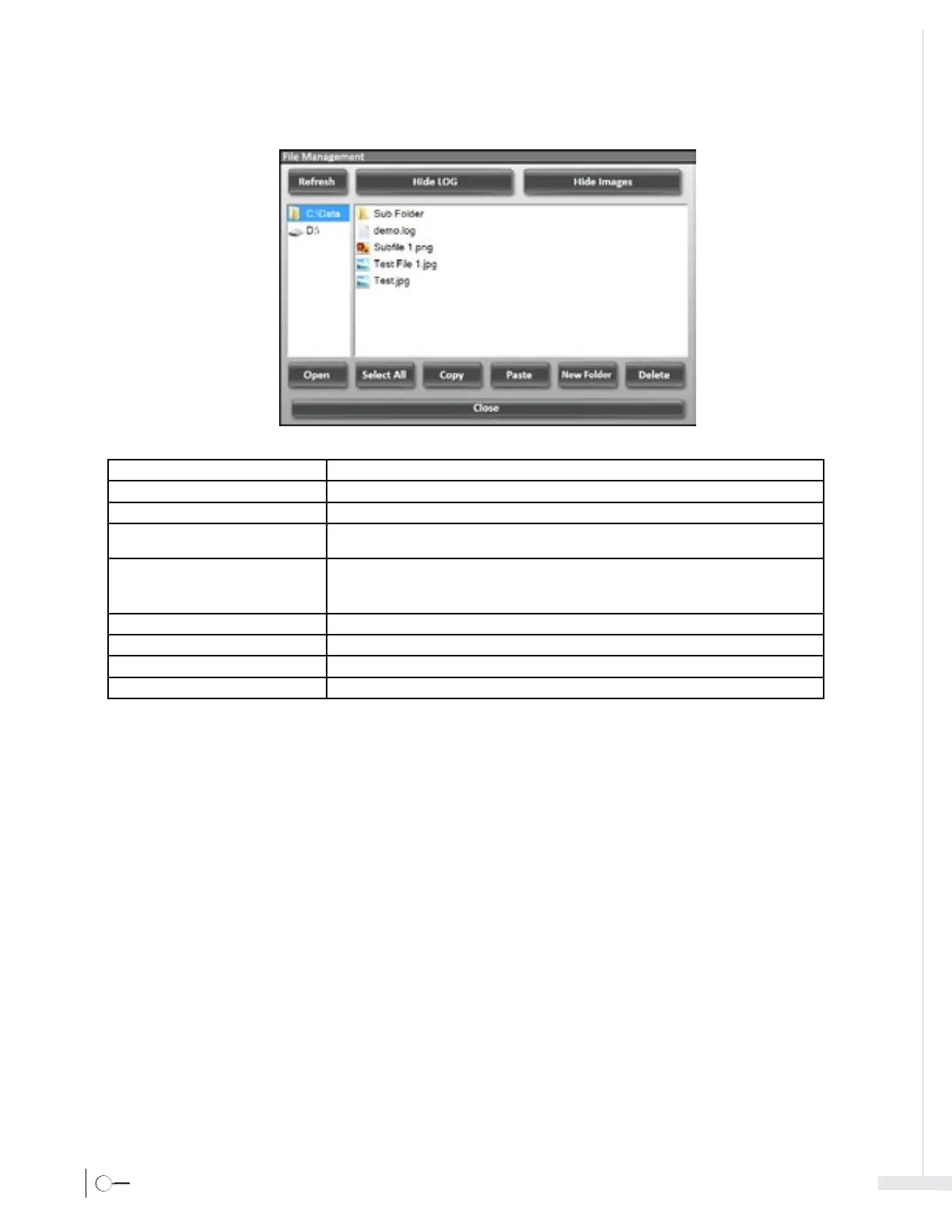
3.3.4 Settings – File Management
Refresh Refreshes the file(s) listing in the viewer.
Hide LOG / Show LOG Hides/Shows all f les with a .log extension from appearing in the viewer.
Hide/Show Images Hides/Shows all f les with a .jpg extension from appearing in the viewer.
New Folder Provides functionality for the user to create and name a new storage folder under the
C:\Data archive.
D
elete Deletes selected files or folders displayed in the viewer and under the C:\Data archive.
Note - The user is prompted again after initiating this command. Additionally, archives listed
under the Refresh button cannot be deleted or moved.
Copy Automatically copies selected f les or folders to the operating system clipboard.
Select All Selects all files displayed in the viewer.
Paste Provides functionality for the user to paste to a designated storage location.
Close Closes the File Management window and Settings menu.



 To Next Page