11
Sherlock 3CG™ Tip Confirmation System
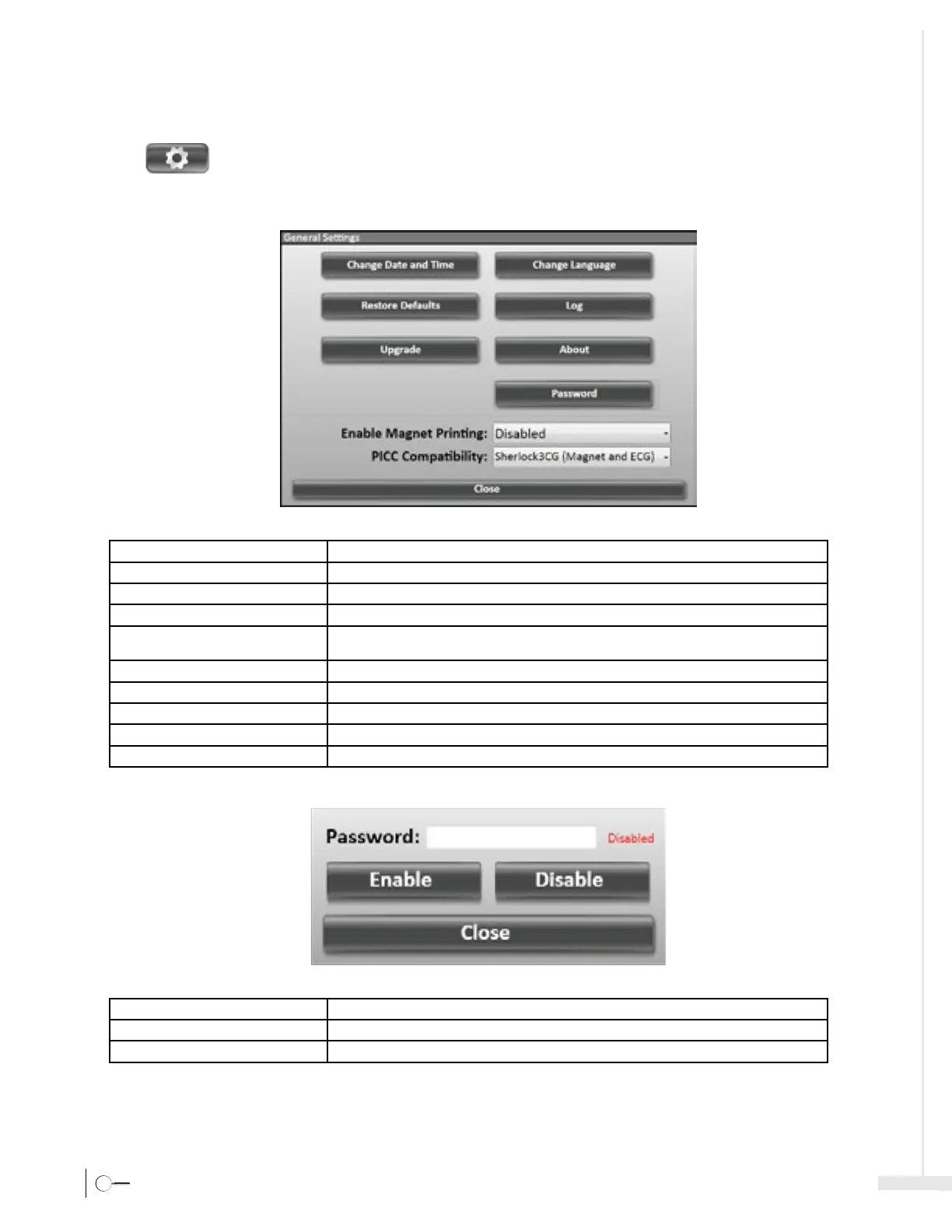
3.3 Settings Icon
Select
to open the Sherlock 3CG™ TCS Settings Window.
3.3.1 Settings – General
Change Date/Time Opens Date and Time properties window.
Change Language Changes system language settings.
Restore Defaults Restores software to factory default settings.
Log View and export system error logs.
Upgrade Provides system software upgrades when a USB flash drive containing a Sherlock 3CG™ TCS com
-
patible installation is inserted.
About Indicates system application version information.
Password To enable or disable password protection, see figure below.
Enable Magnet Printing Enables magnet tracking printing.
PICC Compatibility Selects magnet tracking compatibility between Sherlock™ TLS and Sherlock 3CG™ TPS stylets.
Close Closes the General window and Settings menu.
Enable Enables the password protection, according to the value entered.
Disable Disables the password protection.
Close Closes the password window.








 To Next Page