20
Instructions For Use
5 Magnetic Navigation Only Mode
Step 1: Prepare Device
- Connect the sensor to the Sherlock 3CG™ TCS Display via USB cord.
- Verify the battery charge is sufficient for the procedure.
- Enter Patient Information as needed.
Step 2: Position Patient and Perform Ultrasound Pre-scan
- Refer to the Bard Access Systems’ Ultrasound System Instructions for Use.
Step 3: Measure Catheter Length
- Refer to Bard Access Systems’ Catheter Instructions for Use.
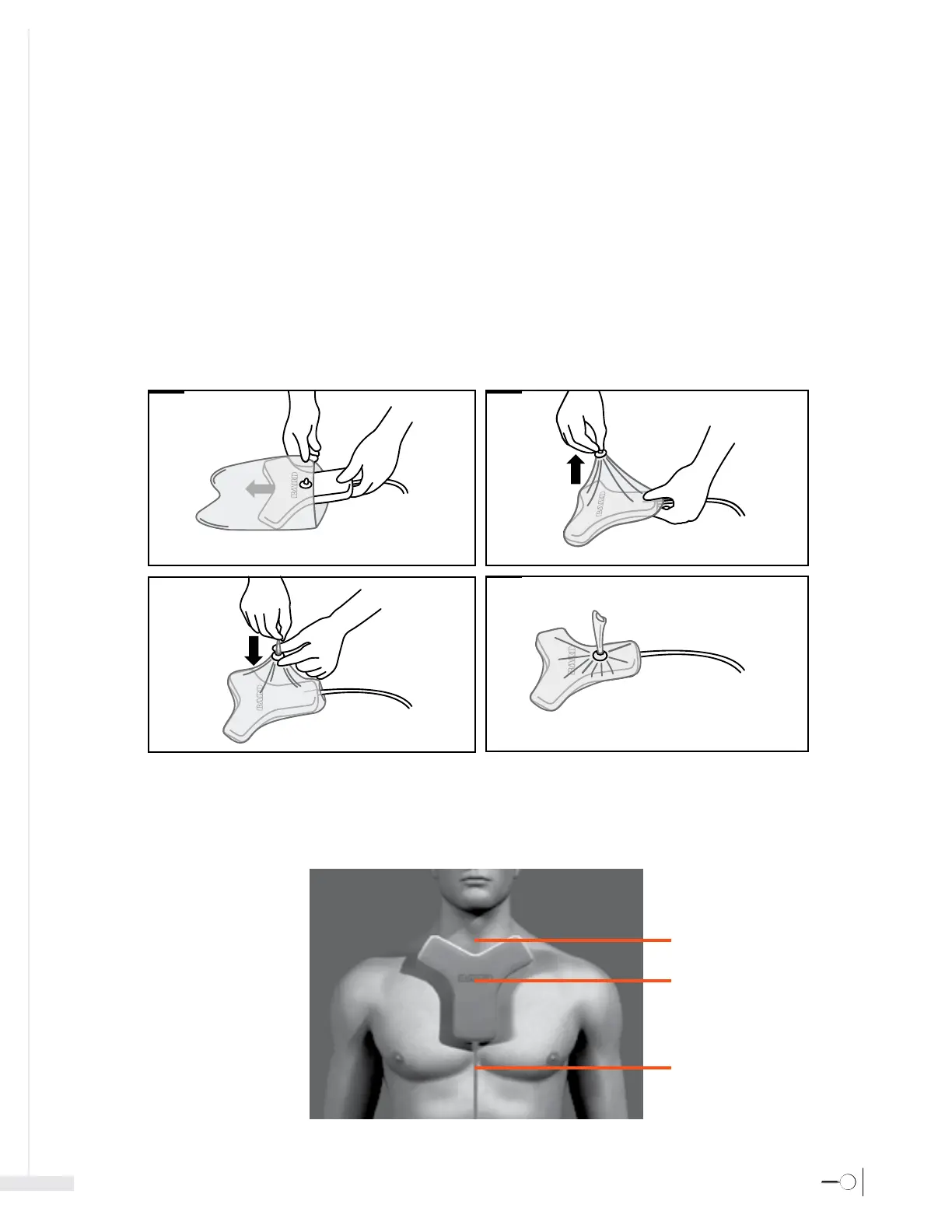
Step 4: Prepare Sensor
-Place the Sherlock 3CG™ Sensor in the sensor holder and tighten the cinch ring
Step 5: Position Sensor
- Remove the adhesive backing from the sensor holder and place the sensor directly on the patient's skin with the adhesive side down. Place the sensor as flat
as possible for best results.
Note: The sensor should be positioned the same for left or right side placements.
[1]
[2]
[3]
[4]
Place high on the patient's chest
touching the neck if possible.
Bard logo face up.
Cord routed towards the
patient's feet.








 To Next Page