page 35page 35
page 35page 35
page 35
930/937 Mulcher (O)
800-00256
MURPHY POWER VIEW OPERATION CONTINUED...
4-UP DISPLAY4-UP DISPLAY
4-UP DISPLAY4-UP DISPLAY
4-UP DISPLAY
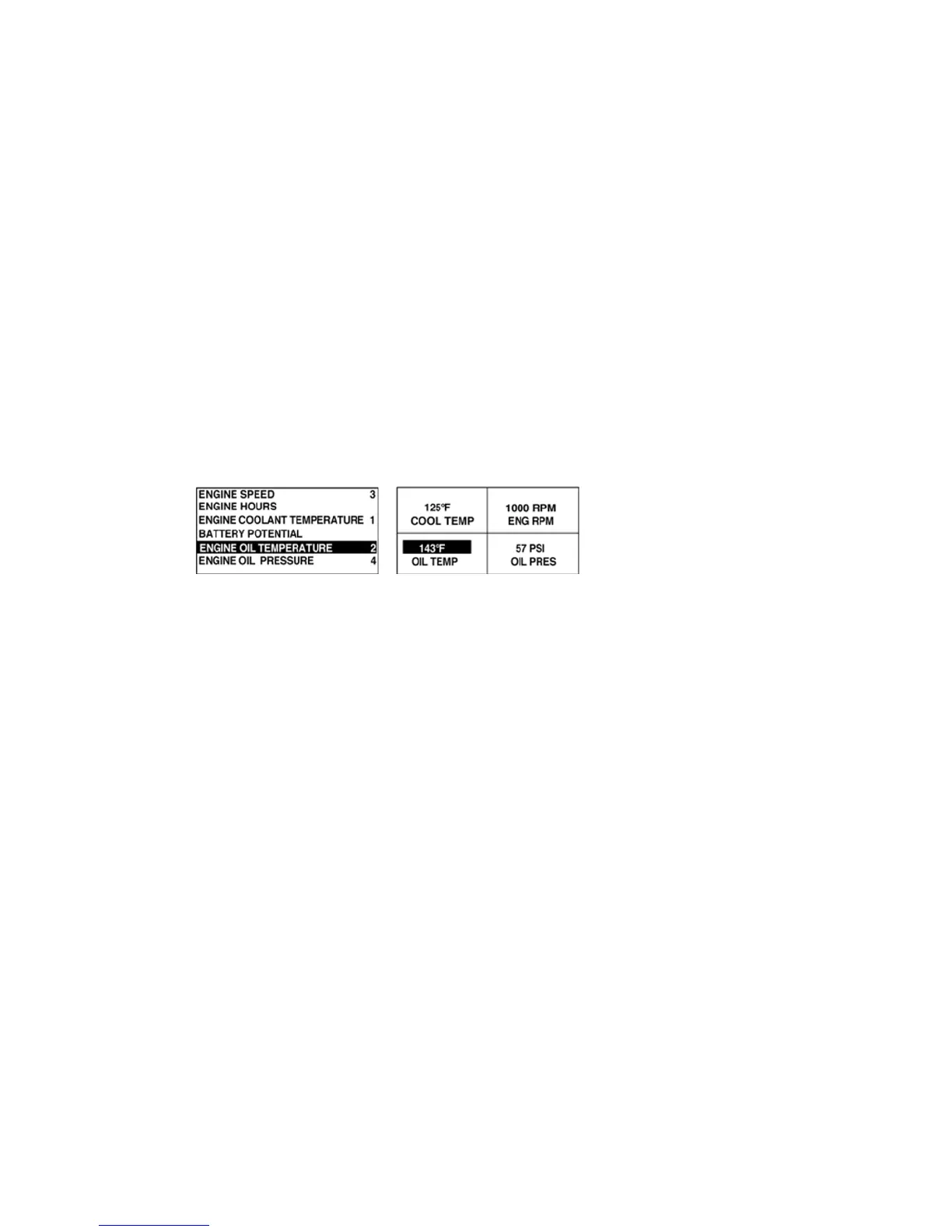
The 4-up display places the parameter data into four areas of the screen known as quadrants. Factory defaults for
the 4-up display include coolant temperature, engine speed, oil pressure, and battery voltage. You may customize
the 4-up display with parameters you define for each quadrant.
1. Touch
Menu Menu
Menu Menu
Menu and use the
Arrow Keys Arrow Keys
Arrow Keys Arrow Keys
Arrow Keys to highlight SETUP 4-UP DISPLAY, then press
EnterEnter
EnterEnter
Enter.
2. To select USE DEFAULTS, highlight the option and press
EnterEnter
EnterEnter
Enter. A message indicating “RESTORED TO
DEFAULTS” is displayed.
3. To select CUSTOM SETUP, highlight the option and press
EnterEnter
EnterEnter
Enter. The 4-up display appears.
4. The quadrant with the backlit parameter value is the currently selected parameter. Use the
Arrow Keys Arrow Keys
Arrow Keys Arrow Keys
Arrow Keys to
select which quadrant you wish to edit.
5. Touch
Enter Enter
Enter Enter
Enter and a list of parameters will appear. The parameter that is highlighted is the selected parameter
for the screen. The number to the right of the parameter indicates the quadrant in which it is displayed.
1 = upper left quadrant
2 = lower left quadrant
3 = upper right quadrant
4 = lower right quadrant
6. Use the
Arrow Keys Arrow Keys
Arrow Keys Arrow Keys
Arrow Keys to highlight the new parameter to be placed in the quadrant that was selected in step 4
and touch
EnterEnter
EnterEnter
Enter.
7. Touch
Menu Menu
Menu Menu
Menu to return to the 4-UP CUSTOM SETUP screen.
8. The parameter in the selected quadrant has changed to the parameter selected in the previous screen.
9. Repeat the parameter selection process until all spaces are filled.



 To Next Page