EasyManua.ls Logo

Baruffaldi DB21 - TURRET TYPE AND PARAMETER SETTING

Baruffaldi DB21
34 pages
Print Icon
To Next Page IconTo Next Page
To Previous Page IconTo Previous Page
Loading...
INSTALLATION AND USE MANUAL
SERVO DRIVE TYPE DB21
M.DRIVE.DB-21.GEN.ENG
Ed.
2022
Rev.11
Pag.
20 di 34
TURRET
MODEL
1
2
3
TB-TBH-TC
N° pos
4
5
6
Profile
7
8
9
10
TB-TBH-TC 120/160
-
-
-
8
-
-
Voltage Selection
Univ.
-
-
Drive Set-up
Acquisition
TB-TBH-TC 200/250
-
-
12
-
Fast
-
TB 320
-
-
16
-
Medium
-
TB 400
-
24
Slow
TB 100
-
-
TAB
N° pos
4
5
TAB 210/265
4
(if set K3)
-
-
TAB 340/440
8
(if set K5)
-
-
6
(if set K3)
-
Custom
12
(if set K5)
-
24
(if set K5)
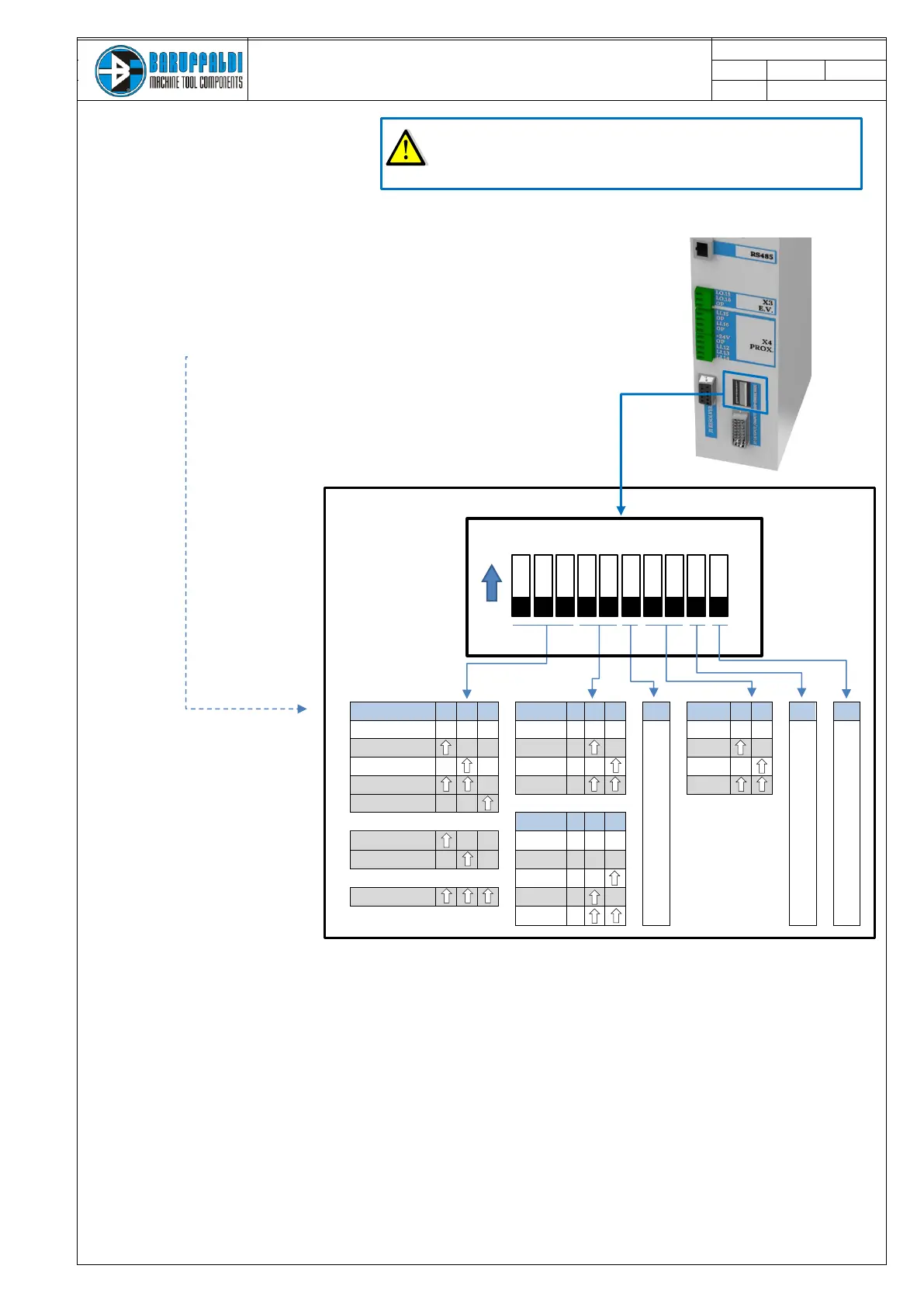
Sequence of operations N°3*
1. Drive OFF (24Vdc Off)
2. Turret Locked on the first position
4. Select the turret voltage (see operations sequence 1.) , type
and number of positions as the table below
5. Turn ON the drive (auxiliary supply 24V dc)
6. Set to ON the dipswitch n°10, the drive counts upto 5, then re-set OFF the
dipswitch n°10 the drive counts down and will displays 01.
7. Make a Zero reference
8. Turret is ready to work
*The drive arrives pre-set for the turret. Perform this procedure only
in case of any error, and contacting Baruffaldi first

Dipswitch
ON
OFF
1 2 3 4 5 6 7 8 9 10

Related product manuals