INSTALLATION AND USE MANUAL
SERVO DRIVE TYPE – DB21
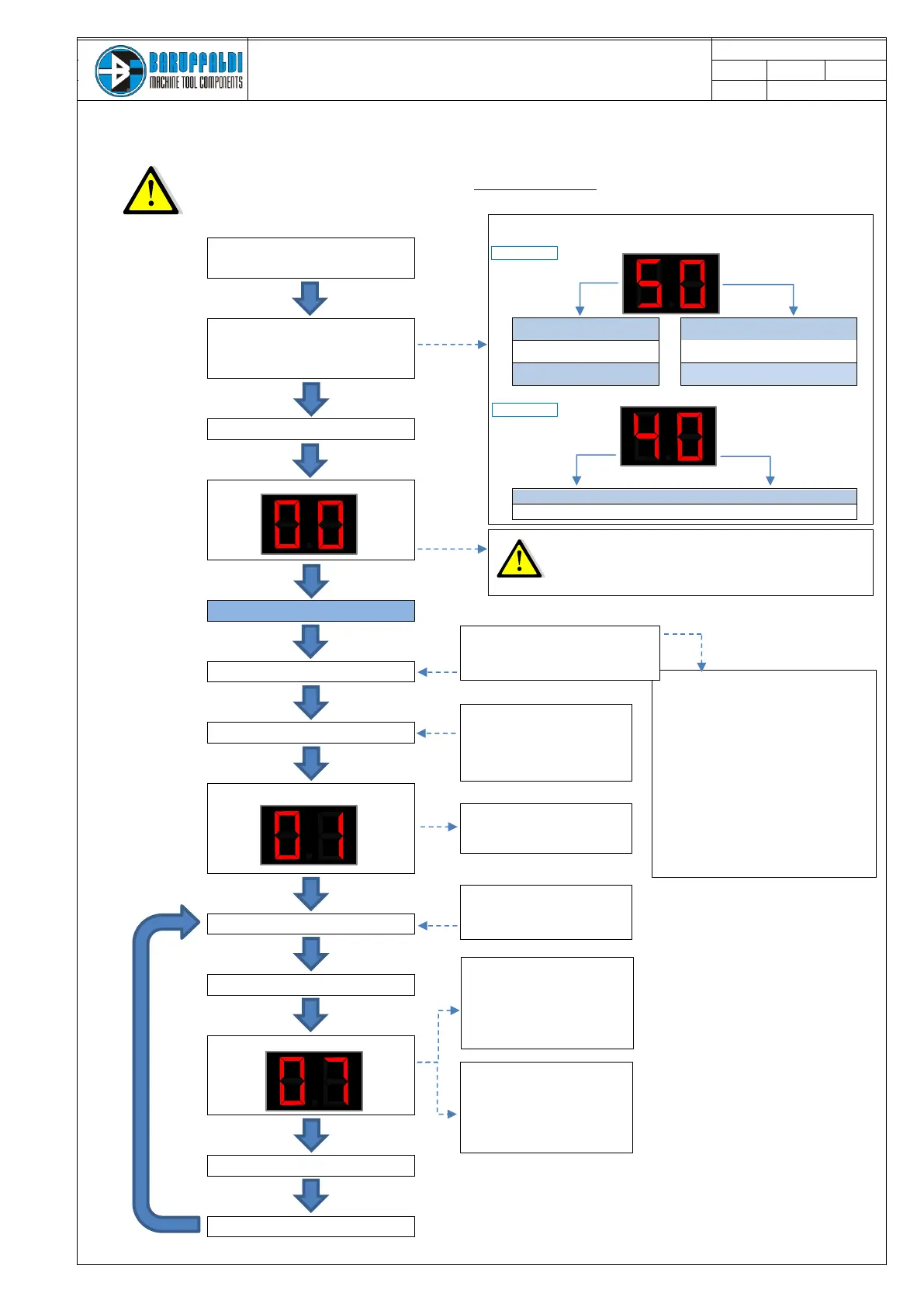
7. WORKING LOGIC AND POSITIONING INQUIRY
During the start it is important that the operative mode 1 (see chapter 5) is selected
so any possible alarm will be displayed.
TURN ON THE CNC
Supply the Drive
Display Shows
SET UP DRIVE
(10”)
Setup Positioning Inquiry
The display will alternate the turret set up and the voltage set up
5 - CODE FOR K5/KL TURRETS
0 - CODE FOR LAFERT 10KHz MOTOR
. (TB-TBH)
0 - CODE FOR MB21 10KHz MOTOR
. (TB-TBH)
0 - CODE FOR MB22 10KHz MOTOR
. (TC)
40 - CODE FOR 400V INPUT VOLTAGE SETUP
23 - CODE FOR 230V INPUT VOLTAGE SETUP
In the case of WRONG SET UP could be activate one of the following alarms:
- Voltage not set-up incorrect or not connected (EE)
- Resolver failure 8.0 at startup
- Locking Error (5.x) after position inquiry
- Position Error (6.x) after position inquiry
ZERO SEARCH*
Zero search (also hidden) has to be performed
after switch on the drive or a reset.
ZERO SEARCH
- Operative mode 1
- Position required = 0
- Wait ≥50ms
- START (≥100ms)
The turret will rotate in the CW direction at
low speed and will stop in the mechanical
station 1.
HIDDEN ZERO SEARCH
- Operative mode 1
- Position required ≥ 2
- Wait ≥50ms
-START (≥100ms <500ms)
The turret will rotate in the CW direction at
low speed, pass over through the mechanical
station 1 without stops and goes straight to the
position required.
Operative mode 1
Position required 0
Delay start ≥50ms
START (duration) ≥100ms <500ms
ST INDEX ON
ST LOCK ON
Output FEEDBACK 1
EV unlocking ON
Px switch turr.unlock ON
Motor rotation Clockwise
Arrival in the position OK
EV locking ON
Px switch turr.lock ON
Operative mode 1
Position required >0(i.e.7)
Delay start ≥50ms
START (duration) ≥100ms
TOOL CHANGE COMPLETED
DISPLAY Turret in Position
Motor status disabled
ST INDEX ON
ST LOCK ON
FEEDBACK POSITION 1
TOOL CHANGE NOT COMPLETED
DISPLAY Alarm
Motor status disabled
ST INDEX OFF
ST LOCK OFF
FEEDBACK POSITION 0


 To Next Page