43
Part No. 6-847681-00 Rev. D
Te s t i n g
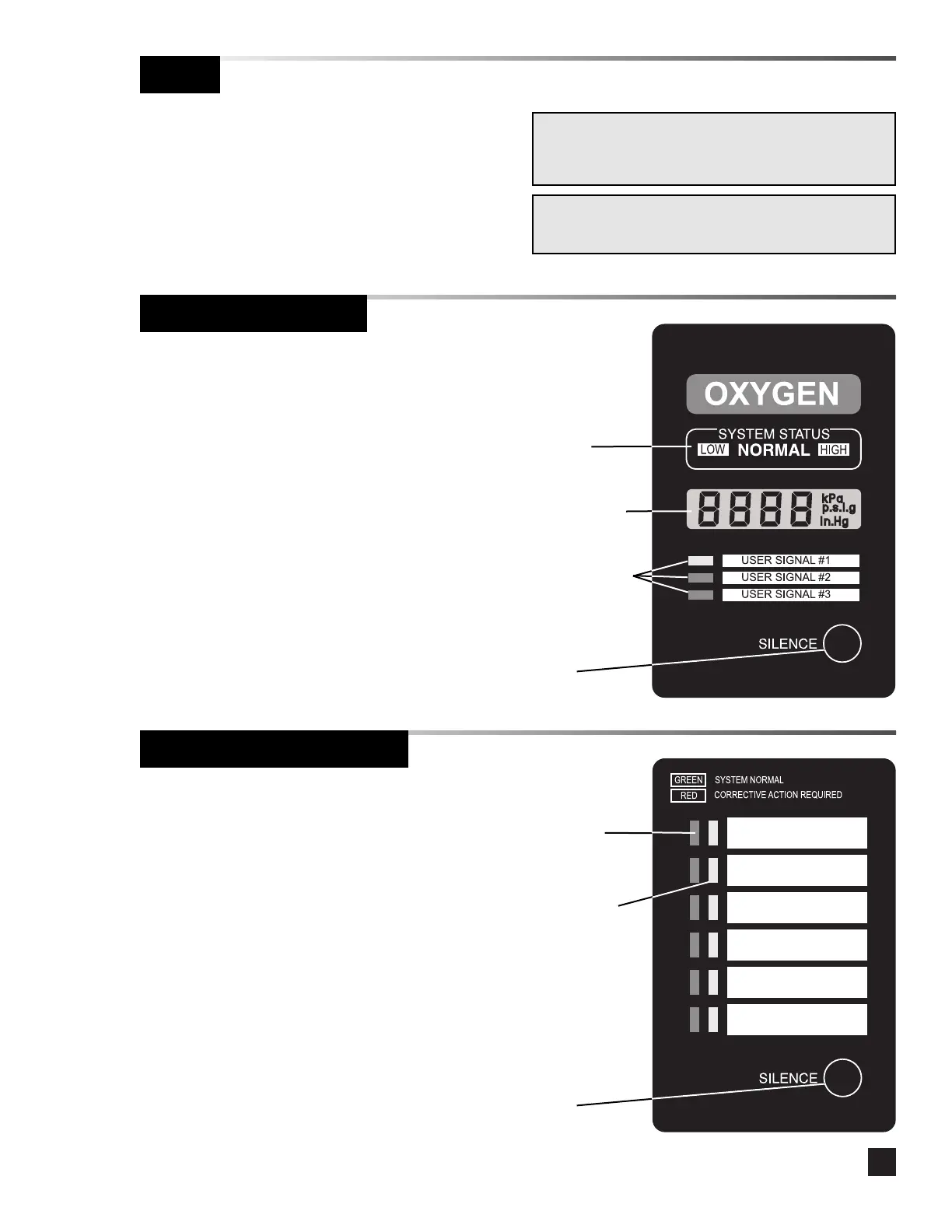
Digital Display Module
Multi-Signal Alarm Module
NOTE:
Notify appropriate personnel before testing alarm system.
Periodic testing of the alarm system is
recommended. Digital display modules and multi-
signal alarm modules have a built-in self-test
mode.
Press and hold the SILENCE button for five
seconds.
•The audible alarm sounds briefly.
•All LCD segments display and all LEDs
illuminate and flash for ten seconds.
•The LOW system status LED illuminates
and the low alarm set point flashes for two
seconds.
•The HIGH system status LED illuminates
and the high alarm set point flashes for
two seconds.
•The module returns to monitoring mode.
Press and hold the SILENCE button for five
seconds.
• The audible alarm sounds for two seconds,
then turns off.
•All six green LEDs illuminate for one
second, then turn off.
• All six red LEDs illuminate for one second,
then turn off.
•The first green LED begins the test
sequence by flashing once, followed by the
first red LED which displays the
programmed display mode for two
seconds.
•This sequence continues until all six
signals display.
•The module returns to monitoring mode.
NOTE:
If any phase of the self-test fails to function, refer to the
troubleshooting guide.
System
status
indicators
Liquid Crystal
Display (LCD)
User-assigned
signal
indicators
SILENCE
button



 To Next Page