BEC MX-210NP User Manual
Usage Allowance (Cont.)
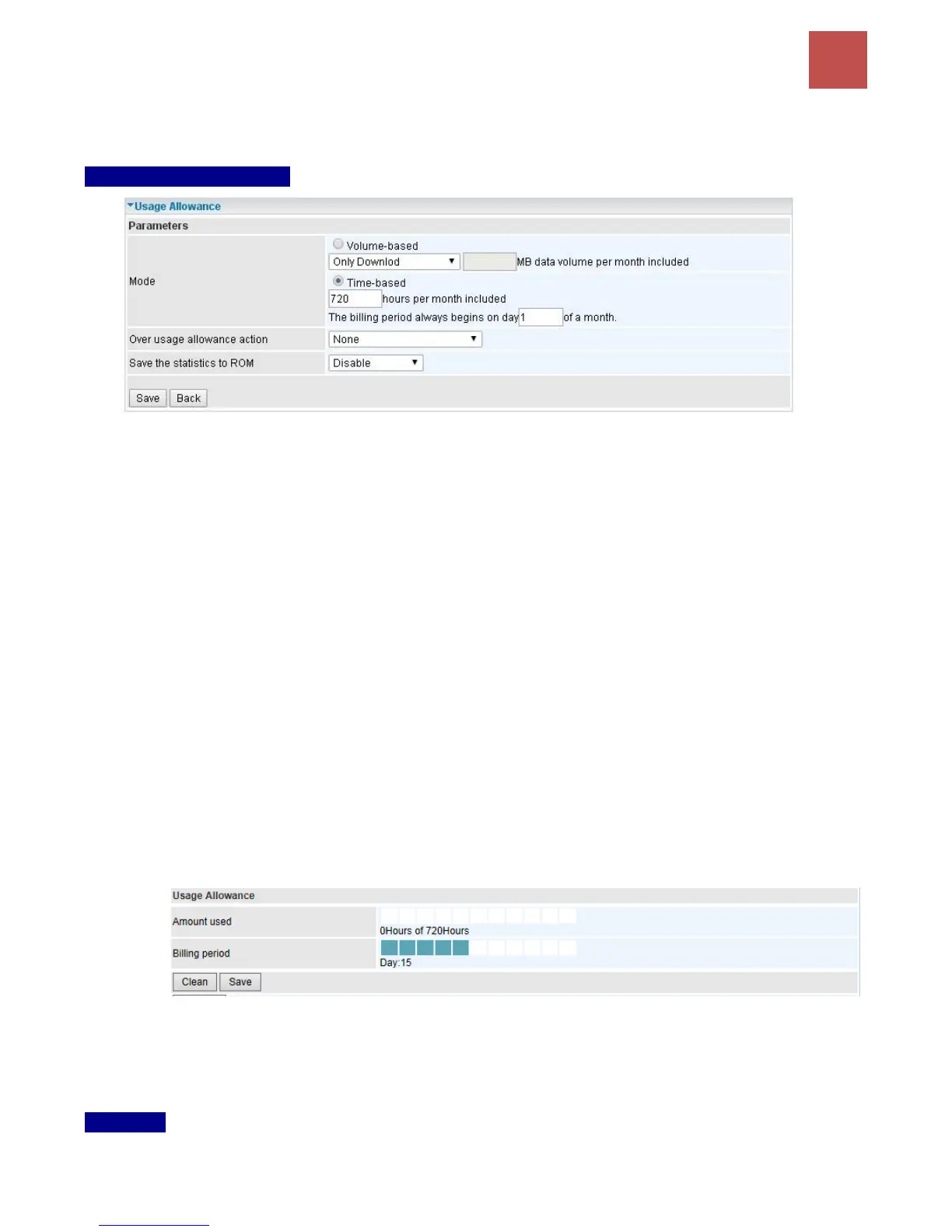
Mode: Include Volume-based and Time-based control.
Volume-based include “only Download”, "only Upload”, and “Download and Upload” to limit
the flow.
Time-based control the flow by providing specific hours per month.
The billing period begins on: the beginning day of billing each month.
Over usage allowance action: Here are actions to perform when mobile data usage, defined in
Mode, reached to its maximum.
None: No action taken
Disconnect: Disconnect mobile connection
Email Alert: Send an e-mail alert and keep the mobile connection alive.
Email Alert and Disconnect: Disconnect mobile connection after an alert e-mail is being
sent.
Save the statistics to ROM:
Every hour: Activate the 3G/4G-LTE statistics on data usage and this info will get updated
and saved to the internal memory (ROM) in every hour.
Once the feature is turned on, you can see the amount of data used and how many days
left before next billing cycle starts. Go to Status >> 3G/4G-LTE Status page for details.
NOTE: This statistic information will get deleted after a factory reset.
Disable: No action taken
LTE Mode*: Display current selected LTE frequency band. To change the band, please click “LTE
Mode” link to access to the band selection page.
LTE Band
LTE Band: A list of available LTE bands to choose from.



 To Next Page