77
Connect
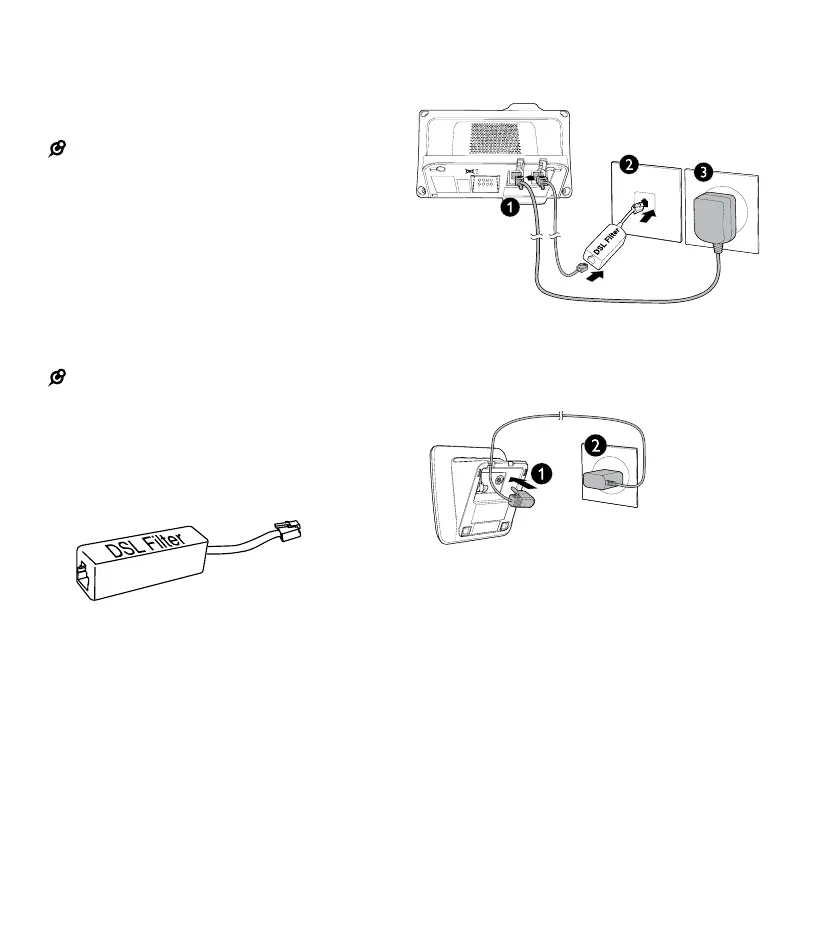
You can connect the telephone base for
desktop usage.
NOTES:
• Use only the adapters provided
• Even if you do not subscribe to any conventional
telephone service, you can pair a Bluetooth
®
-enabled
cell phone to your telephone base (see Bluetooth
®
), and
use the cell line alone without plugging in a telephone
line cord
• Make sure the electrical outlets are not controlled by
wall switches
• The adapters are intended to be correctly oriented in
a vertical or oor mount position. The prongs are not
designed to hold the plug in place if it is plugged into a
ceiling, under-the-table or cabinet outlet
TIP:
• If you subscribe to digital subscriber line (DSL)
high-speed Internet service through your telephone
line, make sure you install a DSL lter (not included)
between the telephone line cord and telephone wall
jack. Contact your DSL service provider for more
information
Connect the telephone base
Connect the charger



 To Next Page