22
Overview
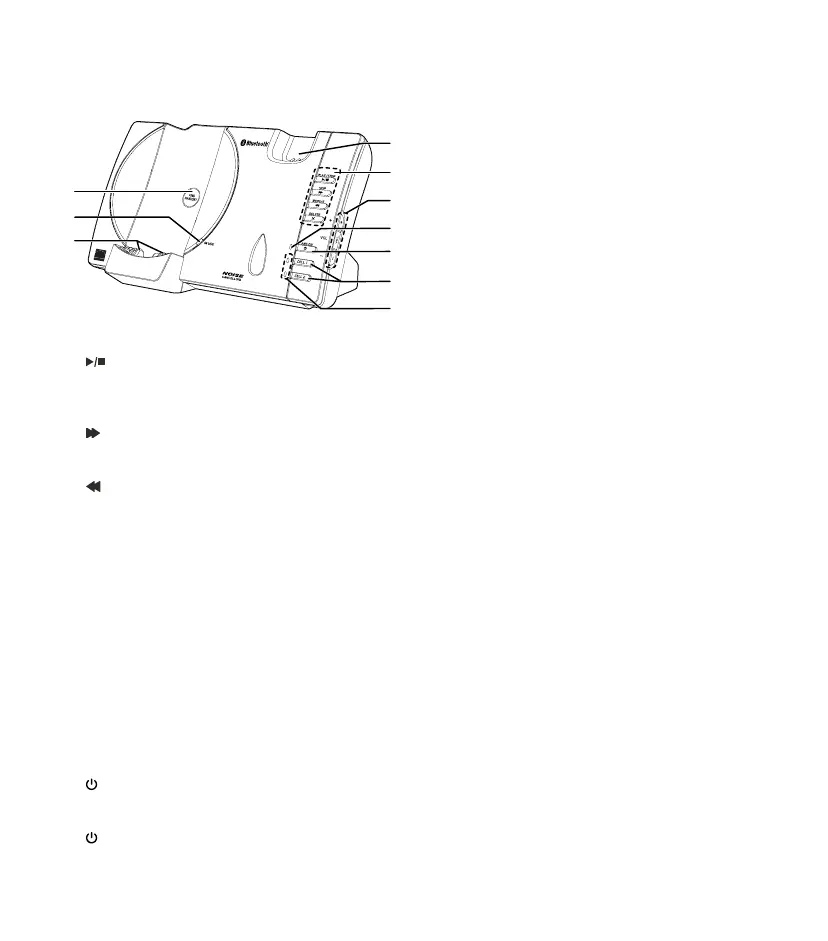
Telephone base overview
1.
Headset charging cradle
2.
/PLAY/STOP
• P
ress to play messages
• P
ress to stop message playback
/SKIP
• Press to skip to the next message
/REPEAT
• Press to repeat a message
• Press twice to play the
previous message
X/DELETE
• Press to delete the playing message
• When the handset is not in use, press twice
to delete all old messages
3.
+
/VOL/
–
• Press to adjust the volume during
message playback
• Press to adjust the telephone base ringer
volume when the handset is not in use
4.
/ANS ON light
• ON when the answering system is ON
5.
/ANS ON
• Press to turn the answering system ON
or OFF
6. CELL 1 and CELL 2
• Press to connect the paired cell
Bluetooth
®
device
• Press and hold to add or replace a
Bluetooth
®
device
7. CELL 1 and CELL 2 lights
• ON when the telephone base is paired and
connected with a Bluetooth
®
device
• Will flash when the telephone base is in
discoverable mode
8. Charging cradle
9. IN USE light
• ON when the handset or headset is in use
or the answering system is answering a call
• Will ash when there is an incoming call or
another telephone sharing the same line is
in use
10. FIND HANDSET
• Press to page all system handsets
and headset



 To Next Page