88
Install the battery
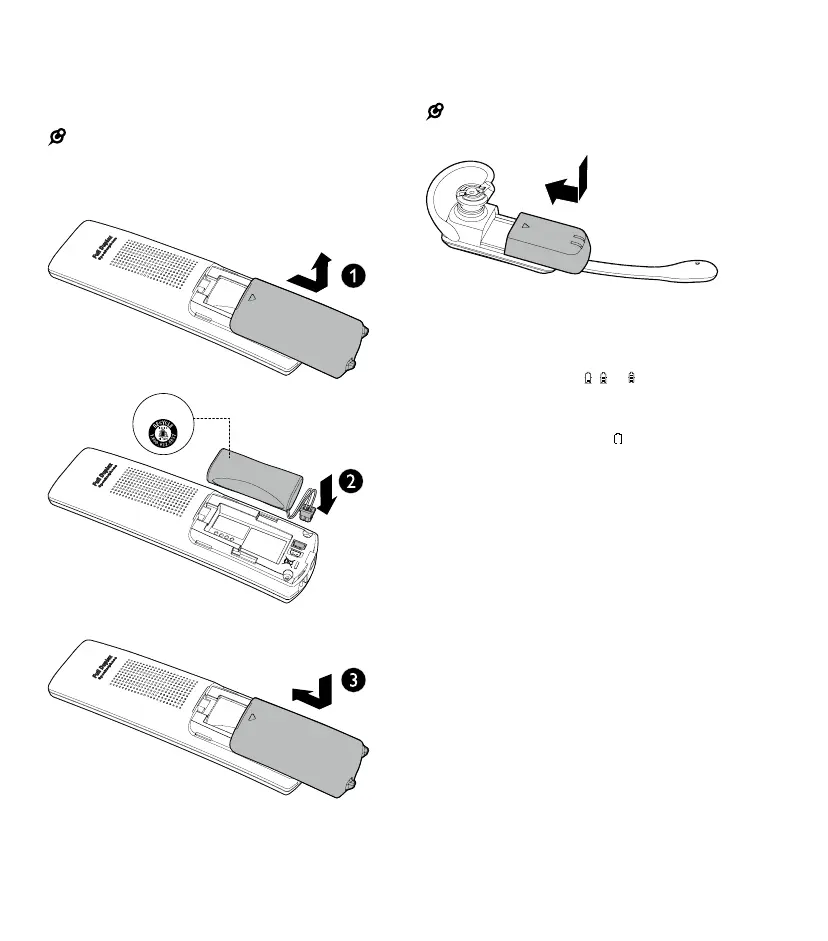
Install the handset battery
Install the handset battery as shown below.
NOTES:
• Use only supplied battery
• If the handset will not be used for a long time, disconnect
and remove the battery to prevent possible leakage
Install the headset battery
Install the headset battery as shown below.
NOTE:
• Use only supplied battery
Check the battery level
After you have installed the battery check the battery
level on the handset screen.
• If the battery icon is
, or
, then go to the
Before use section to set the date and time and
answering system
• If the screen is blank, or
will ash, the battery
needs to be charged. Go to Charge the battery
section prior to commencing setup
THIS SIDE UP



 To Next Page