44
13.
/HOME/FLASH
• Make or answer a home call
• Answer an incoming home call when you
will hear a call waiting alert
14.
/CELL
• Make or answer a cell call
• Answer an incoming cell call when you will
hear a call waiting alert
15. REDIAL/PAUSE
• Press repeatedly to review the redial list
• Press and hold to insert a dialing pause
while entering a number
16.
• Review the phonebook when the handset
is not in use
• Increase the listening volume during a call
• Scroll up while in a menu, the phonebook,
Caller ID log, call block list or redial list
• Move the cursor to the right when entering
numbers or names
• Review the Caller ID log when the handset is
not in use
• Decrease the listening volume during a call
• Scroll down while in a menu, the
phonebook, Caller ID log, call block list or
redial list
• Move the cursor to the left when entering
numbers or names
17. CHARGE light
• ON when the handset is charging
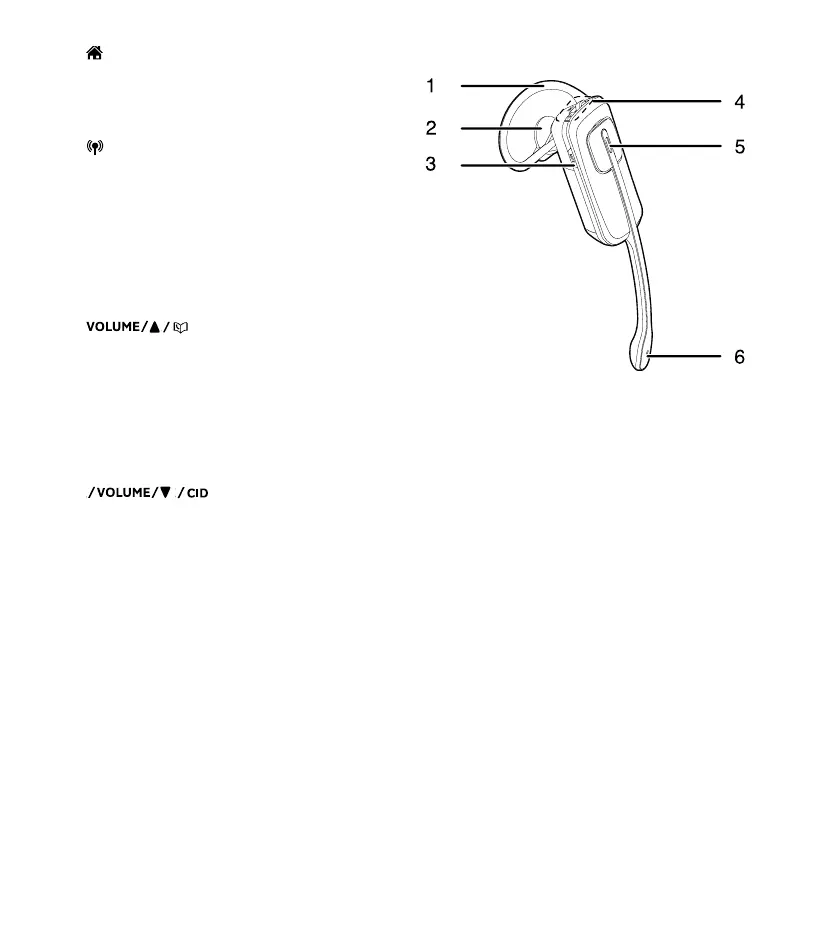
Headset overview
1. Earhook
2. Earpiece
3. MUTE
• Press to activate the voice-controlled
application on your connected cell phone
when idle
• Mute the microphone during a call
• When there is an incoming call,
press to silence the ringer in the
earpiece temporarily
4. VOL+
• Increase the headset volume.
VOL-
• Decrease the headset volume.
Flash
• While on a call, press and hold to answer
an incoming call when you receive a call
waiting alert.
5. ON/OFF light
• ON when the headset is charging.
ON/OFF key
• Press to answer or end a call
6. Microphone



 To Next Page