99
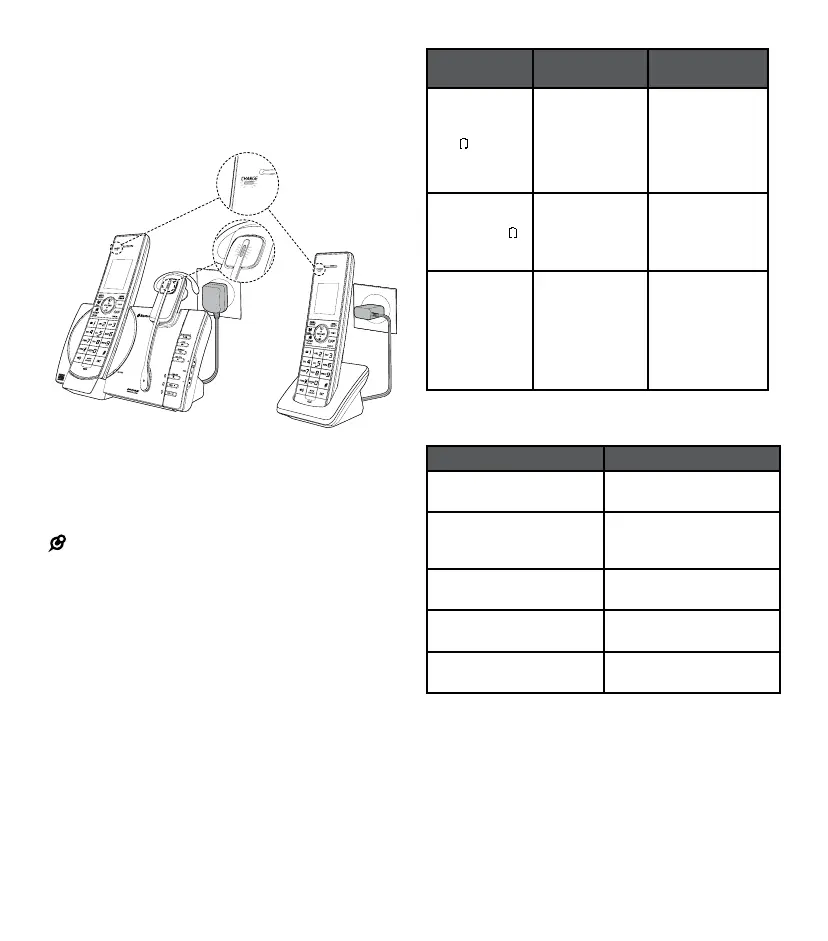
Charge the battery
Place the handset in the telephone base or the
charger to charge.
Place the headset on the telephone base to charge.
Once you have installed the battery the handset
LCD display will indicate the battery status (see
table on next page).
NOTES:
• Press CANCEL or place the handset in the telephone
base or charger to bypass setting the date and time,
and voice guide
• For best performance keep the handset in the
telephone base or charger when not in use. Place the
headset on the telephone base when not in use
• The handset battery is fully charged after 12 hours
of continuous charging. The headset battery is fully
charged after 3 hours of continuous charging
• If you place the handset in the telephone base or the
charger without plugging in the battery, the screen
will display
No battery
Battery
indicators
Battery status Action
The screen is
blank or shows
Put in charger
and
will ash.
The battery has
no or very little
charge. The
handset cannot
be used.
Charge without
interruption
(at least
30 minutes).
The screen
shows Low
battery and
will ash.
The battery has
enough charge
to be used for a
short time.
Charge without
interruption
(at least
30 minutes).
The screen
shows
HANDSET X.
The battery
is charged.
To keep the
battery charged
place it in the
telephone base
or charger when
not in use.
When it is fully charged, you can expect the
following performance:
Operation Operating time
While in handset use
(talking*).
Seven hours.
While handset in
speakerphone mode
(talking*).
Three hours.
While handset not in use
(standby**).
Five days.
While in headset use
(talking*).
Four hours.
While headset not in use
(standby**).
Two days.
* Operating times vary depending on your actual use and the
age of the battery.
** Handset/headset is not charging or in use.
To manually set the date and time and the
answering system, refer to Congure your
telephone and Set your built-in answering
system sections.
To manually initiate the voice guide, refer to
Voice guide under Set your built-in answering
system section.



 To Next Page