33
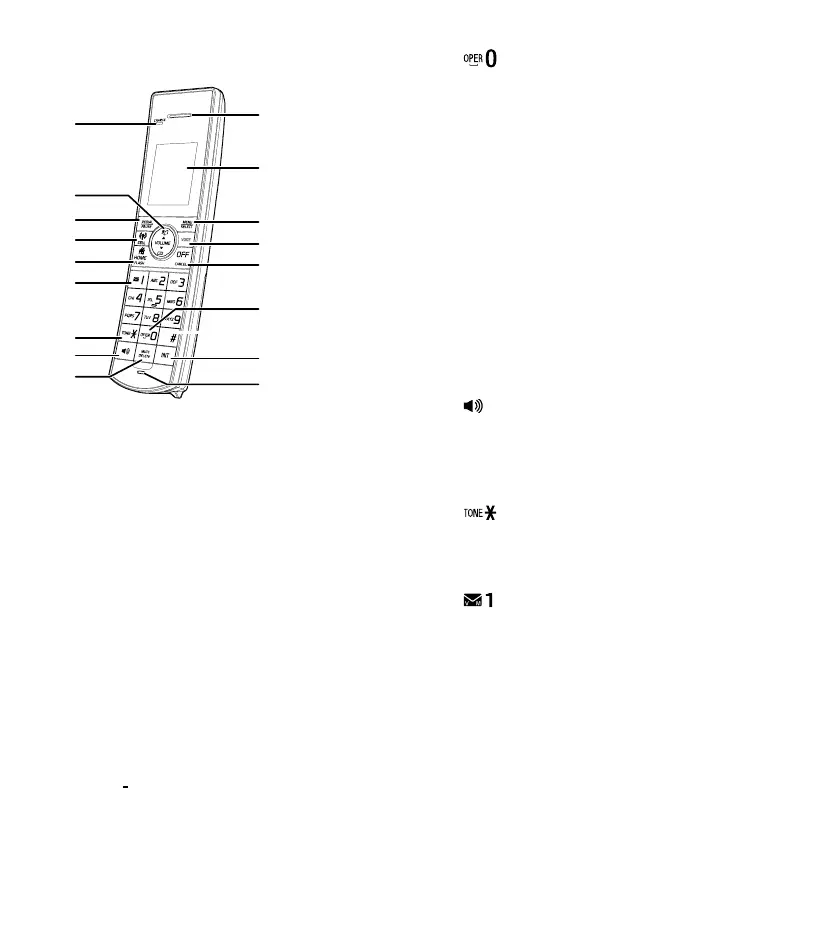
Handset overview
1. Handset earpiece
2. LCD display
3. MENU/SELECT
• Show the menu.
• While in a menu, press to select an item, or
save an entry or setting.
4. VOICE
• Press to activate the
voice-controlled application on
your connected cell phone
5. OFF/CANCEL
• Hang up a call
• Silence the ringer temporarily
while the handset is ringing
• Press and hold to erase the missed call
indicator while the phone is not in use
• Press to return to the previous menu;
or press and hold to return to idle mode
without making changes
6.
• Press to add a space when entering names
7. INT
• Press to start an intercom conversation or
transfer a call
8. Microphone
9. MUTE/DELETE
• Mute the microphone during a call
• Delete digits or characters while using the
dialing keys
• Silence the ringer temporarily while the
handset is ringing
• Delete the displayed entry while reviewing
the phonebook, Caller ID log, call block list
or redial list
10.
• Make or answer a call using the
handset speakerphone
• During a call, press to switch between
the speakerphone and the handset
11.
• When you have set the dial mode to pulse
and on a call, press to switch to tone
dialing temporarily
12.
• Press repeatedly to add or remove 1 in
front of the Caller ID log entry before
dialing or saving it to the phonebook
• Press and hold to set or dial your
voicemail number
9



 To Next Page