33
Operation and setting
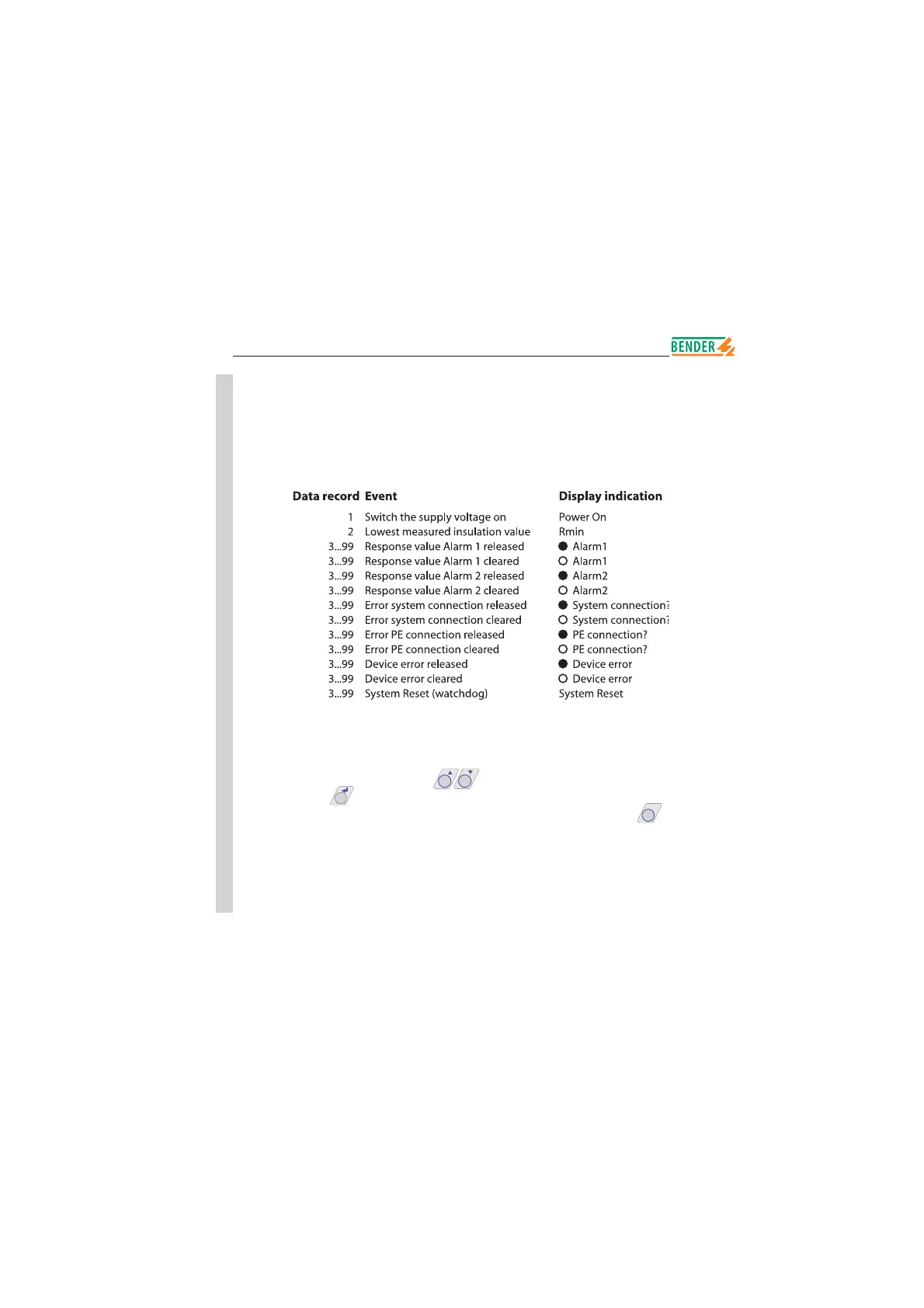
Memory Info
99 events with date and time stamp can be stored in the memory database.
The database is designed as a ring memory, i.e. the eldest entry is overwritten.
Data is written into a non-volatile memory and therefore provides protection
against voltage failure.
In order to store the events with the actual date and time stamp, the
real-time clock in the ISO ADVANCED menu has to be set before.
The following function keys are provided to query data from the „HISTORY
INFO“ submenu: the scroll keys
TEST RESET
to change the data record number,
the ENTER key
MENU
to change from the data record number to the („Clear
all:on“) sub menu in order to reset the memory, and the ESC key
INFO
ESC
to leave
the menu.
A new entry into the memory is signalled with an „H“ on the standard display.
Das „H“ will only be deleted when the HISTORY INFO submenu has been
called up.
B
B
B
B
B
B
B
B
B
B
B
B
B
B
B
B
B
B
B
B
B
B
B
B
B
B
B
B
B
B
B
B












 To Next Page