28
Installing the ATV dongle
1. Remove the cap from the provided ATV dongle.
2. Place the projector on a flat and stable surface covered by a protective
sheet with its top cover facing up.
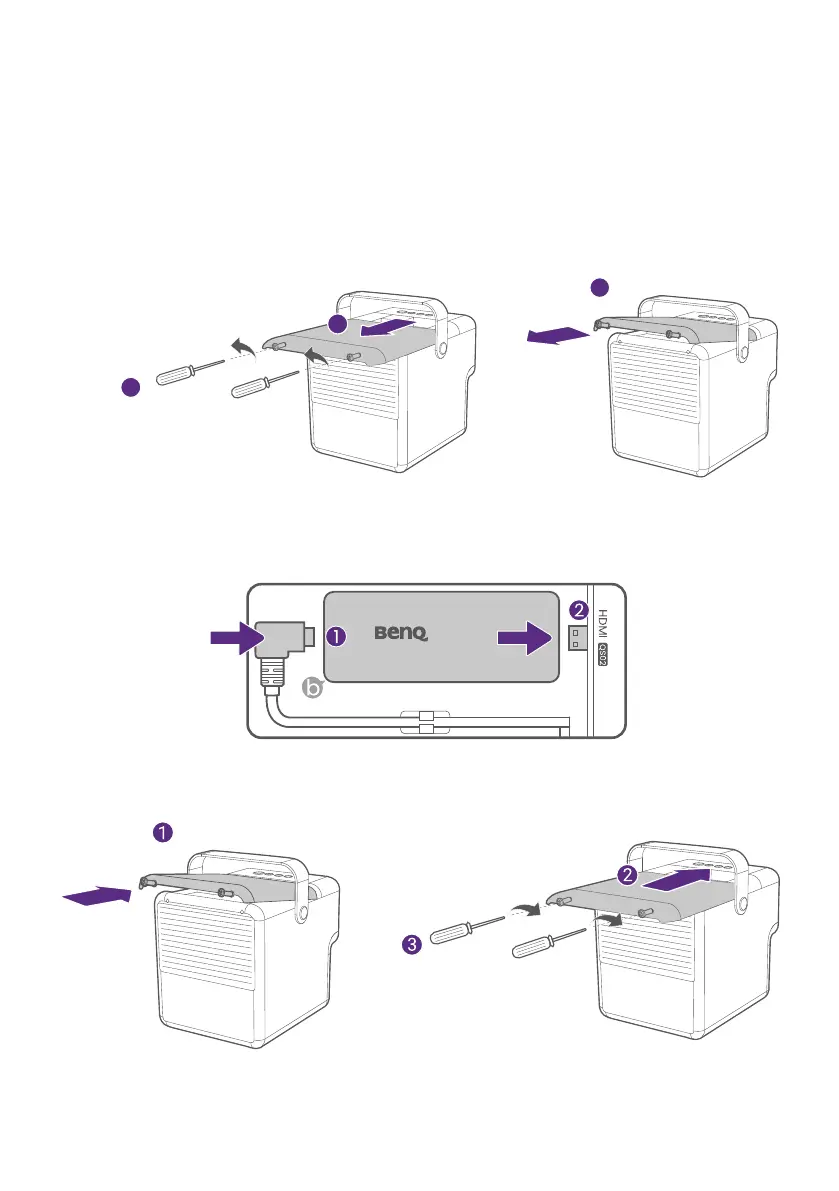
3. Use an M2 Phillips screwdriver to release 2 screws counterclockwise
as illustrated.
4. Remove the top cover from the projector.
M2 Phillips screw driver
(purchased separately)
3
1
2
5. Connect the power cable to the port on the side of the dongle (1) and
then insert the dongle into the designated HDMI port (2) as illustrated
until you hear the clack.
6. Re-install the top cover onto the projector. Use an M2 Phillips
screwdriver to fix two screws clockwise as illustrated.
M2 Phillips screw driver
(purchased separately)



 To Next Page