37
Fitting the image to your screen
You are provided with several ways to adjust the image and to fit the
screen clearly. Depending on the layout of your room, choose one that fits
your need. The effect is up to the last adjustment you made.
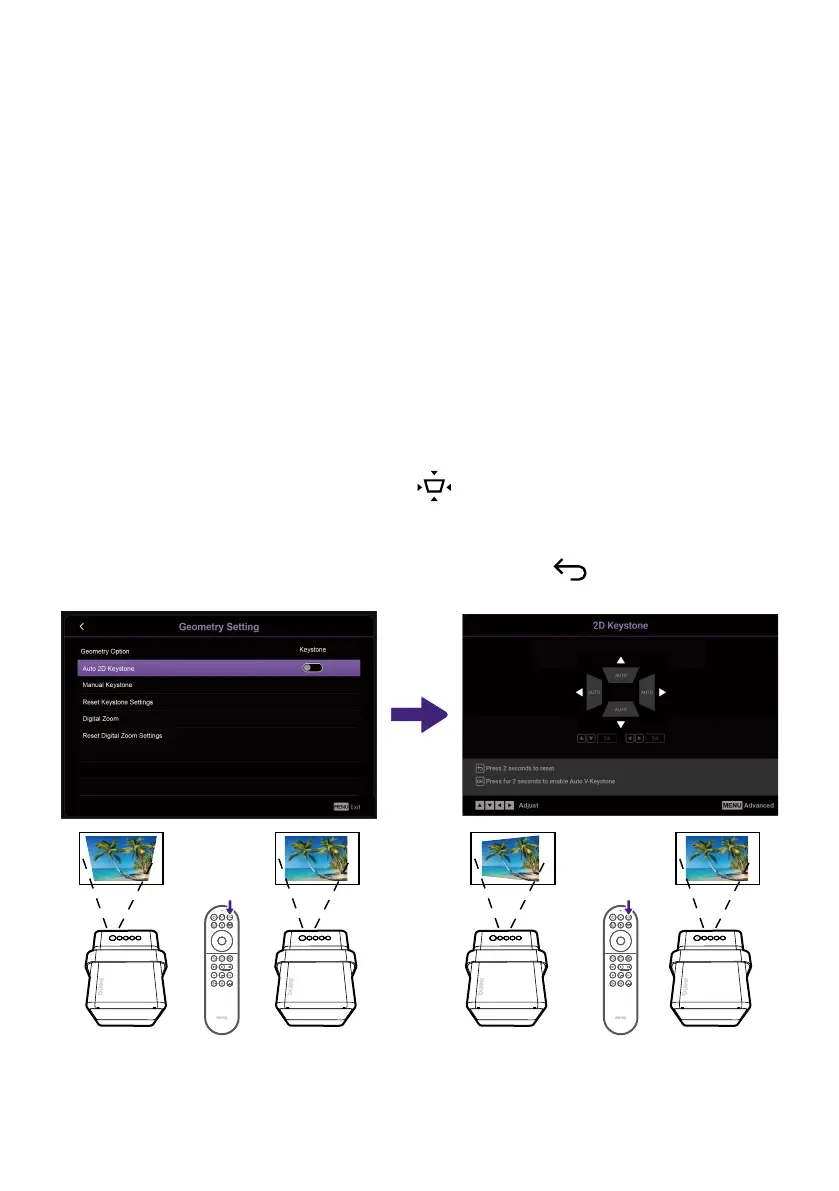
Keystone
The keystone effect refers to the situation where the projected image
is noticeably wider at the top / bottom / left / right. It occurs when the
projector is not perpendicular to the screen. The screen automatically
performs keystone correction as the projector moves.
• Auto 2D Keystone: Available from Smart Auto Settings or Installation >
Geometry Setting. When the projector is moved or the projection angle
is changed, the function will be performed automatically. The effective
distance from the projection lens to the screen is 3.2 meters.
• Manual Keystone: Available from
button on the remote control
or from Installation > Geometry Setting. Simply follow the on-screen
instructions to make adjustments.
When you are done making the adjustments, press
to save your
changes and return to the previous menu.



 To Next Page