Instruction Manual
4747
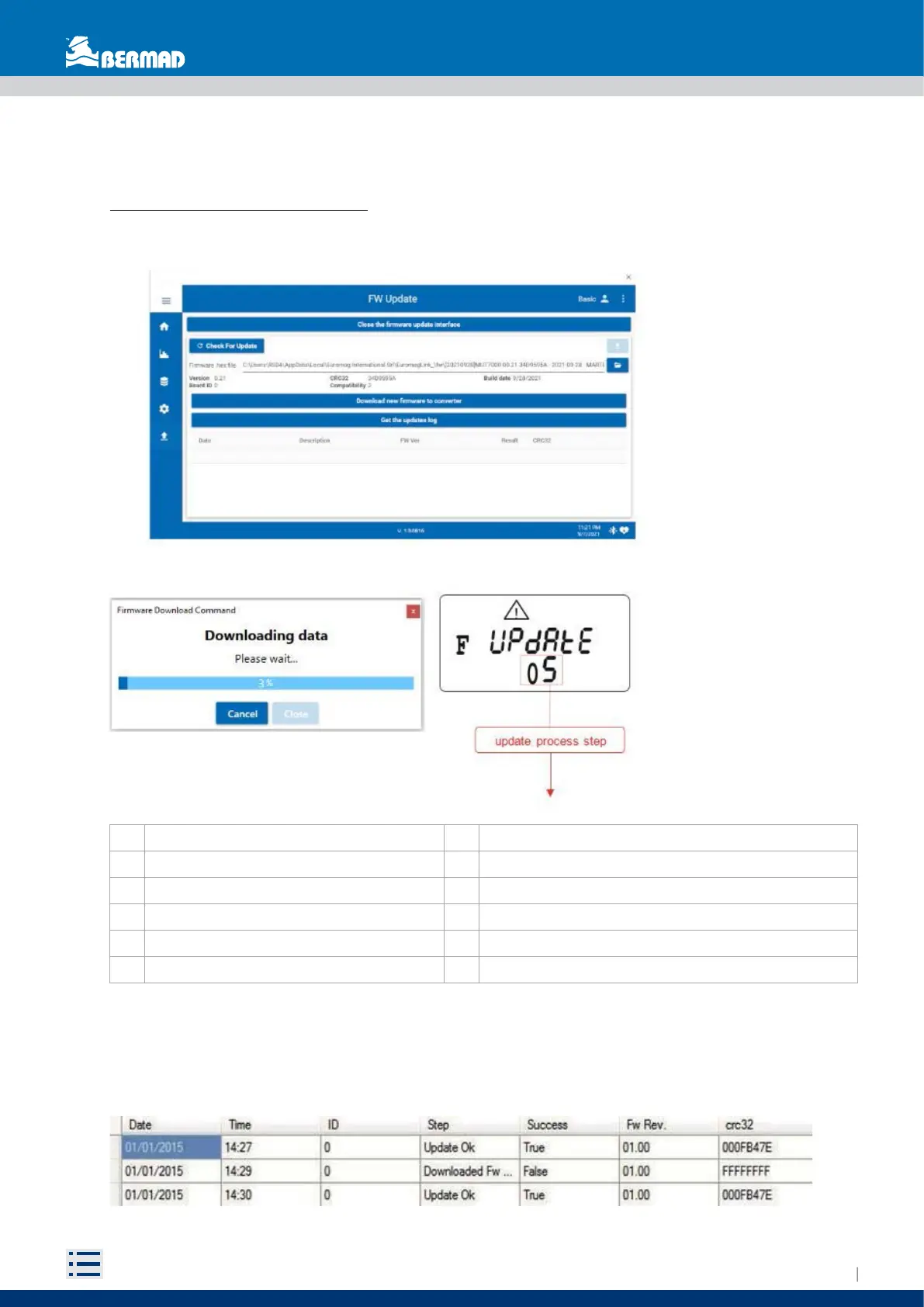
0 Working firmware check 6 Working firmware backup
1 Waiting for the download request 7 Working firmware update
2 Download request received 8 New working firmware backup
3 Erasing download memory 9 Update OK
4 Firmware downloading 10 Restore working firmware (during start-up only)
5 Checking the downloaded firmware 11 Restore working firmware (after update failure)
5.9 FIRMWARE UPDATE
To update the converter with a more recent firmware release select the firmware .hex file and click on
download new firmware to converter. The firmware download progress is shown while the instrument will
display the internal operations sequence. The actual working firmware is backed up on a dedicated memory
area, so in case of failure the converter will automatically recover the normal functionality.
Every firmware download attempt is logged in the internal memory. Selecting “get updates log” after the
reset will show the download attempt log. The log can store over 500 records: once full no more downloads
are allowed.


 To Next Page